


One Man Army EA MT5 – Live Results, Settings & Download
$19.99
One Man Army is an automated forex trading robot for MetaTrader 5. Explore its trading records, compare the available setups and check the package details before you buy.
See how the accounts have performed through profitable and losing periods. Then choose a setup you understand, with clear limits on the amount you are willing to risk.
Trading involves a risk of loss. Results from another account do not guarantee what your account will earn.
Description
Quick product facts
| Detail | Publisher specification |
| Platform | MetaTrader 5 |
| Developer | Ihor Otkydach |
| Chart timeframe | M15: a 15-minute chart |
| Markets | A portfolio of 17 currency pairs |
| Published starting capital | $500 |
| Published leverage | From 1:30 |
| Main strategy | Corrections and reversals, using pending limit orders |
| Trade protection | Stop Loss on each trade |
Source: official One Man Army listing. These are publisher specifications, not findings from our own testing. Check the supplied version and presets before using them.
How One Man Army works
A correction is a move back against the recent price direction. A reversal is a change in direction. The publisher positions One Man Army around these moves.
A pending limit order waits for a chosen price before entering a trade. A Stop Loss is an instruction to close a position if price moves against it. It helps limit a loss, but the final execution price can differ when markets move quickly.
Before using any preset, understand when it can add positions and how much total exposure it can create. A small lot size on one chart can become a larger risk when several charts trade together.
One Shot and Double Shot: check the setup behind the result
The trading records are listed under different portfolio names. Do not assume they represent identical settings.
The main product listing says no averaging. However, the Double Shot signal describes limited micro-averaging with up to three trades per asset. An older developer article describes two positions and says no averaging. Confirm which rules your version and preset use.
Read the Double Shot signal description and the developer’s Double Shot article.
When comparing setups, check the number of open positions, trade size, holding time and losses. Choose a configuration based on the risk you can accept, rather than its name or highest return.
One Man Army live results
The links below let you inspect trading-account history. Read growth and drawdown together before drawing a conclusion.
MQL5 signal comparison
Retrieved on 6 October 2026. Figures can change.
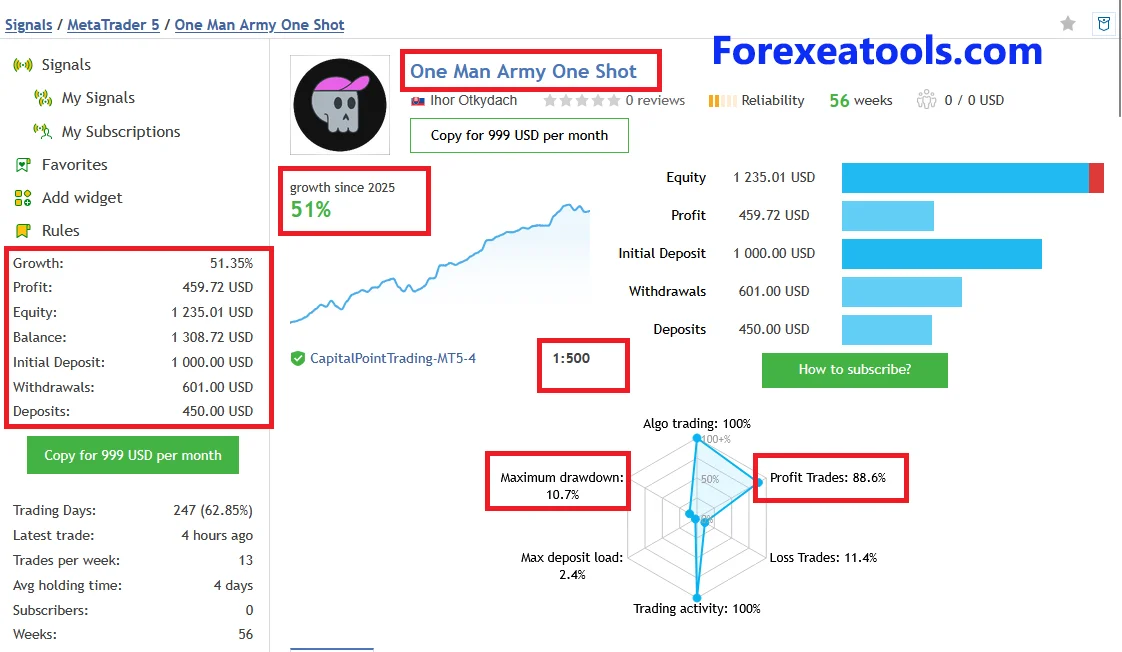
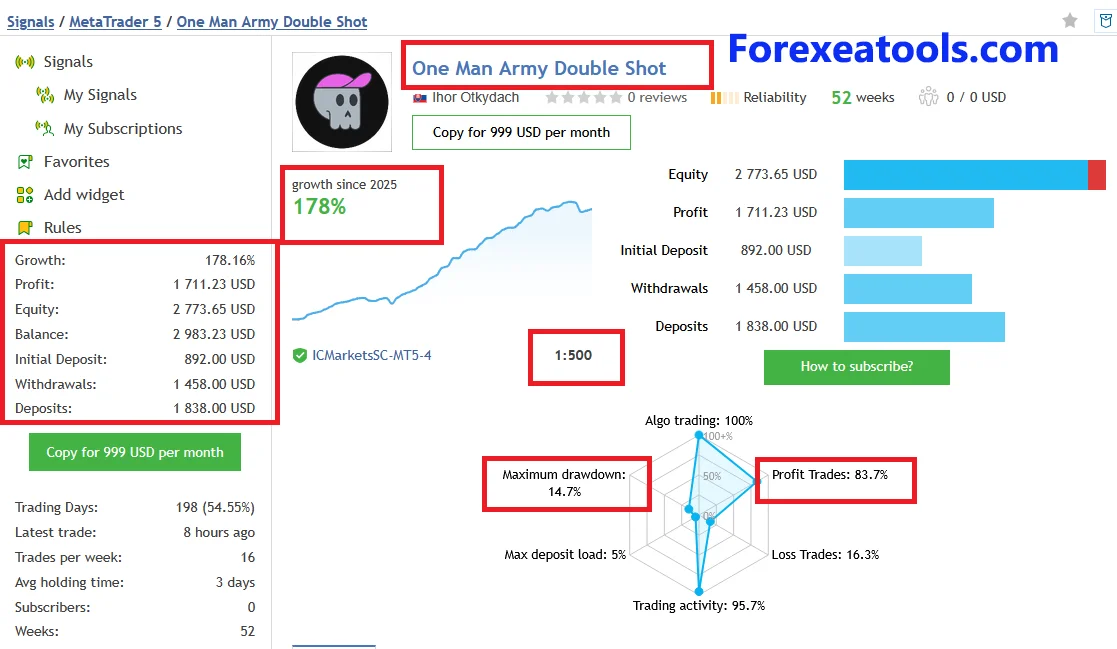
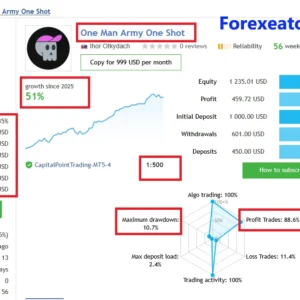
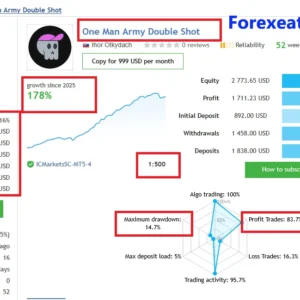
| Metric | One Shot | Double Shot |
| Reported growth | 51.35% | 178.16% |
| Reported profit | $459.72 | $1,711.23 |
| Relative drawdown by equity | 10.65% | 14.68% |
| Relative drawdown by balance | 7.70% | 11.10% |
| Profit factor | 1.61 | 2.10 |
| Closed trades | 727 | 514 |
| Current month growth | -1.30% | -2.99% |
| Average holding time | 4 days | 3 days |
Sources: One Shot live signal and Double Shot live signal.
In this snapshot, Double Shot showed higher growth and higher relative equity drawdown. Both accounts showed negative growth for the current month. This comparison does not establish which setup will perform better in the future.
The reported holding times also show that trades can stay open for days. Do not assume that an M15 chart means every trade closes within 15 minutes or before the end of the trading day.
Myfxbook account links
| Account | What to check |
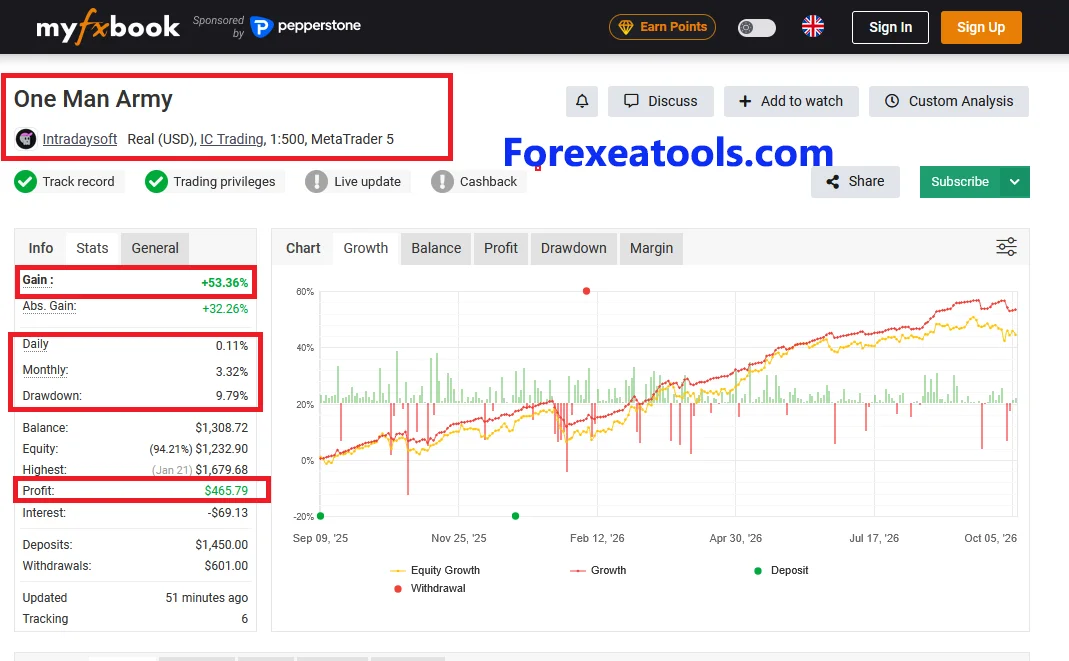
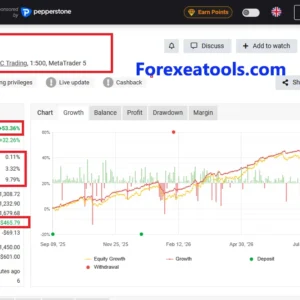
| Intradaysoft — One Man Army | Real IC Trading MT5 account showing 53.36% gain and 9.79% drawdown |
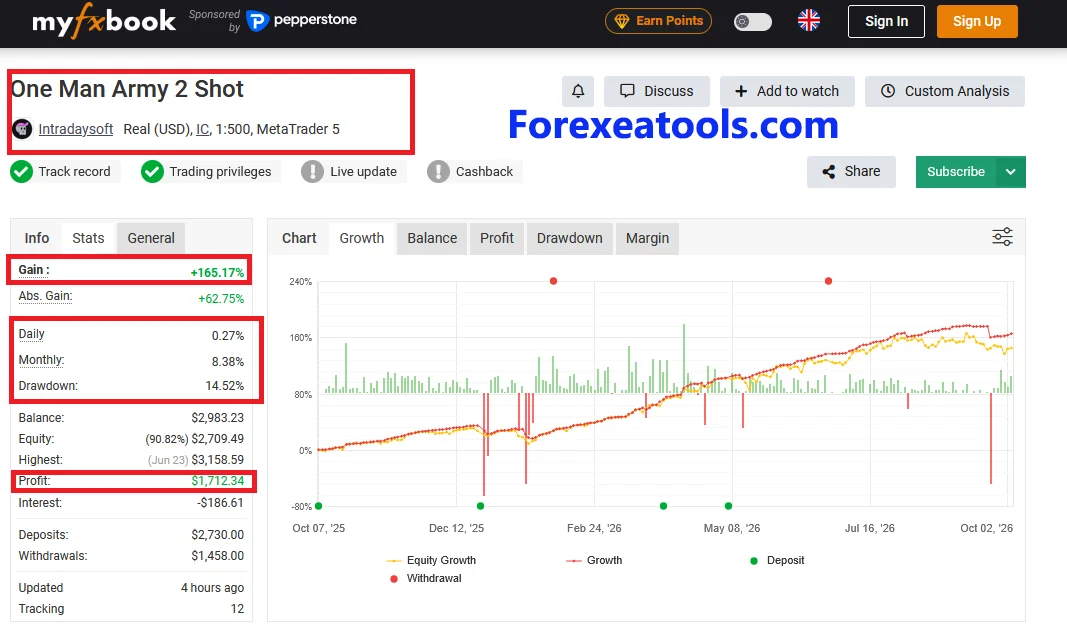
| Intradaysoft — One Man Army 2 Shot | Real MT5 account showing 165.17% gain and 14.52% drawdown |
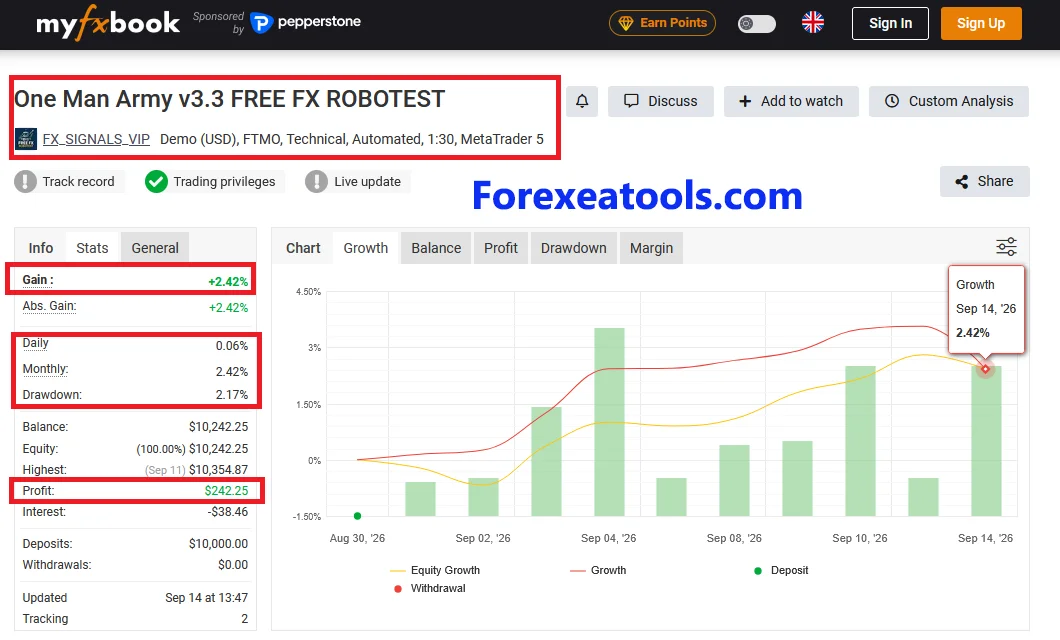
| FX_SIGNALS_VIP — One Man Army v3.3 FREE | Demo FTMO MT5 account showing 2.42% gain and 2.17% drawdown |
The Myfxbook statistics and verification badges were not reliably available during this review, so we have not assigned verified-performance claims to these links. An account name does not establish its exact software, settings or relationship to another record. “FREE” in a title does not establish that an official free license is available.
How to read the results
Balance reflects closed trades. Equity also includes profit or loss on open trades. If you check only the balance, you may miss losses that are still open.
Drawdown measures a decline from an earlier peak. Keep the platform’s exact metric label when comparing accounts. Balance drawdown and equity drawdown describe different things.
For each record, check the last update, losing months, deposits, withdrawals and trading costs. Ask whether its version, preset and risk settings match what you plan to use. Avoid adding together results from records that may track the same trading account.
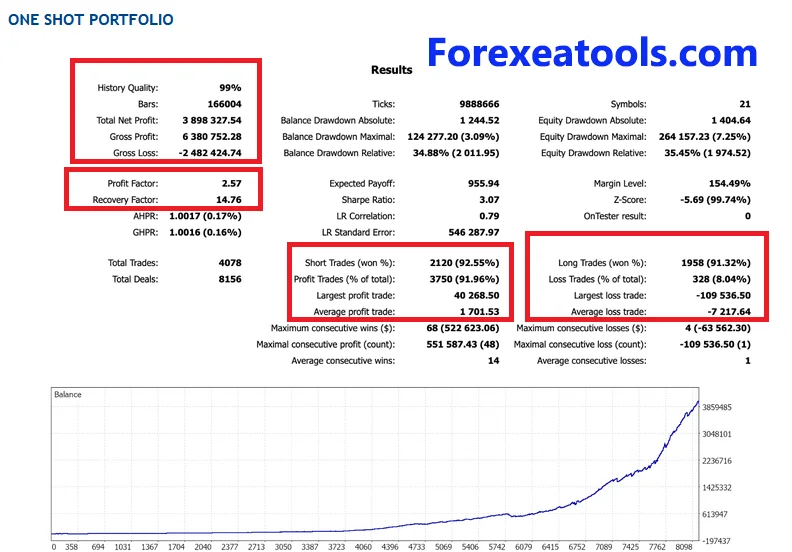
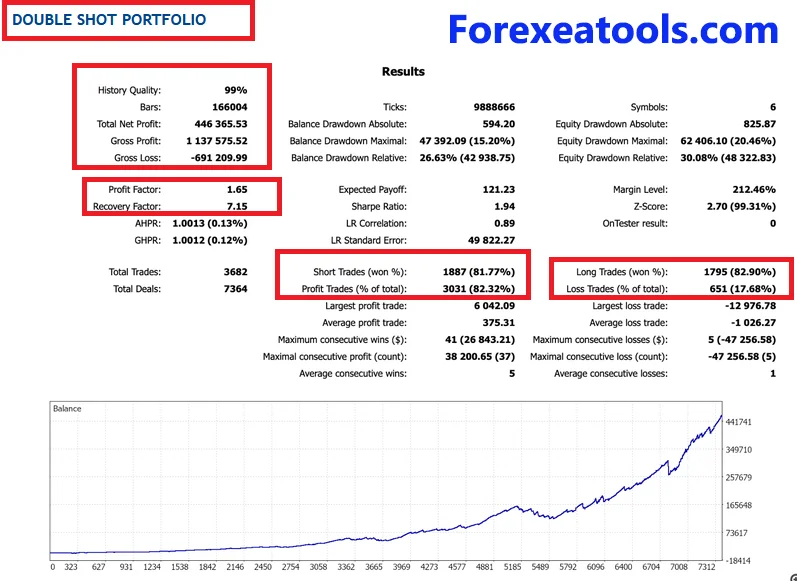
One Man Army Five-Year Backtests: One Shot vs Double Shot
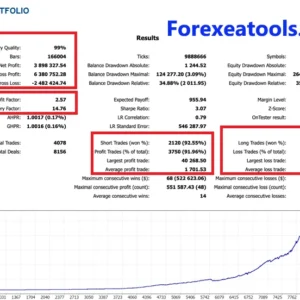
Want to see how both strategies performed over a longer period? Explore the developer’s five-year backtests for the One Shot and Double Shot portfolios.
Compare returns, drawdowns, losing periods and trade activity to understand how each setup behaved under the tested conditions.
Backtests show simulated historical results. They do not guarantee future profits or the same results on a live account.
One Shot Portfolio
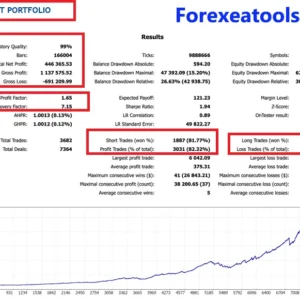
Review the One Shot backtest below. Look at its growth, largest drawdown and recovery periods to understand the risks alongside the returns.
Double Shot Portfolio
Review the Double Shot backtest below, then compare it with One Shot. Consider whether any higher return came with larger losses or greater trading exposure.
Broker Used by the Developer
The developer names IC Markets as their preferred broker for One Man Army. This does not mean your results will match theirs. Spreads, commissions, swaps and execution can affect performance.
Before choosing a portfolio, check that the backtest version and settings match the package you plan to use.
Who should consider this EA?
It may interest MT5 users who want automated trading and are willing to test settings, monitor open positions and accept losing periods.
If you are new to forex, first learn how position size, margin and open losses affect an account. Automation does not remove those decisions. A trading robot is a poor fit for anyone who needs a fixed monthly income or cannot afford losses.
One Man Army settings and setup
Use instructions and set files made for the exact version you receive. A set file is a saved group of settings; it is not a promise of profit.
Before allowing trades, check:
- The software version and chosen portfolio.
- The chart symbols and timeframe required by the instructions.
- Fixed or automatic lot sizing.
- The total possible exposure across all active charts.
- Any averaging or additional-position options.
- Trading hours and broker symbol names, including suffixes.
Do not copy a lot size from another account without understanding the difference in account size and total exposure. If a setting is unclear, ask for its explanation before using it.
Basic MT5 installation workflow
Install through the route supplied with your purchase. An MQL5 Market purchase uses its Market installation process; another licensed package may use a different route.
Attach the EA to the required chart, open its Inputs and load the matching preset. Confirm the settings before enabling automated trading. Check the Experts and Journal tabs for errors, then observe it on a demo account.
MT5 supports attaching EAs through Navigator and loading presets from Inputs. Follow the official MT5 instructions and the One Man Army setup-guide link. The product guide did not load reliably during this review, so this is a general workflow, not a tested product-specific installation guide.
One Man Army risks and limits
Losing periods: A profitable historical record can still include losses and long recovery periods.
Open losses: Check equity while trades remain open. A rising balance chart does not tell the whole story.
Shared currency exposure: Different pairs may move together. Several trades can lose at the same time.
Broker differences: Spreads, commissions, swaps, price feeds and execution can change results.
Settings: Changing trade size or enabling additional positions can materially change the risk.
Prop-firm limits: Check the firm’s current rules for EAs, daily loss, total drawdown, news trading and overnight positions before using the robot.
Package, license and delivery details
Before ordering, check the version, including presets, permitted accounts, activation method and update terms shown with the offer. Also confirm the tested MT5 build, support scope and delivery method.
The developer’s official purchase terms and a separate store’s package terms may differ. A performance-account link does not confirm what files, rights or support a purchase includes.
If a package detail is unclear, ask before paying. After receiving it, confirm that the version and files match the offer before enabling trading.
Frequently asked questions
What is One Man Army EA?
It is a forex Expert Advisor for MetaTrader 5. An Expert Advisor is software that can place and manage trades using programmed rules.
Does One Man Army work on MT4?
The product reviewed here is for MT5. Do not buy it for MT4 unless the seller provides a separate compatible edition.
What timeframe does it use?
The published chart timeframe is M15. Use the timeframe stated in the instructions for your preset. Chart timeframe and trade duration are different things.
Which currency pairs should I use?
The listing describes a 17-pair portfolio. Follow the symbol list supplied for your version and preset. Do not attach it to every available pair just because a store says “any pair.”
Can One Man Army trade gold or XAUUSD?
Do not assume gold support. Ask for explicit XAUUSD instructions, a matching preset and relevant test evidence before using it on gold.
What is the minimum deposit?
The publisher states $500 as starting capital. This is a specification, not assurance that any configuration is suitable for a $500 account. Total exposure and position size still matter.
What leverage does it require?
The published guidance starts at 1:30. Higher leverage is not proof of a safer setup or better returns. Confirm the requirements for the configuration you will use.
Does One Man Army use martingale, grid or averaging?
The documentation differs between the main product and portfolio descriptions. Ask whether the supplied preset can add positions, increase lot sizes or manage trades as a basket. Avoid relying on a blanket “no averaging” label for every setup.
What is the difference between One Shot and Double Shot?
They are different portfolio configurations with separate trading records. Confirm their current entry and position rules before choosing one. The Double Shot name alone does not explain all of its risk settings.
Can I run both portfolios on the same account?
Do not assume this is supported. The older Double Shot article advised separate accounts. Ask for current instructions that match your version before combining portfolios or changing chart assignments.
What is the best One Man Army set file?
There is no universal best preset. Use a version-matched preset, understand its risk settings and test it under your broker’s conditions. The highest historical return does not make a preset the best choice for you.
Is One Man Army suitable for a prop-firm challenge?
Check with the firm. A product’s marketing description does not establish approval. Review daily and total loss limits, position restrictions and EA rules before starting.
How much profit can it make per month?
There is no reliable fixed monthly income figure. Look at losing months and open losses alongside profitable periods. Your costs, settings and market conditions can differ from a published account.
Are the MQL5 signals and Myfxbook links the same account?
Do not assume so. Check the broker, account dates and trading history, and ask the account owner. Different pages may track the same account, different accounts or different settings.
Is a signal subscription included with the EA?
A link to a signal is not a subscription. Confirm what the purchase includes. Buying software and paying to copy a trading signal are different services.
Can I backtest or demo-test One Man Army?
Check which testing options your license permits. Where supported, use MT5’s Strategy Tester and then observe a demo account. A historical simulation does not guarantee live results. See MT5 Strategy Testing.
Do I need a VPS?
You need a reliable environment that keeps the required trading software running. A VPS can help when your computer cannot remain online. Confirm compatibility and setup instructions for your package.
Does One Man Army require DLL imports or external services?
This was not confirmed for the supplied package. Check its instructions and dependencies. Do not enable extra permissions simply because a generic installation guide tells you to.
Does it support hedging and netting accounts?
Ask for compatibility confirmation for your version and portfolio. Account mode can affect how multiple positions are handled. Do not treat “MT5 compatible” as confirmation of both modes.
Why is One Man Army not opening trades?
Check automated-trading permissions, connection, market hours, symbol names, preset settings and the Experts and Journal messages. It may also be waiting for an entry condition. Ask support about an error before changing risk settings.
Is there an official One Man Army free download?
Check the official listing for any trial or demo offered. A third-party filename or account title containing “free” does not establish a free official license.
Is v3.3 the latest version?
The official listing showed v5.25 when checked. A v3.3 package is an older version. Check what is actually delivered and what update rights are included.
Are updates and lifetime access included?
Check the offer’s written terms. Software access, activation limits, future updates and support are separate details. Do not assume all of them are unlimited.
Can it run directly on a phone?
Do not buy this MT5 EA expecting a mobile-app installation. Confirm the supported desktop or hosting environment. Phone monitoring and running the trading robot are separate tasks.
Will my results match the live signal?
Not necessarily. Version, settings, broker conditions, trading costs, start date and position size can all differ. Use the records as evidence to inspect, rather than an earnings promise.



Reviews
There are no reviews yet.