





SixtyNine EA MT5 v1.30 for XAUUSD
$19.99
Automate your gold trading with SixtyNine EA. It monitors the market, opens trades when its strategy conditions are met, and manages positions using stop loss, take profit, and trailing stop.
Designed for traders who want a gold-focused EA with adjustable lot sizing and public trading results they can review before buying.
- Gold-focused setup: Built for XAUUSD on MT5.
- No grid or martingale: The developer describes a strategy without these trading methods.
- Flexible position sizing: Choose fixed lots or supported automatic sizing options.
- Public performance history: Review live trades, growth, losses, and drawdown.
Platform: MT5 | Recommended timeframe: H1 or H4
Your download includes: [Verified EA version and included set files]
Delivery: [By Email]
License: [Unlimited]
Description
Recommended setup
The developer’s listing describes the following setup. These are developer recommendations, not a test of the package sold here.
| Item | Developer information |
| Platform | MetaTrader 5 |
| Instrument | XAUUSD |
| Chart timeframe | H1 or H4 |
| Starting balance | $300 for small-lot/testing profiles; $1,000+ recommended |
| Broker conditions | Reliable ECN/RAW spreads recommended |
| VPS | Recommended |
| Listed release at research date | 1.30 |
The stated starting balance is not a safety guarantee. Check your broker’s minimum volume, contract size and margin requirements before using a preset.
How SixtyNine EA works
The developer describes six strategy layers, stop loss, take profit and trailing stop, with no grid, martingale or recovery system. Buy and sell trades are supported without simultaneous opposite hedging. Available lot-sizing modes include Fixed Lot, Auto Lot and Risk of Previous Trade.
Read the developer’s product description.
Automation still needs oversight. Review settings before enabling trading and check the account regularly. A stop loss cannot remove every execution or market risk.
Live results: review the account before buying
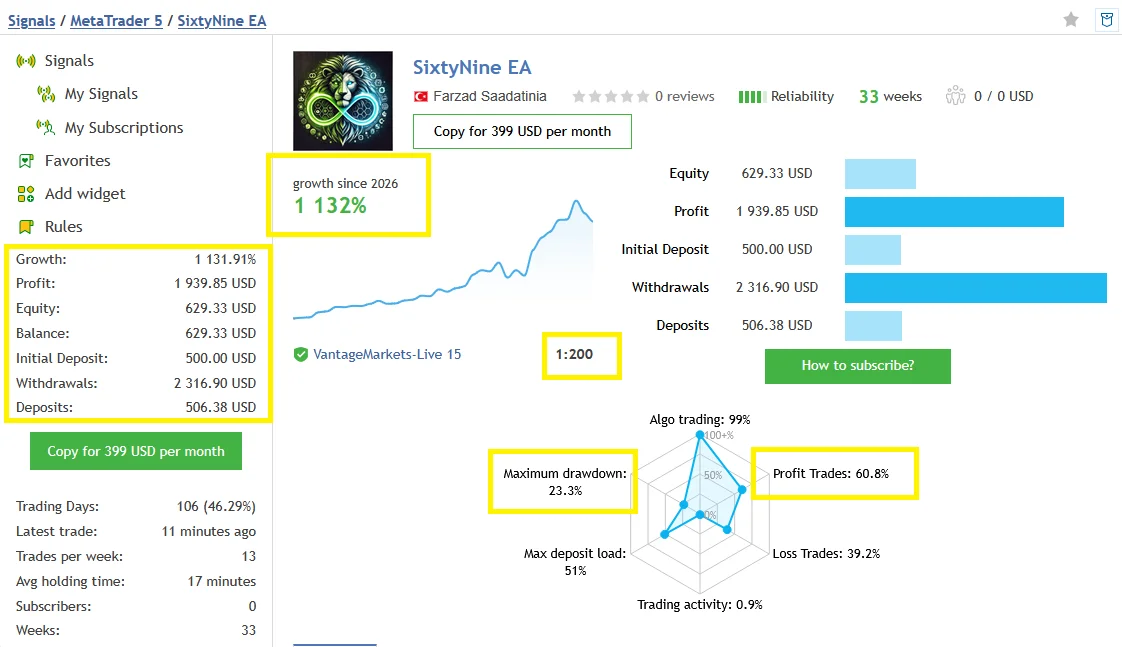
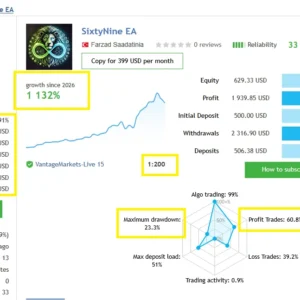
The developer links a public MQL5 signal. The following is a snapshot retrieved on 5 October 2026; figures can change.
| Metric | Observed figure |
| Initial deposit | $500 |
| Reported growth | 1,131.91% |
| Recorded trades | 502 |
| Winning trades | 60.75% |
| Profit factor | 1.82 |
| Relative drawdown by balance | 23.29% |
| Relative drawdown by equity | 10.34% |
| Maximum consecutive losing trades | 9 |
View the public SixtyNine EA signal to check the latest trading activity, broker, history and risk figures.
This is the provider’s account, not a ForexEATools test account. The drawdown figures have different labels and should not be treated as interchangeable. Deposits and withdrawals are recorded, so reported growth should not be read as a simple multiple of today’s balance. Results on your account can differ because of settings, costs and execution. The signal-copying subscription is a separate service from purchasing the EA.
View Live Results → https://www.mql5.com/en/signals/2361673
Gold trading can lose money. Historical results do not guarantee your account’s outcome.
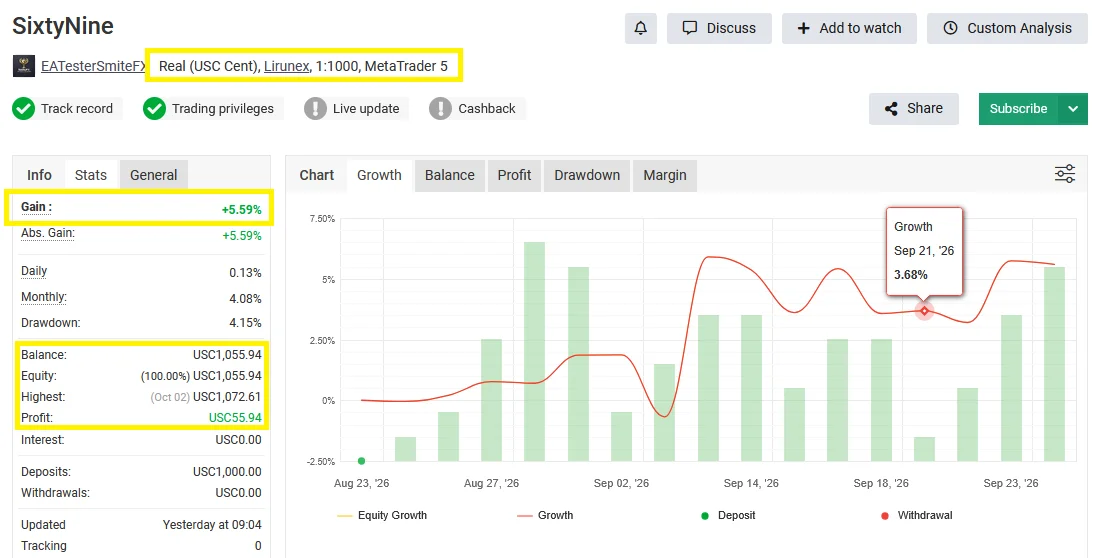
SixtyNine EA Myfxbook Results – Gain, Drawdown & Account Details
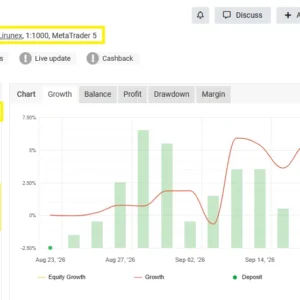
Review the performance of a Myfxbook account listed as running SixtyNine EA on MetaTrader 5. The supplied snapshot shows 5.59% total gain and 4.15% reported drawdown on a real Lirunex cent account.
| Performance metric | Supplied snapshot |
| Total gain | +5.59% |
| Reported drawdown | 4.15% |
| Profit | 55.94 USC |
| Balance | 1,055.94 USC |
Account: Real cent account · Broker: Lirunex · Platform: MT5 · Leverage: 1:1000
View the SixtyNine Myfxbook Account
Amounts are in US cents: 1,055.94 USC equals approximately US$10.56. Figures reflect the supplied snapshot; trading duration, EA settings and verification status are not established here. Past performance does not guarantee future results.
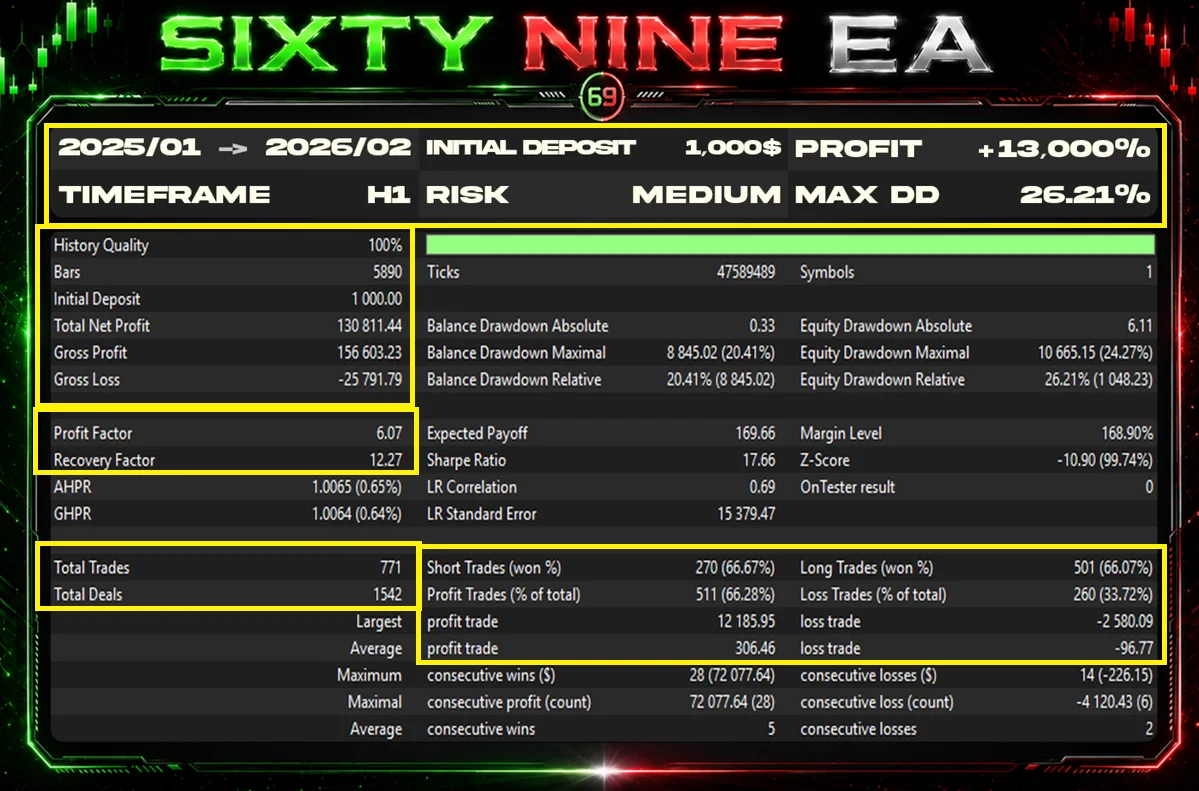
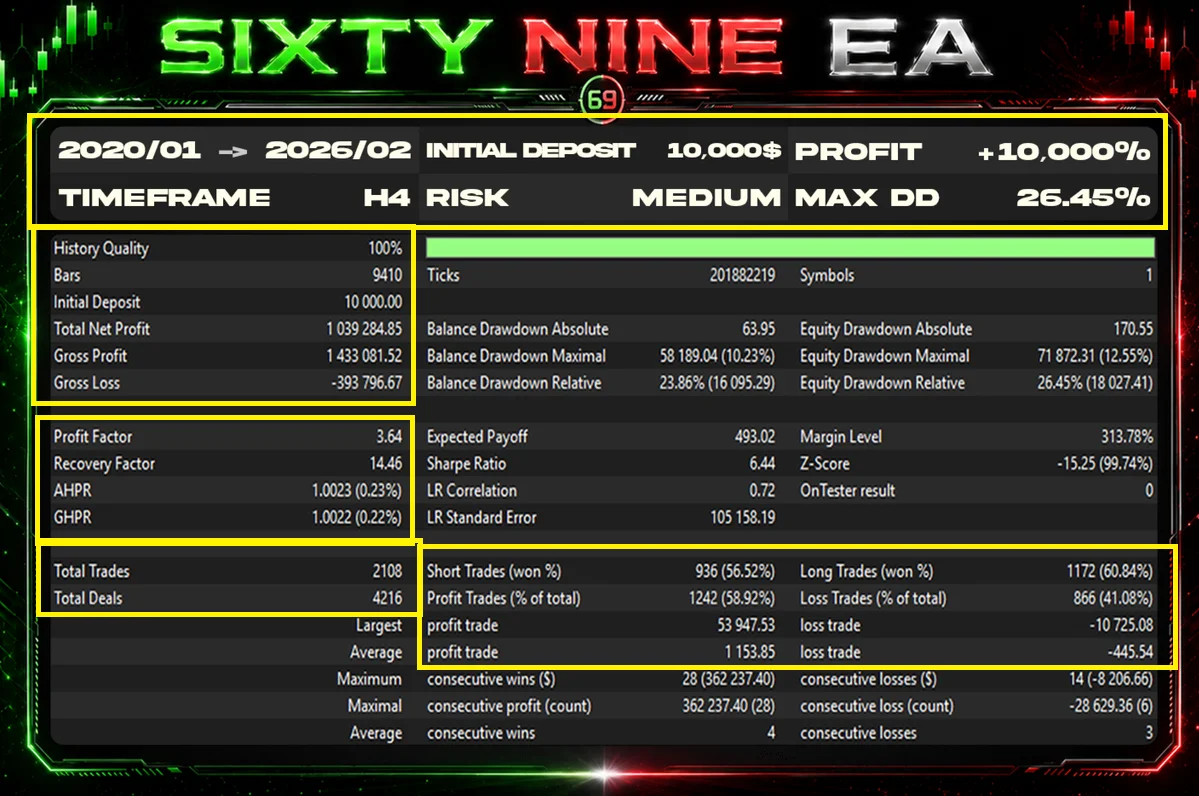
Backtest information
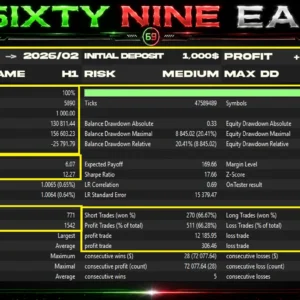
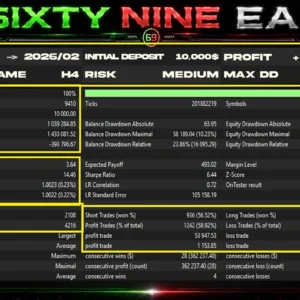
Use a full report to assess historical testing. A profit-chart image alone leaves important questions unanswered.
ForexEATools test status: Check below images and data
If a test report is provided, it should identify the software release, preset, broker data, symbol, dates, starting balance, lot-sizing mode, spread, commission and modelling method. Include both profit and drawdown. Label backtests separately from live results.
What your purchase includes
| Package item | Supplied with this order |
| EA file | MT5 v1.30 EX5 |
| Settings files | SetFile included |
| Installation instructions | included guide |
| Test report | included report |
| Setup support | Contact Me for more info |
A settings file contains saved inputs. It does not replace the EA program. Read the preset notes before loading it, especially the volume and risk settings.
Check our delivery and download information for order-access instructions.
Installation overview
Follow the installation method provided for your licensed package. For a legitimately supplied standalone EX5 file:
- Extract the download.
- Open MT5 and select File → Open Data Folder.
- Place the EA file inside MQL5 → Experts.
- Refresh Expert Advisors in the Navigator or restart MT5.
- Open the chart specified in the package guide and attach the EA.
- Load the supplied preset, if included, and review its inputs.
- Enable algorithmic trading in the terminal and the EA’s settings.
- Check the Experts and Journal messages and complete any required activation.
For an MQL5 Market purchase, use the Market installation process for the purchasing account. Enable DLL imports or external permissions only when the verified package instructions require them.
If the EA does not attach or does not trade
These are different problems. If it does not attach, check the file location, platform, build and activation messages. If it attaches but does not trade, check trading permissions, margin, symbol and any active filters.
Do not increase risk or remove filters just to force a trade. Send support your order number, software version, MT5 build and the relevant Experts/Journal message. Remove private account details from screenshots.
Contact ForexEATools support or read the store FAQs.
Frequently asked questions
What platform, pair and timeframe should I use?
SixtyNine EA runs on MetaTrader 5 and is designed for gold trading on XAUUSD. Use an H1 or H4 chart with the included set file. Review the lot-size settings before enabling trading.
How much money do I need to start?
The developer lists $300 for small-lot or testing profiles and recommends $1,000 or more. Your required balance also depends on your broker’s contract size, leverage and selected lot size. A higher balance does not guarantee safe trading.
How much can I earn with SixtyNine EA?
There is no guaranteed daily or monthly income. Results depend on market conditions, settings, trading costs and broker execution. The public signal shows historical results, including losses, rather than the returns you should expect.
Are set files included?
Yes. This package includes a set file with saved EA settings. Check its lot size and risk settings before using it on your account.
Does SixtyNine EA use grid or martingale?
The developer states that SixtyNine EA does not use grid, martingale or recovery systems. It uses stop loss, take profit and trailing stop to manage trades. These features do not eliminate the risk of losses.
Can I use it for a prop-firm challenge?
Only if your prop firm permits this type of automated trading. You must configure the EA to respect the firm’s daily and total loss limits. No EA or preset can guarantee that you will pass a challenge.
Can I use it on multiple accounts?
Yes. Our package allows use on multiple trading accounts without an account-count limit. Each account needs its own installation and suitable settings.
Can I run it on a VPS?
You can run the EA on a compatible VPS with MT5 installed, subject to the installation permissions supplied with your package. A VPS helps keep the terminal running when your own computer is switched off.
Will I receive future updates?
Yes. Future updates will be made available to customers when we receive them. Contact ForexEATools with your order number to ask about the latest available version.
How will I receive my files?
Your download link will be sent by email after payment is confirmed. If you cannot find it, check your spam folder or contact support with your order number.
Why is the EA not opening trades?
The EA waits for its trading conditions to be met, so it may not trade immediately. Check that algorithmic trading is enabled, the correct chart is open and your account has enough margin. The Experts and Journal tabs may show a specific error.
What if I cannot install the EA?
Contact ForexEATools support with your order number, MT5 build, broker name and the exact error message. Include a screenshot of the Experts or Journal tab so we can help identify the problem. Do not send your trading password.
Compare related gold trading tools
You can also review Mon Scalper MT5 and our Smart Gold Hunter EA review. Compare their setup, risk approach and evidence before choosing. They are comparison options, not claims of equivalent performance.
Ready to order?
Check the package contents and license terms above. If the requirements match your setup, select Buy SixtyNine EA to order.
Questions first? Ask us about compatibility.




Reviews
There are no reviews yet.