PolyGold Scalper MT5 + SET Files is a gold-trading EA for traders who want to use market sentiment as part of an automated strategy. It connects to Polymarket data and places trades in MetaTrader 5.
This offer includes SET files. Before buying, review the connection requirements, stop-loss behaviour and public account record below. Start on a demo account and check every risk setting before using real money.
See the
developer’s PolyGold Scalper listing for the published specification.
What is included?
| Purchase detail |
Included with this offer |
| Product |
PolyGold Scalper MT5 |
| Trading platform |
MetaTrader 5 |
| SET files |
Included |
A SET file loads saved input values. It does not install the EA, activate a licence or make the selected trade size suitable for every account. Review the inputs after loading any preset.
Pair, timeframe and deposit guidance
The developer recommends
XAUUSD on H1 and a
$200 USD deposit. This is a recommendation, not a promise that $200 is enough for every broker, lot size or market condition.
Your broker’s gold contract size, minimum volume, margin requirements and trading costs affect the account’s exposure. Check those details before choosing a trade size. If a preset opens a position larger than you understand, stop and review it on demo first.
The connection setting you need to check
PolyGold Scalper requires an allowed WebRequest address for its external data connection. Follow the instructions for your exact release and enter the approved API address under
Tools → Options → Expert Advisors.
Do not assume that seeing the EA on a chart means the feed is working. Check its panel and the Experts and Journal tabs for connection errors. A missing permission, unavailable service or connection problem needs attention before live use.
Understand virtual stops before trading
A virtual stop is managed by software running in the terminal. It should not be treated as the same protection as a stop-loss order already held by the broker.
Keep the terminal connected and the EA running while it manages trades. Understand what happens if the computer, VPS or internet connection fails. Check whether your chosen release and preset also place a broker-side stop; do not assume they do.
Public trading results: read the risk as well as the growth
The developer links to a
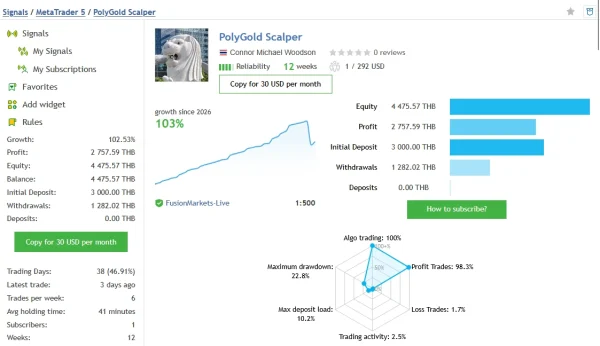
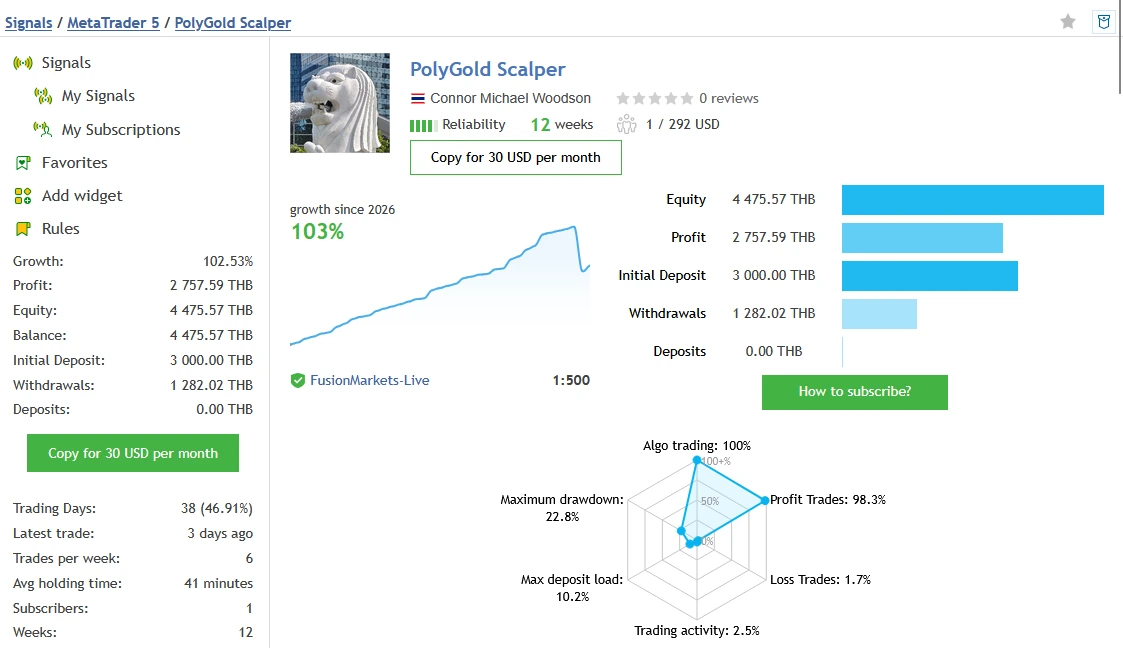
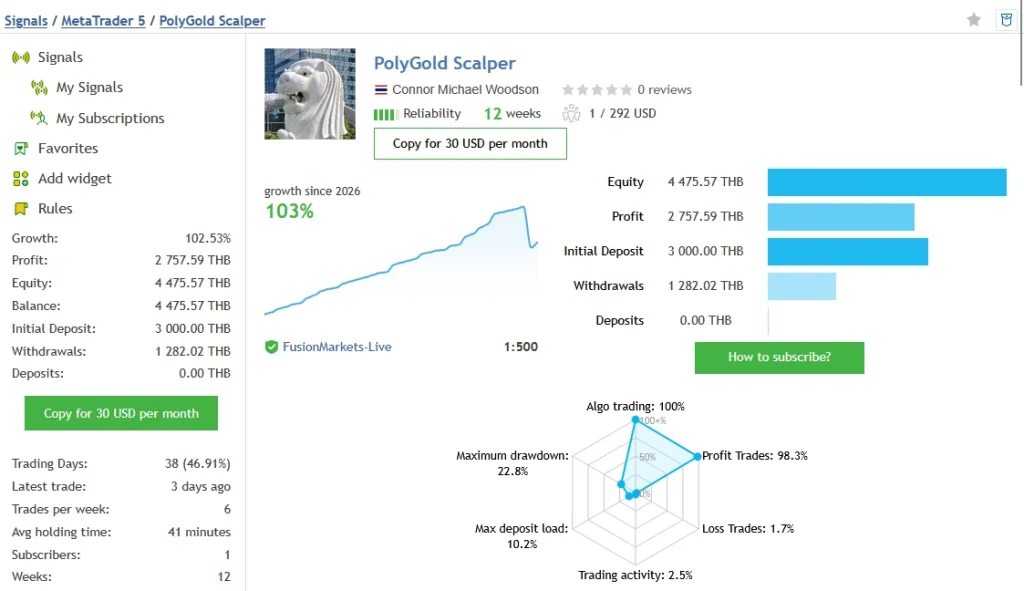
PolyGold Scalper public MQL5 signal. On
1 November 2026, it showed
102.53% growth,
2,757.59 THB profit and
4,475.57 THB balance and equity. Its initial deposit was
3,000 THB. These amounts are in
Thai baht, not US dollars.
The record showed
60 trades over 12 weeks, with
59 profitable trades and one losing trade. However, the worst trade was
−1,271.17 THB. Relative drawdown was
22.76% by balance and
22.57% by equity. A high win rate can still include a large loss.
All 60 recorded trades were buys. This short history does not establish how every release, sell configuration or supplied SET file will behave. The account’s results are third-party evidence, not a forecast for your account. Open the source to check the latest figures, trade history and settings context.
Why a backtest does not tell the whole story
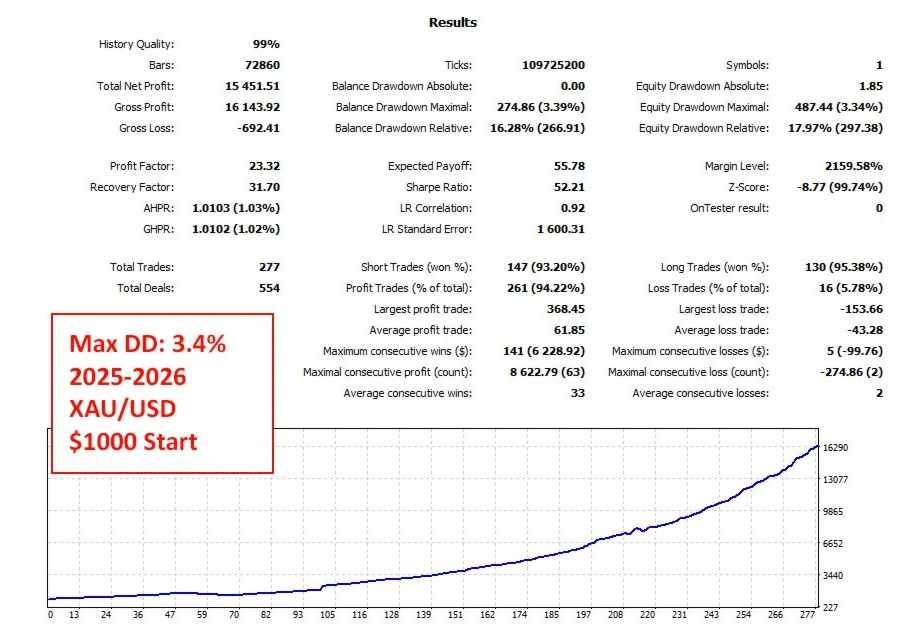
MetaQuotes states that
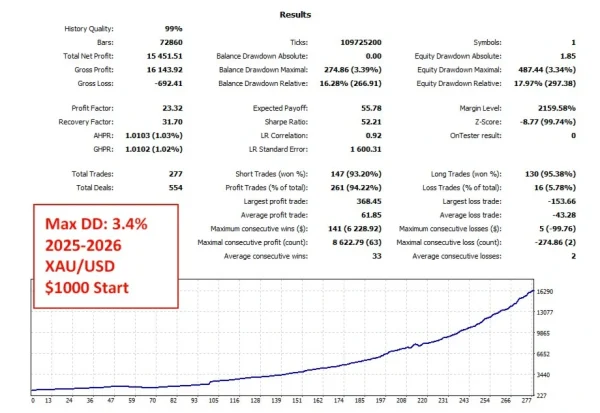
WebRequest cannot run in the MT5 Strategy Tester. That matters for a strategy that uses an external feed.
A backtest alone cannot demonstrate that the live connection and live sentiment inputs work as intended. If a report uses stored, simulated or replacement inputs, those assumptions need to be explained. Follow a demo forward test with working connections and keep a record of the actual inputs, broker and release used.
Source:
MetaQuotes WebRequest documentation.
How to install PolyGold Scalper in MT5
- Open the MT5 terminal you intend to use.
- Choose File → Open Data Folder and open MQL5 → Experts.
- Copy the supplied EA file into that folder, then refresh Navigator → Expert Advisors.
- Open your broker’s XAUUSD chart and follow the release instructions for the timeframe.
- Add the required API address to the allowed WebRequest list. Use the exact address from the release instructions.
- Attach the EA. Open Inputs → Load and select a matching supplied SET file.
- Review position size, stop settings and every other input the preset changes.
- Enable the necessary trading permissions when ready to test on demo.
- Check the panel, Experts and Journal tabs for errors. Keep monitoring the connection and trade management.
For screenshots and general steps, see
how to install an EA in MT5. Our
MT5 SET-file guide explains how to load and review a preset.
Delivery, help and refunds
Read
Delivery & Downloads for general order-access information. Check the package details for the delivery method and any activation requirements before purchasing.
For an installation problem, use
Product Support and include your order number, EA version, MT5 build and the exact error message. Never share your trading-account password.
Please read our
refund policy before ordering. Check the conditions and process for reporting a technical problem; do not assume a losing trade makes an order refundable.
Frequently asked questions
Does PolyGold Scalper work in MT4?
This product is for MetaTrader 5. Do not buy an MT5 package for an MT4 terminal.
Are SET files included?
Yes, this offer includes SET files. Use a preset that matches your EA release, then review the loaded risk settings.
Does a high win rate mean it is low risk?
No. Look at losing-trade size, drawdown and exposure alongside the win rate. Many small wins can be offset by one large loss.
Will it match the public account?
Matching results are not guaranteed. Broker execution, trading costs, inputs, connection quality and software changes can affect trades.
Is it suitable for someone new to MT5?
You need to understand EA permissions, WebRequest, presets and trade size. Practise on demo first. If you cannot explain how the EA will limit a loss or handle a connection failure, resolve that before live use.
Is profit guaranteed?
No. Automated gold trading can lose money. A public account, preset or backtest does not guarantee future returns.