Squid Grid AI v1.3 MT5 is a multi-market grid Expert Advisor. Review its published setup, grid risks and public account evidence before choosing it for your account.
A grid can hold several open positions. Check the total exposure and floating losses, rather than relying only on closed profits.
Setup at a glance
| Item |
Developer-published guidance |
| Markets |
XAUUSD, EURUSD, EURJPY, GBPNZD, AUDCAD and USDCAD |
| Launch chart |
EURUSD M5 |
| Other analysis timeframes |
M5–H1, depending on the asset |
| Minimum / recommended deposit |
$500 / $2,000 for the six-market setup |
| Strategy description |
Mean-reversion grid; developer states no martingale |
Source:
original product information.
The launch chart and the markets traded are different things. Follow the supplied manual before adding extra chart instances: duplicate installations can create unintended exposure.
The deposit figures are setup guidance, not a guarantee that an account can absorb future losses.
What changed in v1.3?
The developer’s update history dates v1.3 to 13 May 2026 and identifies a minor automatic lot-size calculation fix. The preceding v1.2 added spread filtering, automatic sizing, trade comments and prop-firm settings.
Check the version shown by the installed EA and test its sizing before allowing orders.
Read the
official update history.
How the grid risk works
Mean reversion means expecting price to move back towards an earlier range or average. A market can instead continue moving in one direction for a long time.
A grid may build a group of positions. Even if each individual position is small, their combined loss and margin requirement can become large.
“No martingale” does not mean “no added exposure.” Several same-size positions still create more exposure than one.
For a simple example, suppose a $2,000 account has $300 of open losses. Its equity would be about $1,700 before other adjustments. Closing earlier trades in profit would not remove the risk carried by those open positions.
Before testing, understand the maximum open exposure, loss controls and what happens when an exit cannot execute at the intended price.
AI features and connection requirements
The developer advertises AI monitoring of news, sentiment and volatility, with risk suggestions and the ability to pause or close trading. The listing directs buyers to obtain separate AI setup instructions.
Do not assume that attaching the EX5 file proves the AI service is connected.
Before purchase, check whether the offer provides the required access, any ongoing service cost and clear setup instructions. Before trading, verify the connection status and understand what the EA does if that connection is lost.
AI monitoring cannot guarantee an exit before a sudden market move. A reassuring dashboard label is not evidence that capital is protected.
Public trading evidence
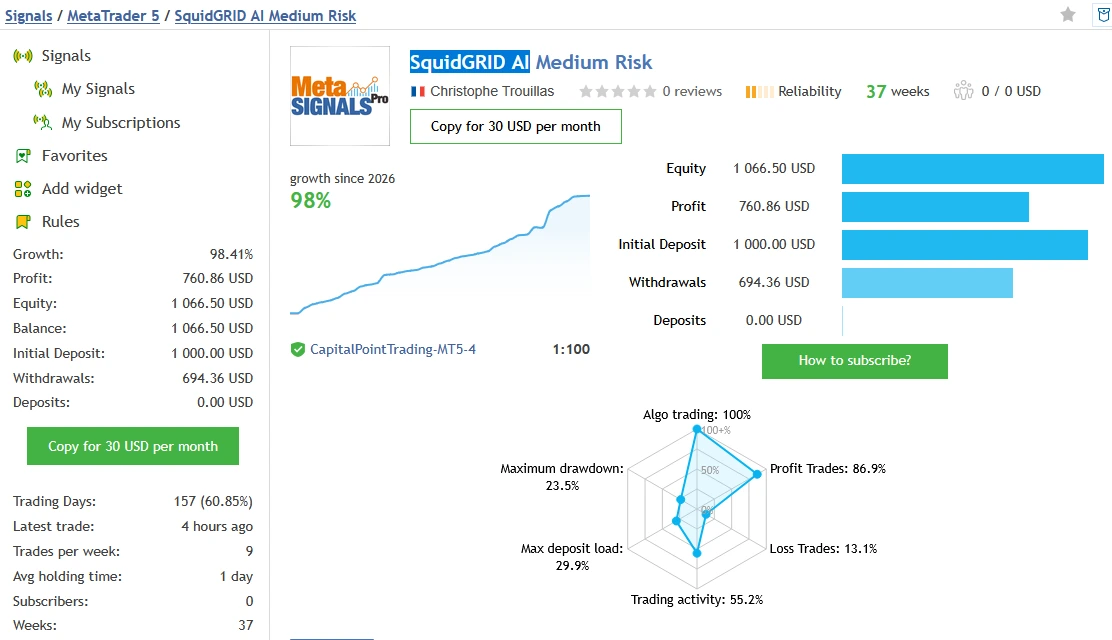
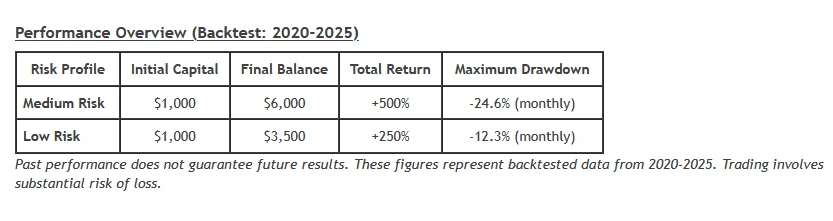
The developer links
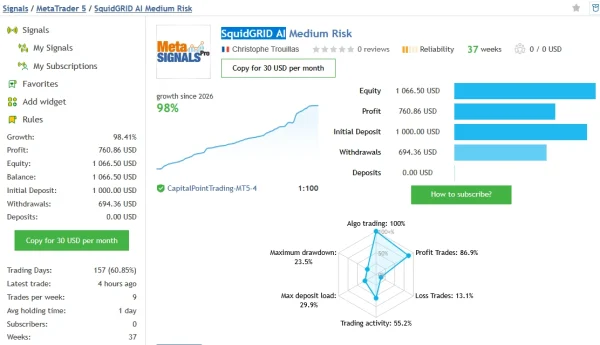
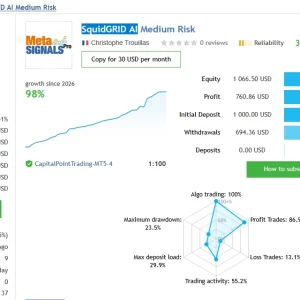
SquidGRID AI Medium Risk on MQL5.
At the check on 21 October 2026, the page displayed 98.41% growth, $760.86 profit and 419 trades over 37 weeks. It showed a $1,000 initial deposit, no additional deposits and $694.36 withdrawn.
Relative drawdown was 23.46% by equity and 3.65% by balance. The account’s settings and continuous use of v1.3 were not independently established.
This is third-party account evidence, not a ForexEATools trading account or a promise for your purchase.
Why the drawdown difference matters
Balance mainly reflects completed trades and cash movements. Equity also reflects open trading profits and losses.
A balance graph can therefore look calm while open positions carry substantial losses. Compare both measures before deciding whether the strategy fits your loss tolerance.
The historical drawdown is not a maximum future loss. Future trading can be worse.
How to read historical tests
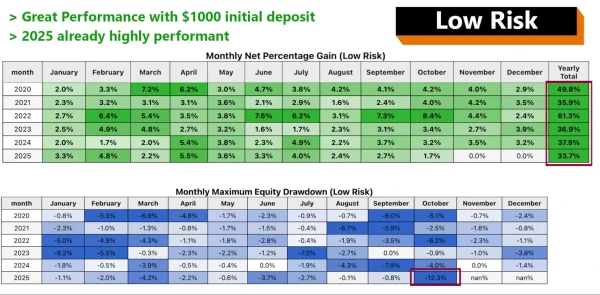
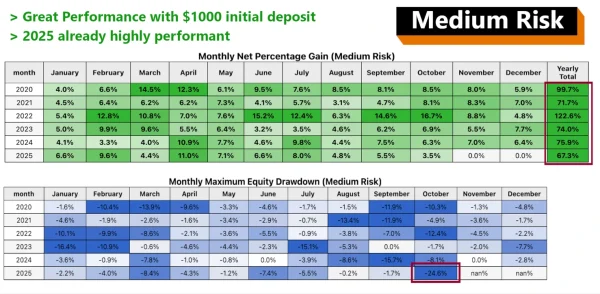
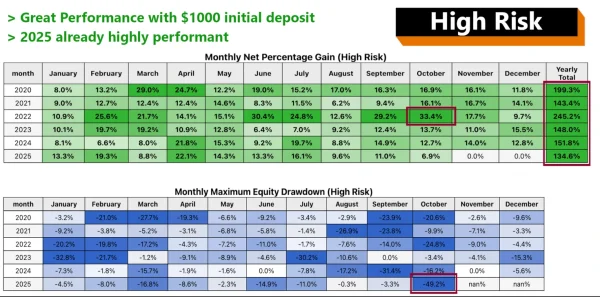
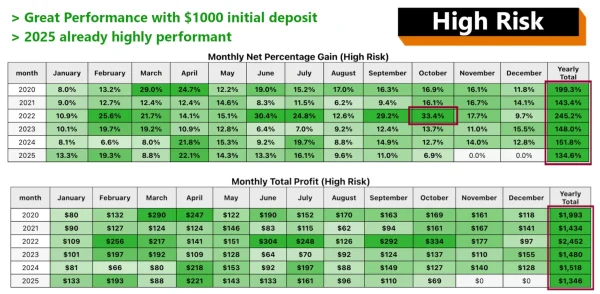
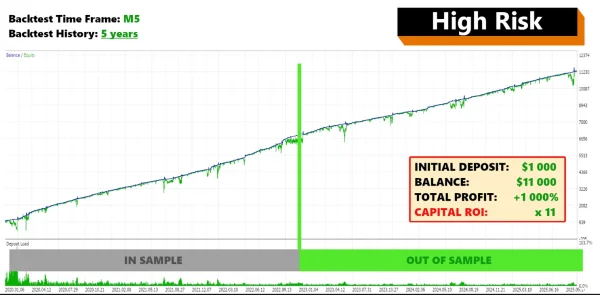
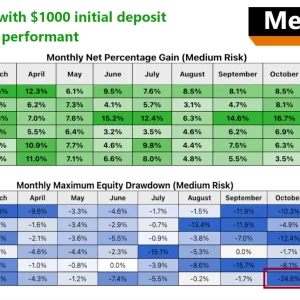
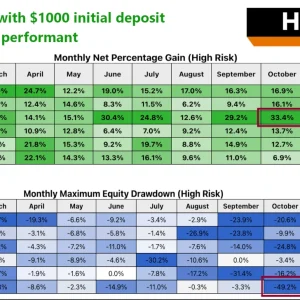
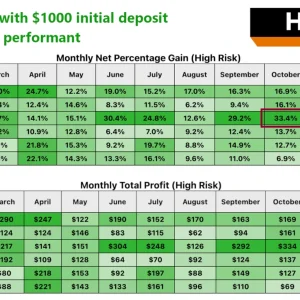
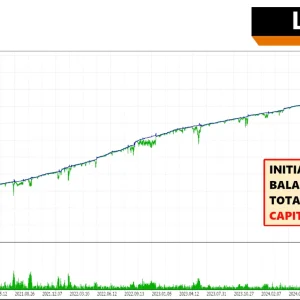
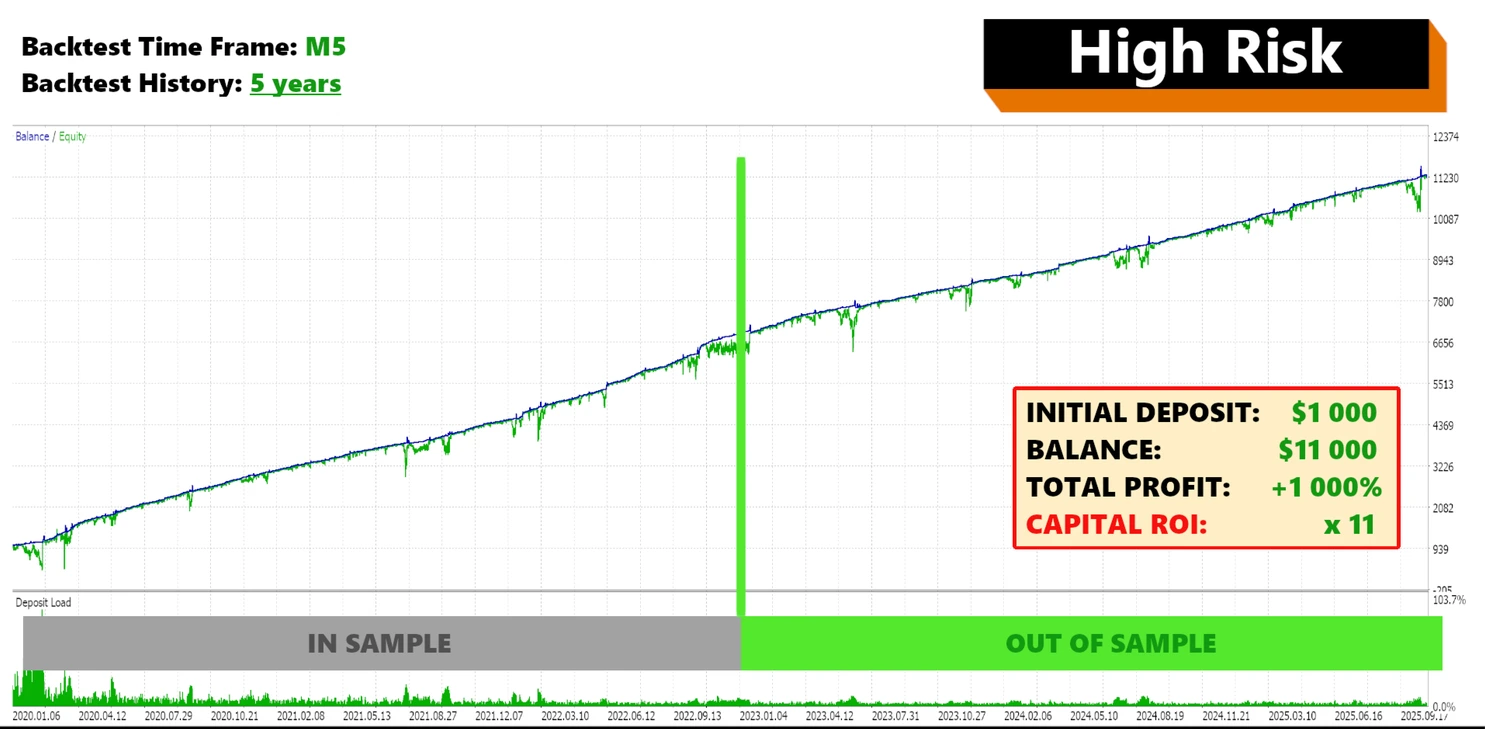
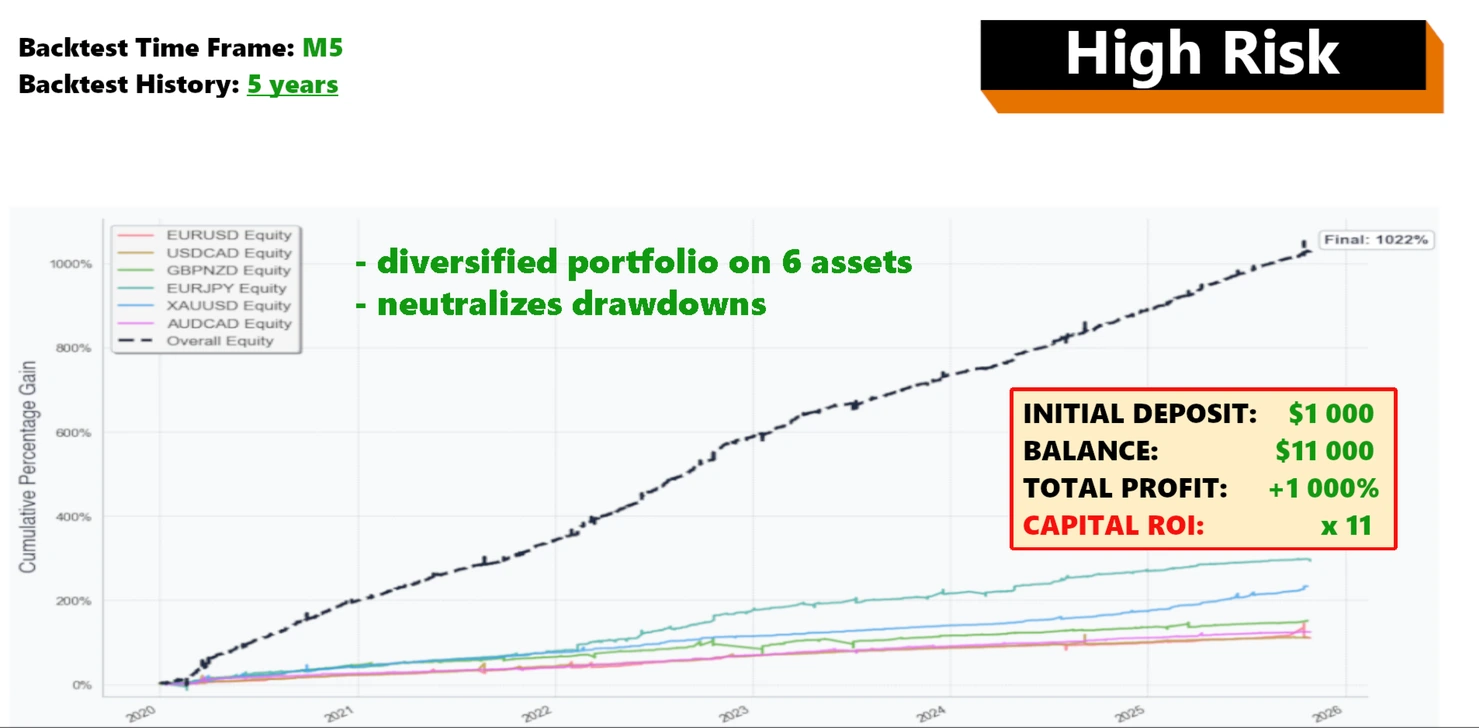
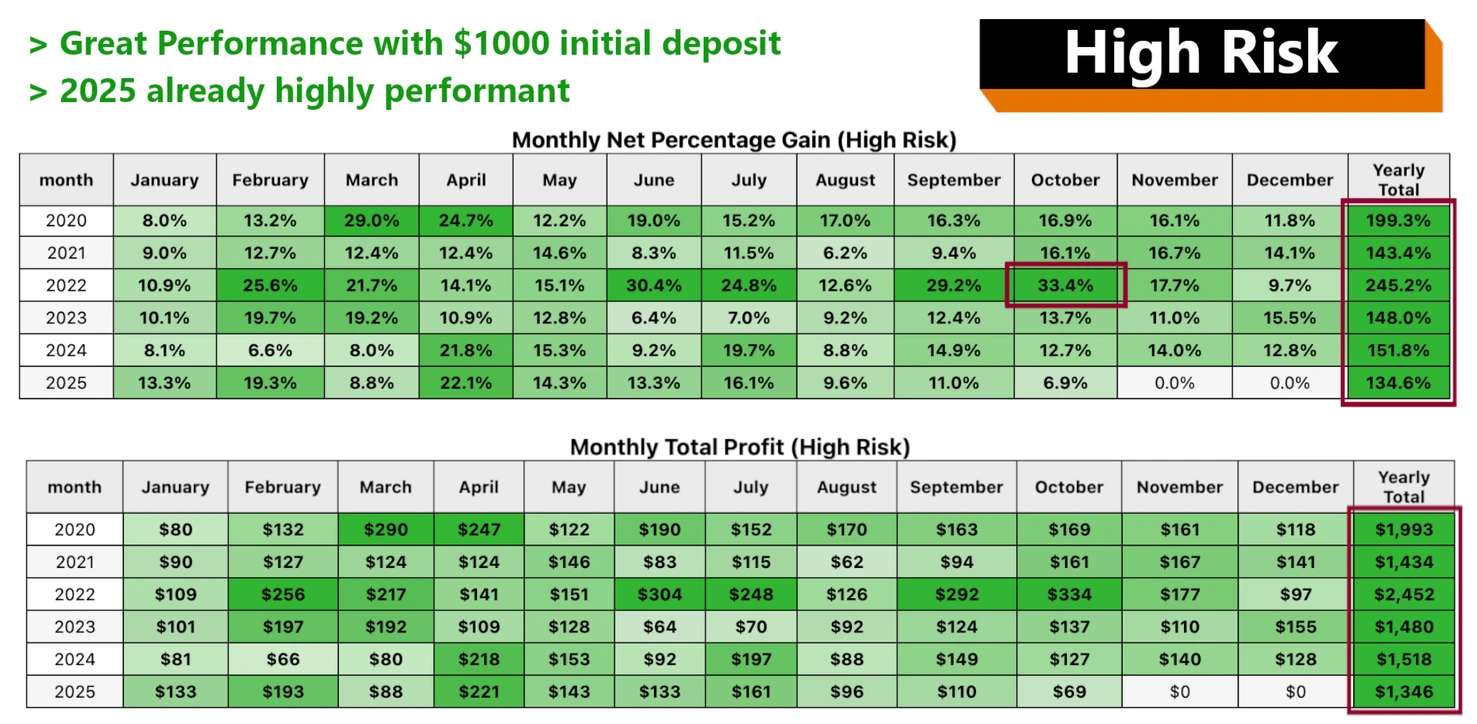
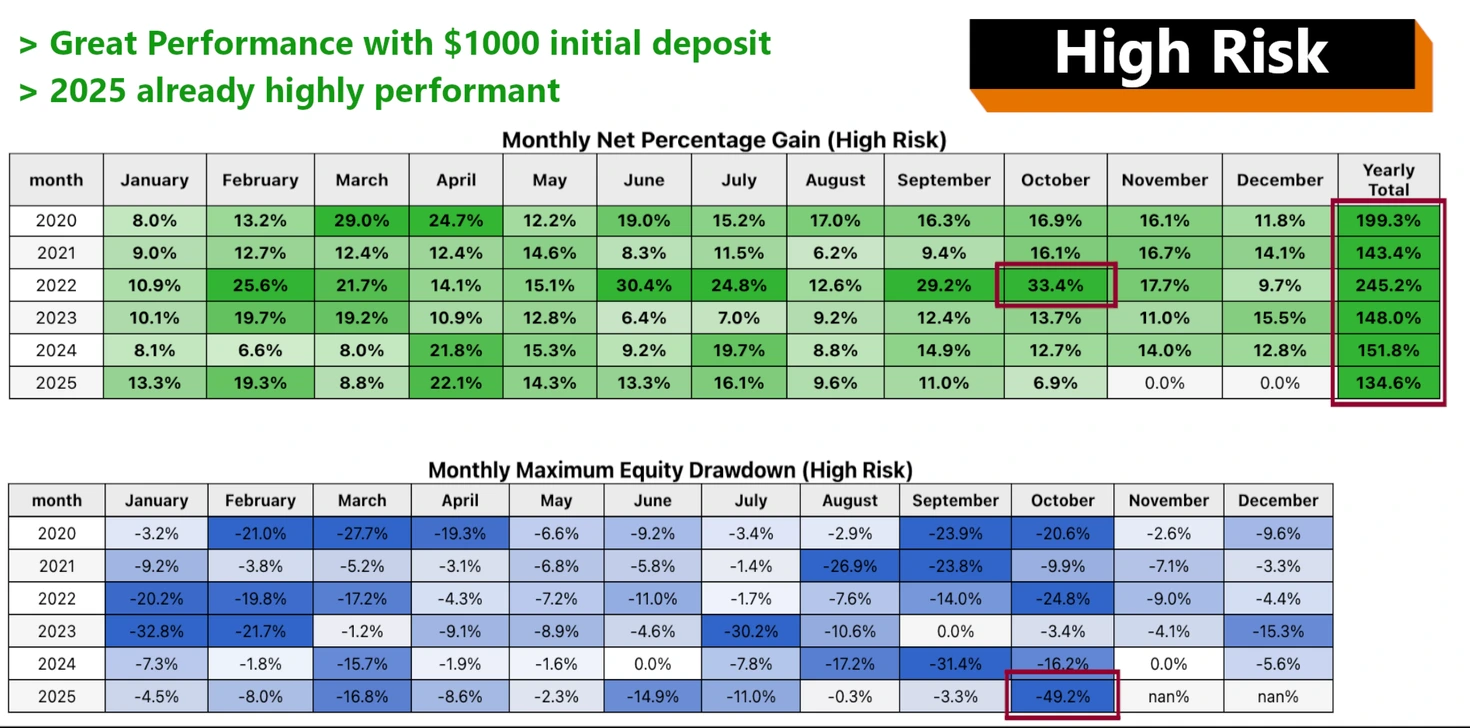
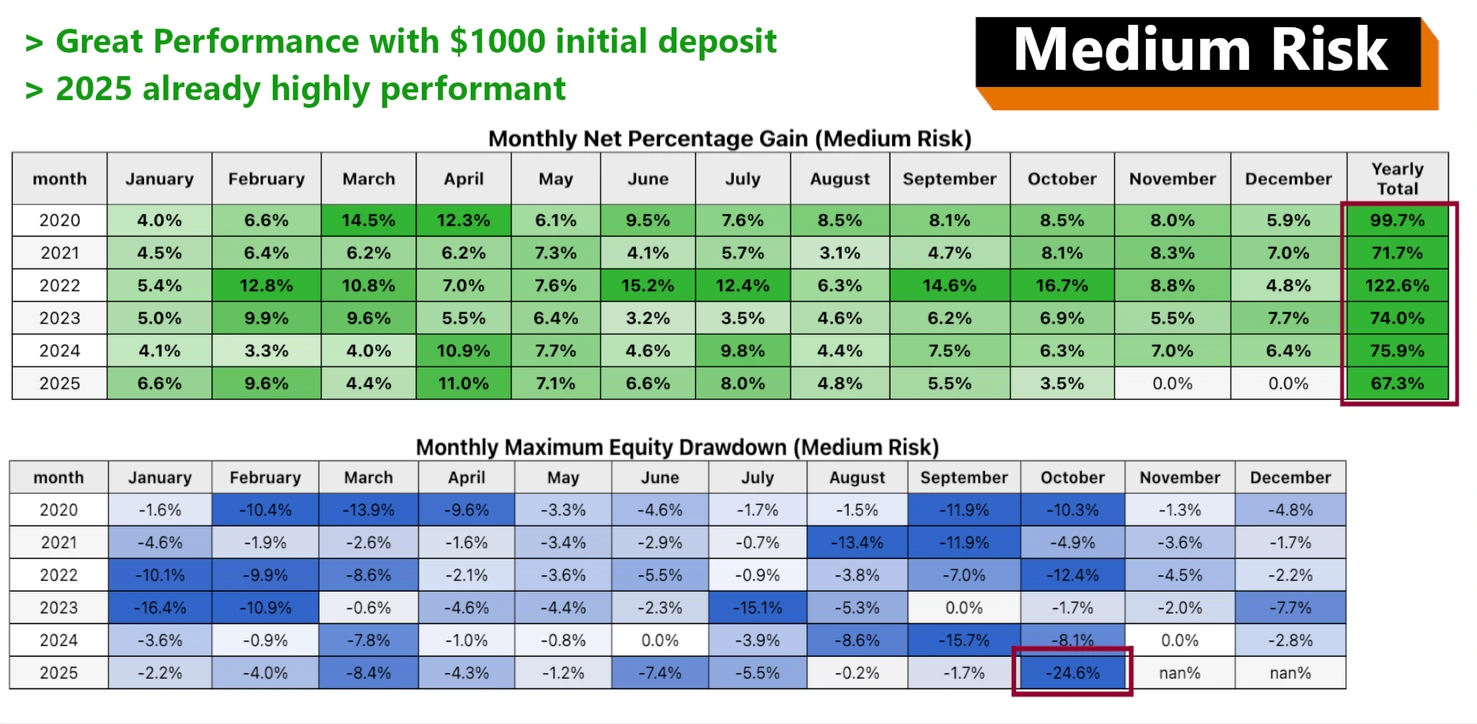
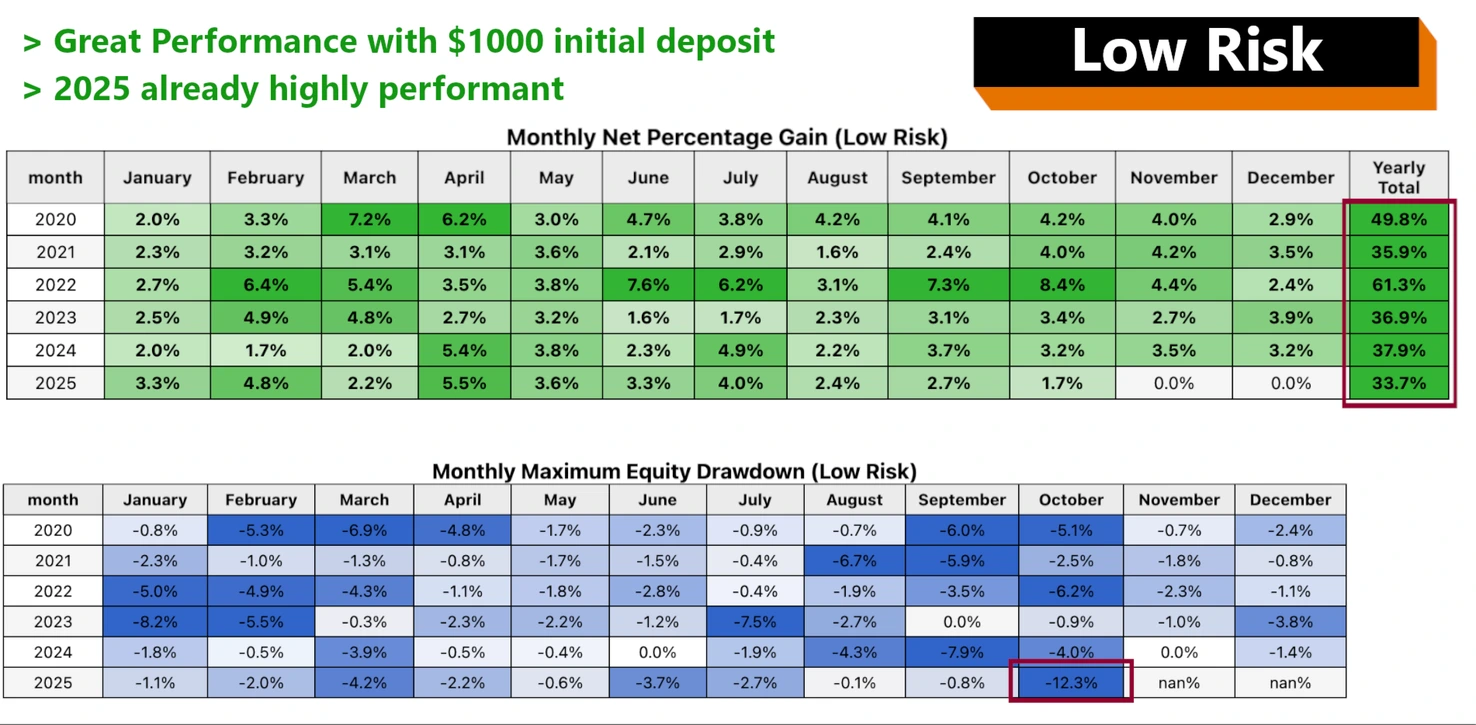
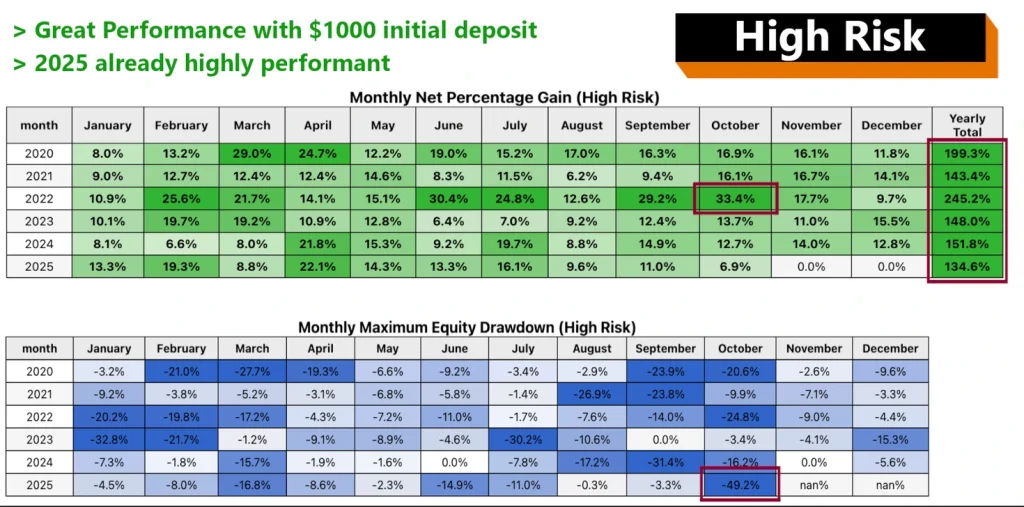
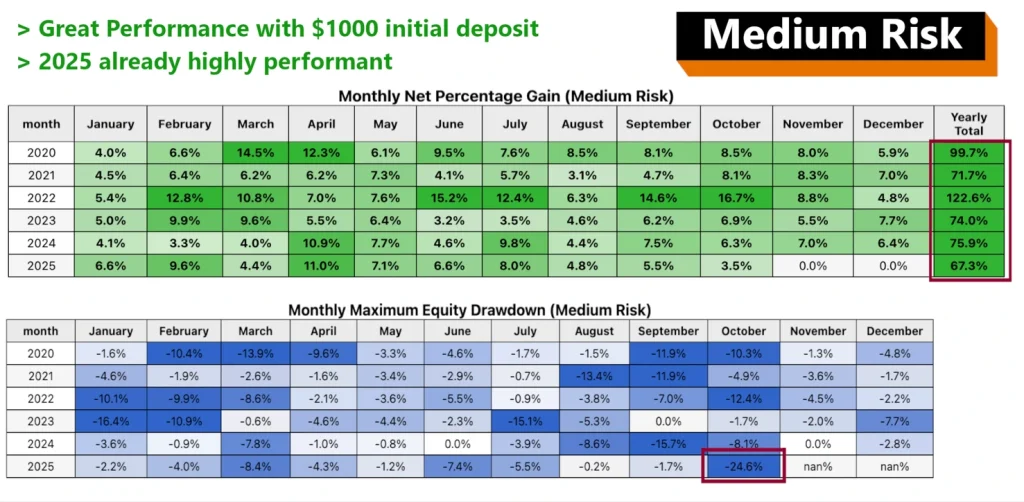
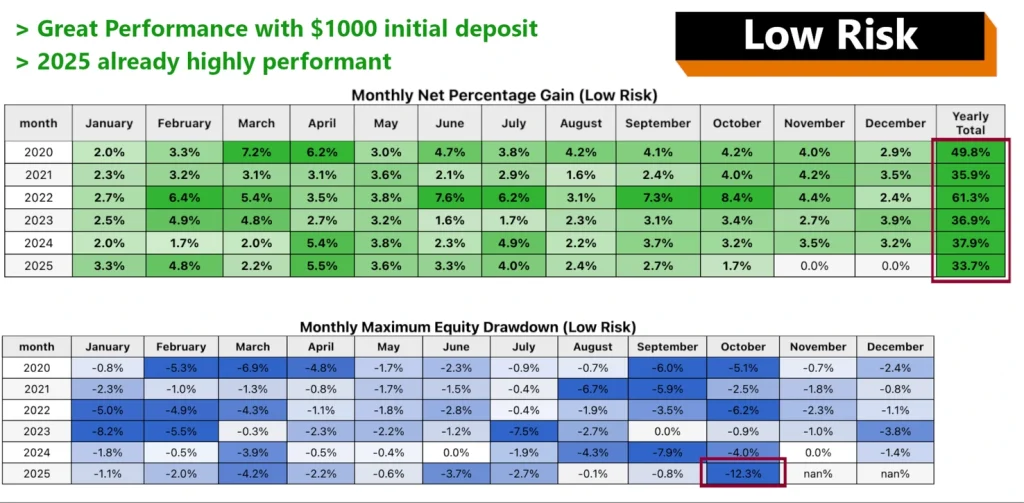
The developer describes its historical test as an OHLC simulation for 2020–2025. Its summary attaches a “monthly” qualifier to maximum drawdown, without enough detail to interpret that label confidently.
Use the complete report and exact settings before comparing those figures. Do not present them as monthly returns, an established live result or a future loss limit.
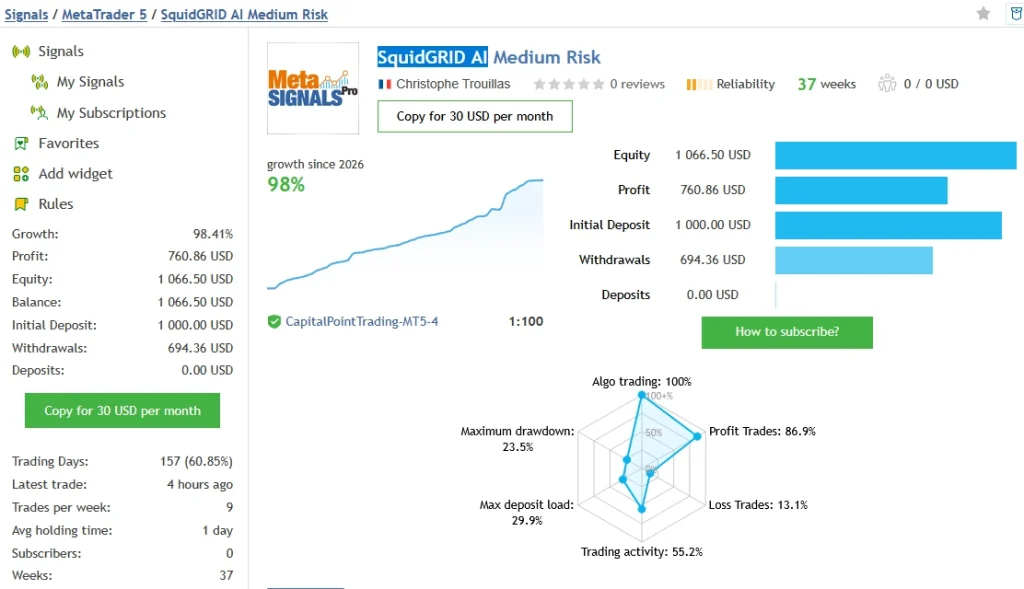
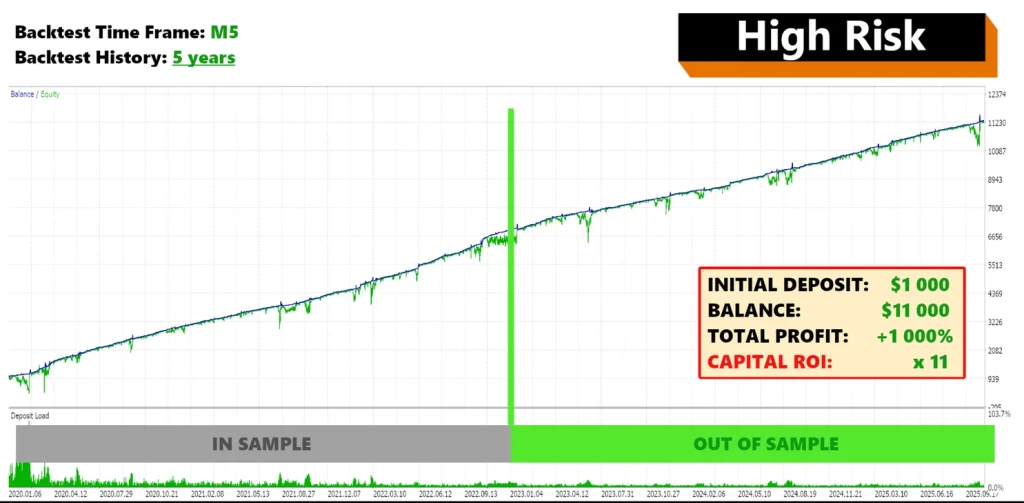
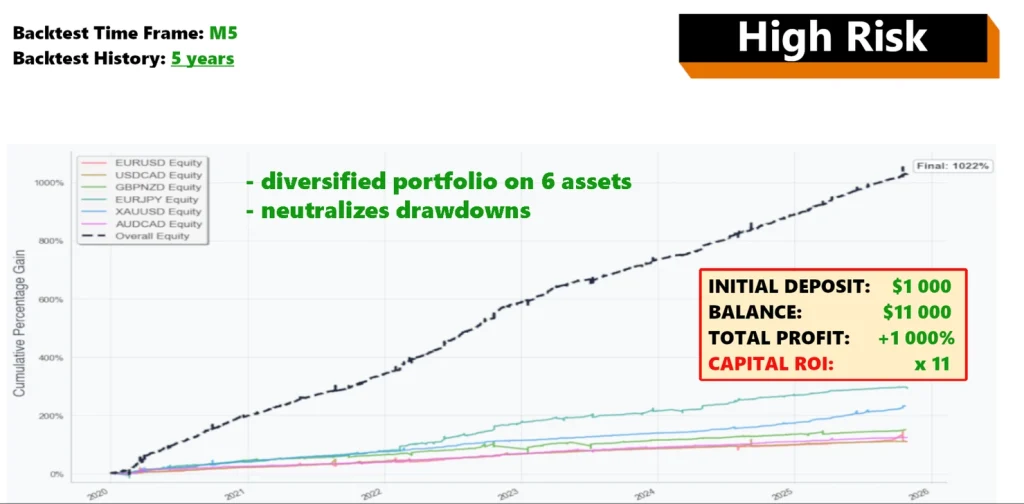
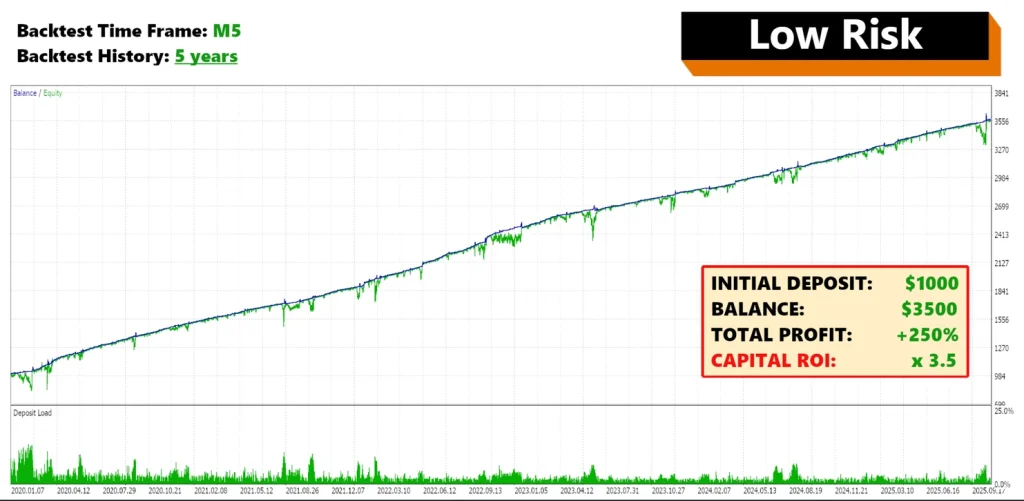
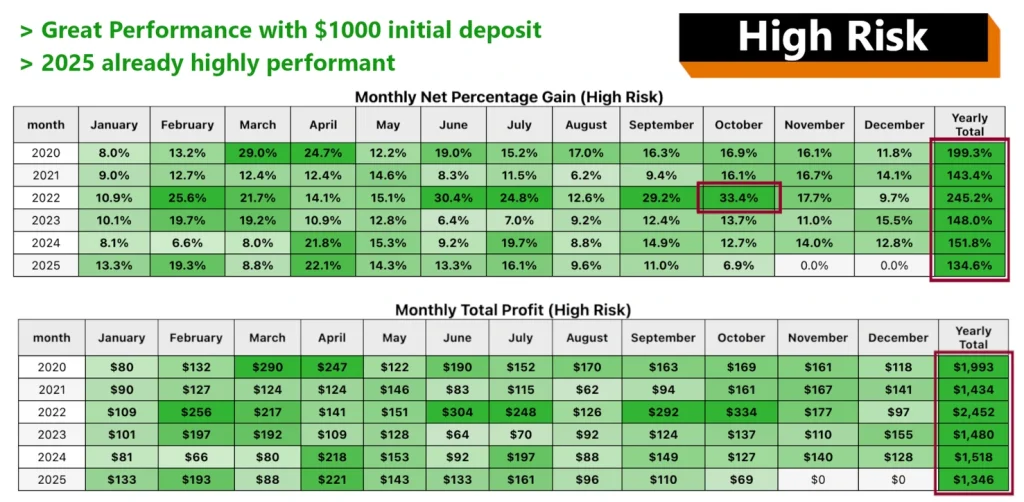
Developer-Reported Backtest Results: 2020–2025
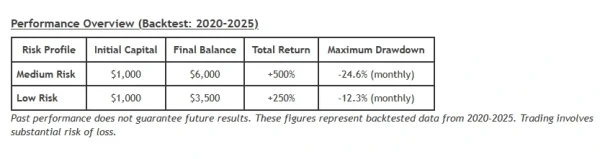
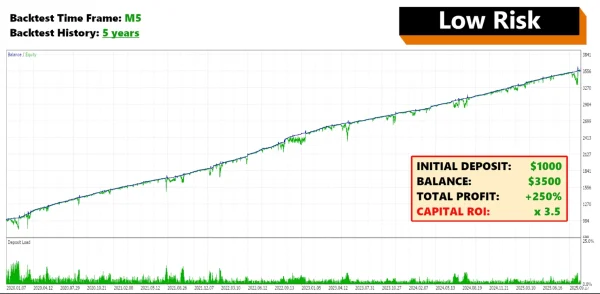
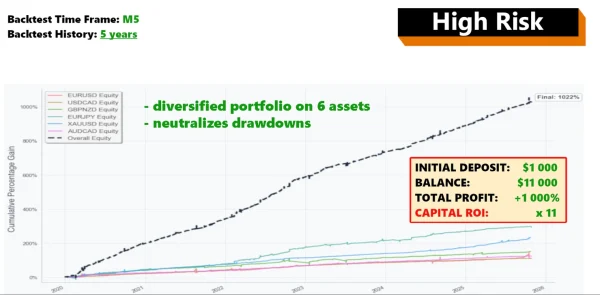
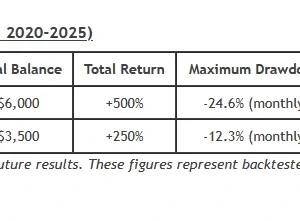
The developer reports that a $1,000 starting balance reached $6,000 with the Medium Risk profile and $3,500 with Low Risk during historical testing. These represent total returns of 500% and 250% across the test period—not monthly returns.
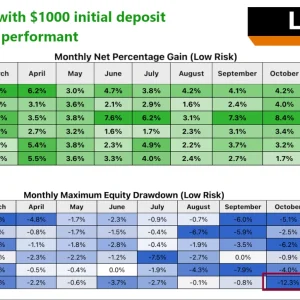
The published drawdown figures are labelled
24.6% “monthly” for Medium Risk and
12.3% “monthly” for Low Risk. The meaning of this measurement needs clarification from the complete test report. These figures should not be treated as maximum future losses.
These are historical simulations, not results from a live trading account. Actual performance may differ because of settings, spreads, trading costs and execution conditions. A profile named “Low Risk” can still lose money.
Broker and account checks
Having MetaTrader 5 installed does not by itself establish compatibility.
Check that the broker provides the required symbols and that their names match the EA’s configuration. Confirm the supported account mode, minimum lot, lot increments, contract sizes, spread and commission.
Review the complete portfolio, including other EAs on the same account. Two strategies may place similar trades even when their product names are different.
Trading several markets does not guarantee independent risk. For example, several instruments in this list have exposure to the US dollar. Relationships between markets can also change.
Installation and first checks
For a separately supplied EX5 package:
- Extract the package.
- In MT5, select File → Open Data Folder.
- Place the EA file in MQL5 → Experts, preserving any instructed folder structure.
- Refresh Navigator → Expert Advisors.
- Open the chart specified by the release instructions.
- Attach the EA and review its lot sizing, limits and symbol settings.
- Complete the required activation and AI setup.
- Enable trading when ready, then check Experts and Journal for errors.
- Observe the intended configuration on demo before using real money.
Follow our illustrated
MT5 EA installation guide for the platform steps. MQL5 Market purchases use the marketplace’s installation route.
If you receive a matching preset, our
MT5 SET-file guide explains how to load it. A preset stores inputs; it does not activate a licence or make the settings suitable for every account.
Is it suitable for a prop firm?
Check the firm’s current written rules before using it. Important limits can include grid trading, maximum exposure, floating daily loss, news trading and overnight positions.
An EA setting labelled “prop firm” does not establish permission or guarantee that a challenge will pass.
Who should consider it?
This product may interest traders who understand grid exposure, can review account equity and want to investigate a multi-market strategy.
It is a poor fit for anyone expecting guaranteed income, no open losses or a system that never needs monitoring.
Order access and technical help
Review the offer details beside the purchase button for the supplied files, licence, delivery and support coverage.
Our
Delivery & Downloads page explains general access procedures. For an installation issue, contact
Product Support with your order number, version and error message. Never share your trading password.
Read the
refund policy before buying.
Frequently asked questions
Is the AI feature included automatically with the EA file?
Do not assume so. Confirm service access and setup requirements for the offer. Installing a file and establishing an external connection are separate steps.
Does a non-martingale grid prevent large losses?
No. Combined positions can still create substantial floating losses. Limits and filters cannot eliminate execution and market risk.
Do I need a SET file?
Follow the supplied instructions. Load only a preset intended for the actual release and review the imported values. SET-file inclusion depends on the offer.
Can I use MT5 mobile to run it?
The mobile app does not run Expert Advisors. Use the desktop platform or a suitable supported hosting setup.
Will it perform like the linked account?
That cannot be promised. Settings, versions, broker conditions, execution and trading dates may differ.
Are unlimited accounts and lifetime updates included?
Only if those terms are explicitly stated for this offer. Another seller’s licence or support terms do not transfer to your order.
Does it guarantee profit?
No. Forex and CFD trading can result in loss of capital. Historical tests and public accounts do not establish future returns.