Aura Gold Pro Edition MT5 is a Gold-focused Expert Advisor with four published trading approaches. Its advertised setup is XAUUSD/GOLD on H1.
Compare the version, risk settings and public account records before choosing it. Several strategies can create combined exposure on the same market, and losing periods remain possible.
Setup at a glance
| Detail |
Developer-published information |
| Market / chart |
XAUUSD or GOLD / H1 |
| Platform |
MetaTrader 5 |
| Advertised approaches |
Classic Breakout, London Open Momentum, Swing Capture and Price Action Scalper |
| Published starting guidance |
$500 minimum; higher balances suggested for less aggressive operation |
| Minimum stated leverage |
1:20 |
| Broker guidance |
ECN recommended |
| Published design |
Stop-loss protection; no grid, martingale or averaging |
Source:
original product listing.
H1 means each candle represents one hour. These details describe published operating guidance, not an independent compatibility test.
What do the four strategies mean?
The names describe different ways of finding an opportunity:
- Classic Breakout: looks for a move beyond a price level.
- London Open Momentum: focuses on movement around the London session opening.
- Swing Capture: seeks larger price swings.
- Price Action Scalper: targets shorter-term price movement.
Four approaches still trade the same underlying market. A sharp Gold move can affect several positions together. “Independent strategies” should not be read as a guarantee of independent losses.
Account size and actual trade risk
A published minimum deposit is not a promise of low-risk trading.
The developer’s guide says minimum trade volume can prevent a small account from reaching the percentage risk selected in the inputs. It suggests larger balances for more precise sizing.
The practical question is whether the broker can execute the trade size needed for your chosen stop distance. Check the contract size, minimum lot and volume increments before relying on a percentage shown in the settings.
For example, a hypothetical minimum-size trade that risks $15 represents 3% of a $500 account. Selecting a smaller percentage does not make that minimum trade smaller unless the software or broker supports it. Confirm whether the EA skips the trade, rounds volume or behaves another way.
Risk is shared across the account
The
developer’s user guide describes per-system sizing controls and account-level protection. Review the actual inputs rather than assuming defaults fit your account.
As a simple example, four simultaneous positions each intended to risk $5 expose about $20 before costs and execution differences. On a $2,000 account, that is approximately 1% in total.
This example does not establish a maximum number of trades or a recommended setting. Other positions and EAs can add further exposure.
The guide describes its daily-risk control as stopping new entries after the threshold is reached. That wording does not establish that every open position closes immediately or that the final loss cannot exceed the threshold.
A stop loss is an intended exit instruction. Gaps or execution differences can produce a different final loss.
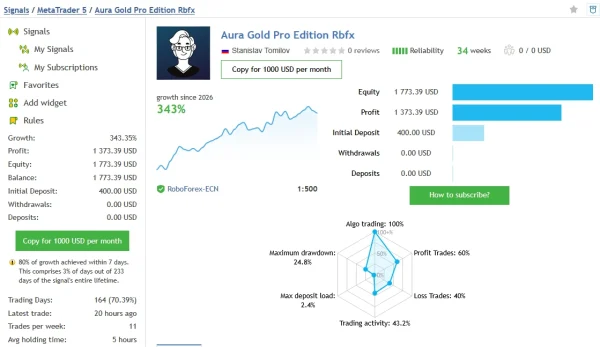
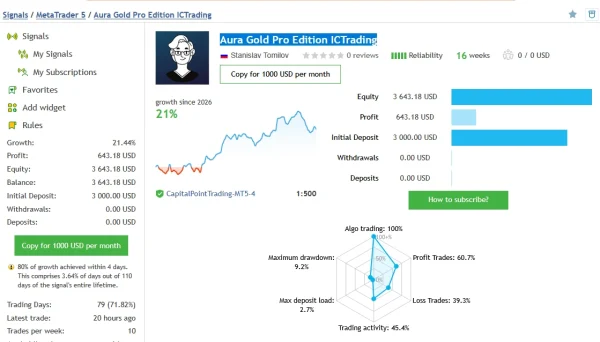
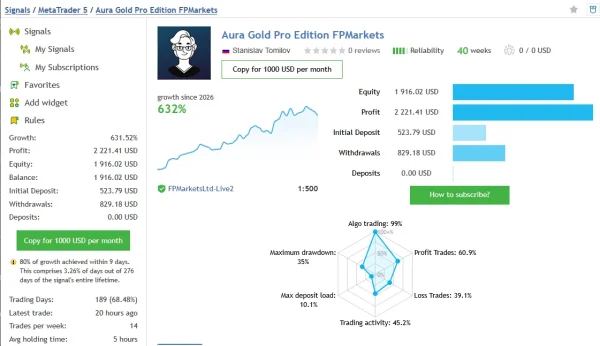
Aura Gold Pro Edition results: three public records
The original listing links three monitoring pages. The following snapshot was checked on
24 October 2026.
| Developer-linked record |
Growth |
Trades / displayed history |
Relative DD by balance |
Relative DD by equity |
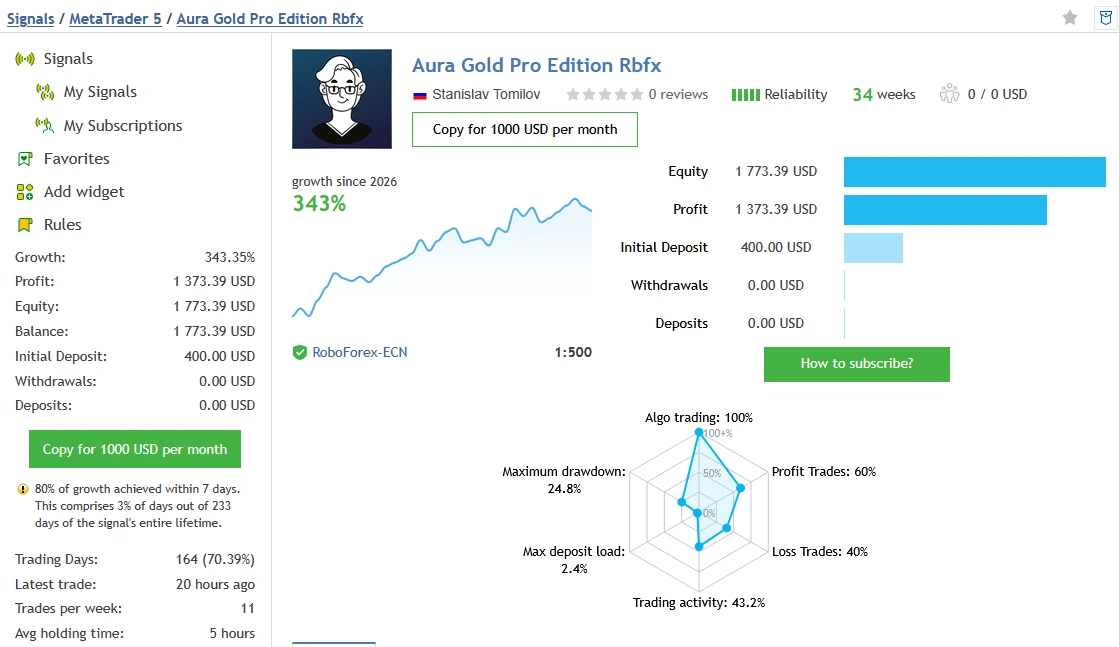
| RoboForex / Rbfx |
343.35% |
423 / 34 weeks |
24.83% |
6.86% |
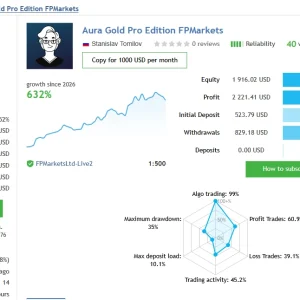
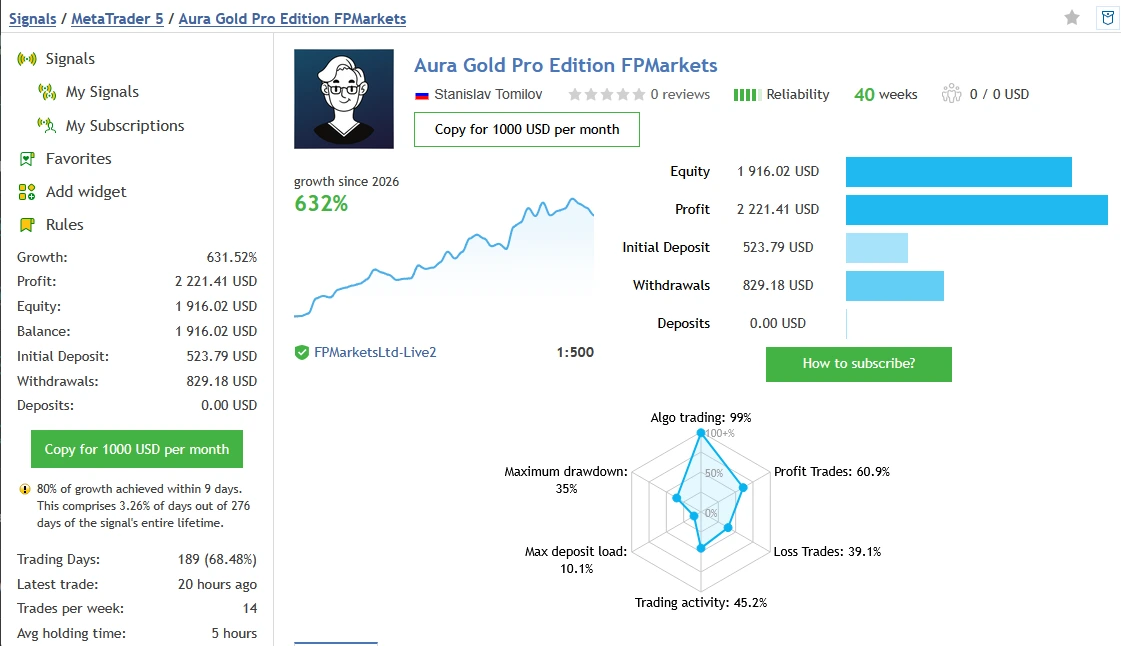
| FPMarkets |
631.52% |
501 / 40 weeks |
34.97% |
8.57% |
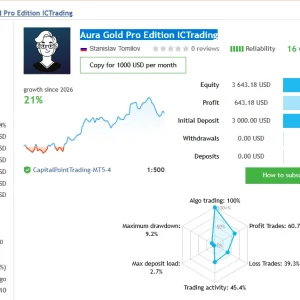
| ICTrading-labelled record |
21.44% |
201 / 16 weeks |
9.25% |
1.77% |
These are the displayed relative-drawdown fields, not a replacement for every other risk metric on the platform. The account name also does not verify its current broker server.
RoboForex / Rbfx
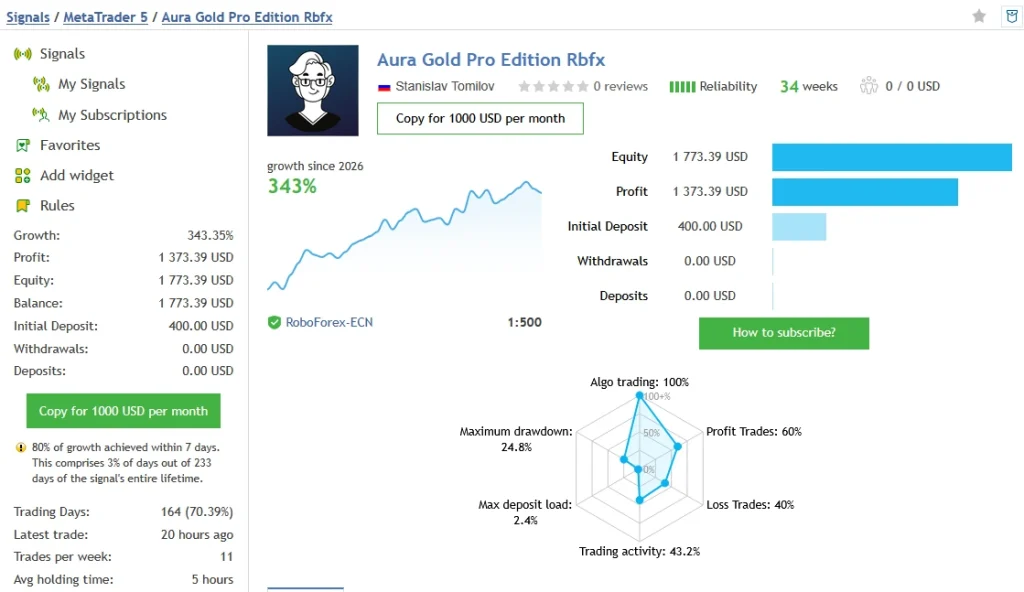
The snapshot showed $1,373.39 profit from a $400 initial deposit, with no additional deposits or withdrawals. MQL5 warned that 80% of growth occurred within seven days.
A result concentrated in a small number of days should not be presented as steady daily income.
FPMarkets
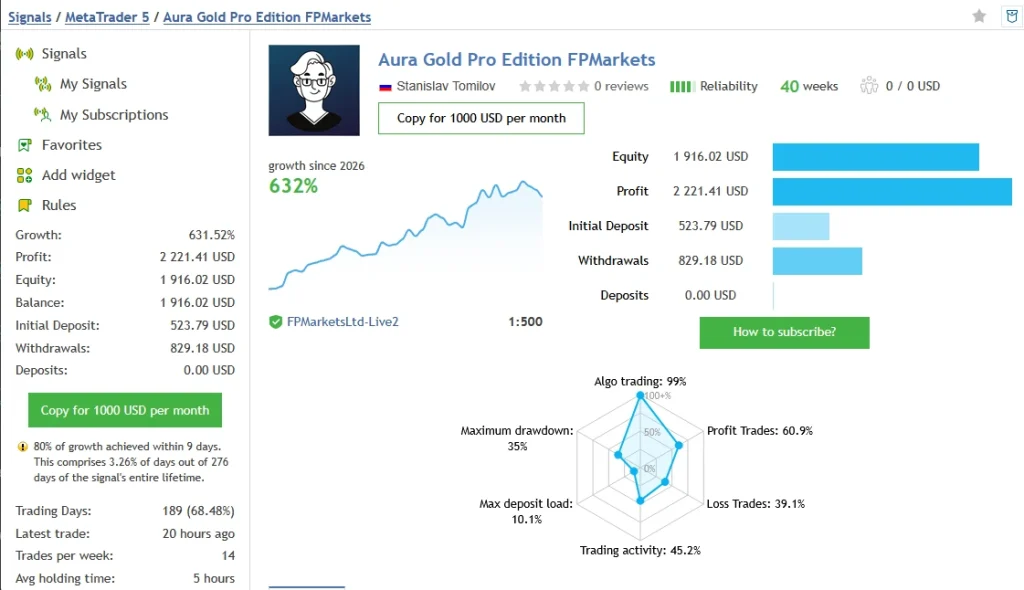
The snapshot showed $2,221.41 profit, a $523.79 initial deposit and $829.18 withdrawn, with no additional deposits. MQL5 warned that 80% of growth occurred within nine days.
The higher growth figure does not establish a more suitable configuration. Compare the losses, settings and period as well.
ICTrading-labelled record
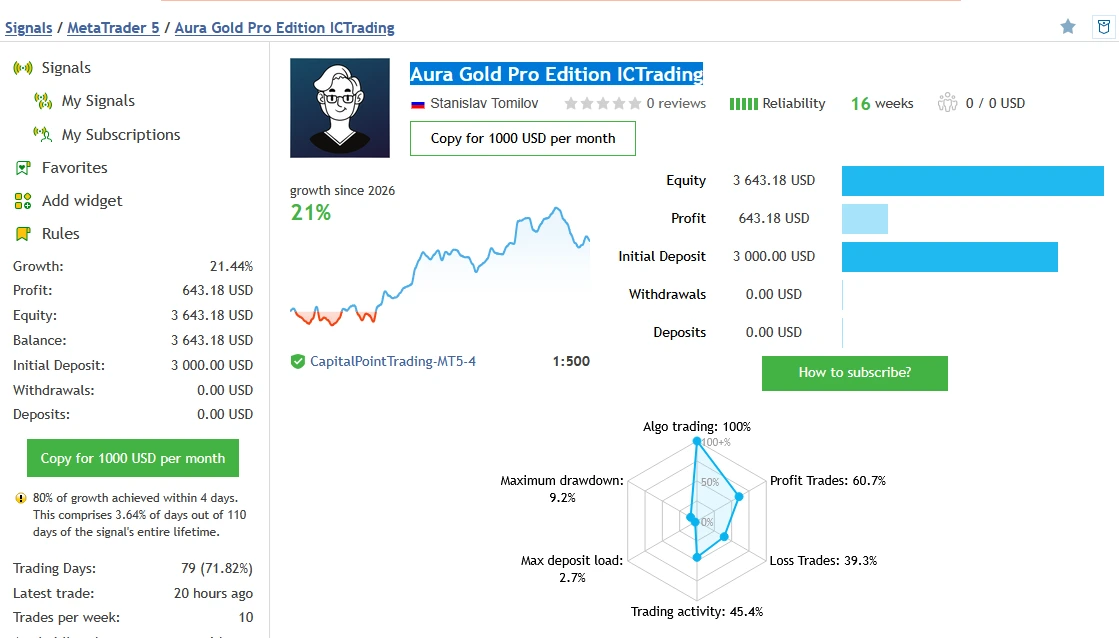
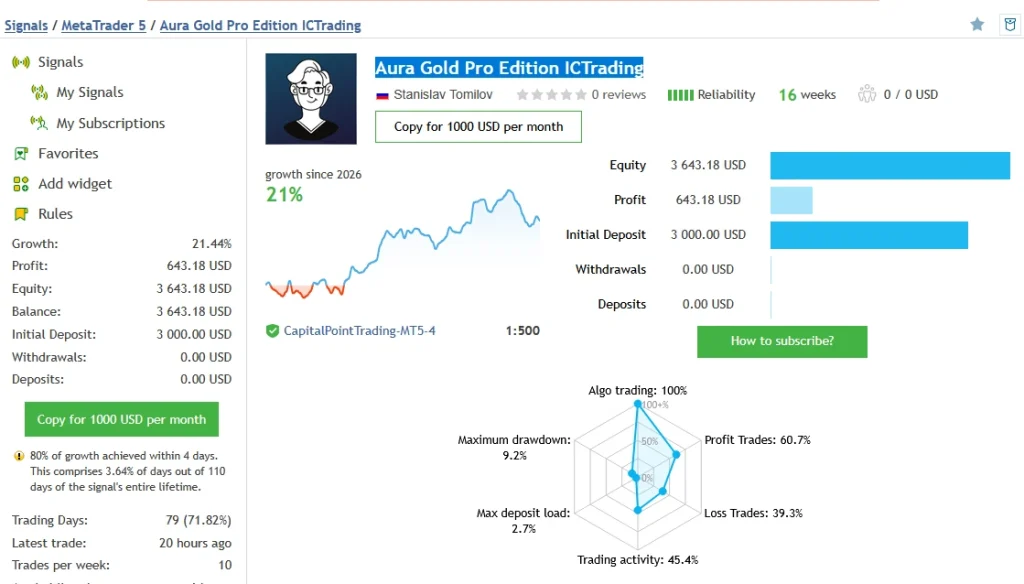
The snapshot showed $643.18 profit from a $3,000 initial deposit, without additional deposits or withdrawals. MQL5 warned that 80% of growth occurred within four days.
Its smaller growth figure does not prove lower risk for your account. Trade size, settings and history may differ.
What the records do not prove
These are third-party records, not ForexEATools trading accounts. We have not independently established continuous use of one release, a complete settings history or that the supplied package reproduces these accounts.
Displayed account history is not necessarily the duration of continuous public monitoring. Historical drawdown is not a future loss limit.
Our
drawdown guide explains why the measurement and account history matter. Refresh the original records before making a decision.
Buying an EA and subscribing to a trade-copying signal are separate services.
Settings and broker checks before trading
Review the installed file, its instructions and your broker’s specifications. Check:
- Which systems are enabled.
- How the active sizing mode calculates volume.
- Combined open risk and account-level restrictions.
- Broker symbol naming, contract size and account mode.
- Server-time configuration and session settings.
- Exit behaviour and any Friday-close option.
- Permissions and external connections actually required.
Do not enable every MT5 permission because it appears in a generic tutorial.
If a matching preset is included, follow our
MT5 SET-file guide. A SET file stores input values. It does not install the EA, activate its licence or make those values suitable for every account.
Installation in MT5
For a separately supplied EX5 package:
- Extract the package.
- Select File → Open Data Folder in the MT5 terminal you will use.
- Place the EA file in MQL5 → Experts, keeping any instructed folder structure.
- Refresh Navigator → Expert Advisors.
- Open the chart named in the release instructions.
- Attach the EA, review its inputs and complete any required activation.
- Enable trading when ready and inspect the Experts and Journal messages.
- Observe the intended configuration on demo before using real money.
Our illustrated
MT5 EA installation guide explains the platform steps. MQL5 Market purchases use the marketplace’s installation route.
Keep the terminal and its required connections running. Suitable hosting may help continuity, but it does not remove trading risk.
Can Aura Gold Pro Edition work with a prop firm?
Check the firm’s written rules for the exact account. Important differences include daily-loss calculations, floating losses, news restrictions, overnight positions and permitted software.
A product advertised as prop-firm ready does not guarantee permission or a successful challenge. An EA’s own daily-risk setting may use a different calculation or reset time from the firm’s rule.
Who may find it useful to investigate?
This EA may interest traders who want to assess several Gold-trading approaches and can review both trade-level and combined account risk.
It is a poor fit for anyone expecting a profit every day or treating stop-loss protection as a guarantee that capital cannot be lost.
Delivery, updates and setup help
Check the offer details beside the purchase button for the supplied release, files, activation, delivery and update coverage.
Our
Delivery & Downloads page explains general order access. Contact
Product Support with your order number, version and relevant error message if you have an installation issue. Never share your trading-account password.
Read the
refund policy before buying.
Frequently asked questions
Does having four strategies diversify away from Gold?
No. Different entry rules can still create exposure to the same Gold move. Review the positions together.
Does “no martingale” mean low risk?
No. Large trade sizes, simultaneous positions and execution differences can still produce substantial losses.
Will the daily-risk control close every open position?
Do not assume so. The public guide describes stopping new entries. Confirm the exact release behaviour before relying on it as an account exit.
Does a SET file include the EA?
No. A preset stores settings and needs the compatible EA installed separately. Preset inclusion depends on the offer.
Is source code included?
Do not assume it is. A compiled EX5 package is different from editable source code. Follow the stated purchase contents.
Can I use MT5 mobile to run it?
The mobile app does not run Expert Advisors. Use the desktop platform or a suitable supported hosting setup.
Are unlimited accounts and lifetime updates included?
Only if explicitly stated for this offer. Another seller’s licence and update terms do not apply automatically.
Will my trades match the linked accounts?
That cannot be promised. Version, settings, broker conditions, timing and execution may differ.
Does it guarantee profit?
No. Forex and leveraged Gold trading can result in loss of capital. Backtests, monitoring records and customer reviews do not guarantee future returns.