EA Super Trend XAUUSD MT5 automates Gold entries and trade management using a primary signal followed by a second confirmation stage. Published controls include stop loss, take profit, partial closing and trailing stops.
Review the exact release, lot sizing and account requirements before buying. Public signal results include a manually supported account and should not be treated as a promise of unattended performance.
| Item |
Current developer-published guidance |
| Platform |
MetaTrader 5 |
| Symbol |
XAUUSD / Gold |
| Chart timeframe |
M30–H1 |
| Account type |
Hedging |
| Broker conditions |
ECN / RAW recommended |
| Minimum deposit |
$1,500 |
| Recommended leverage |
1:500 |
| VPS |
Strongly recommended |
These are operating guidelines, not a guarantee that the account size or leverage is suitable for you. Match the instructions to the exact supplied release. See the
official product listing.
How does the EA work?
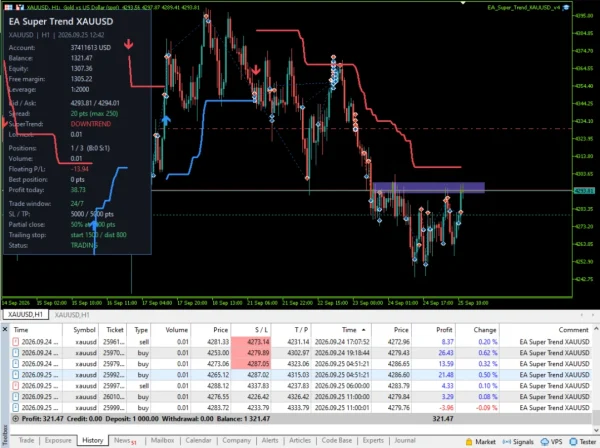
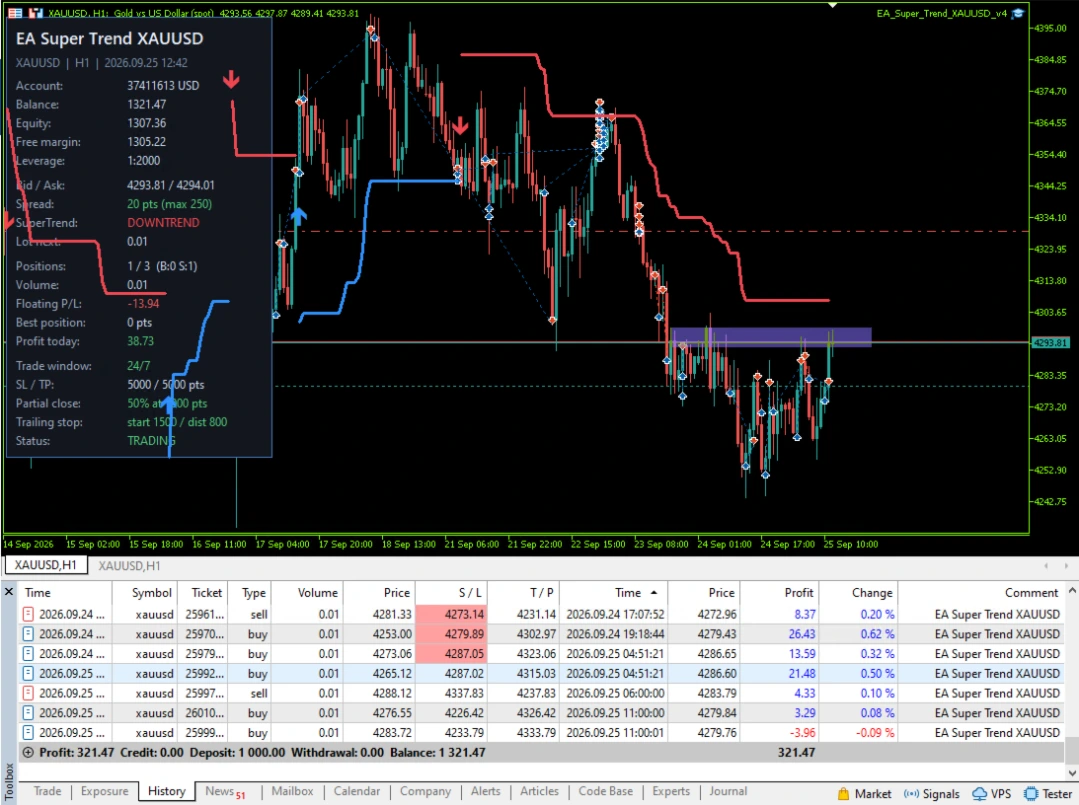
The published approach uses Synthetic Trend AI-based signals with two confirmation stages before entry. Signal analysis takes place when a new bar appears. Trade-management options include a reverse-signal exit, partial closing and trailing protection.
Two-stage confirmation can restrict when entries qualify, but it does not make a signal correct. A Gold trend can reverse, or a setup can lose before the next favourable move.
The name “AI” does not establish a disclosed model architecture, a particular accuracy rate or independent proof that the strategy will remain profitable.
Version guide: why the exact release matters
The
official update history gives an important explanation:
- v2.0, 15 October 2026: Described changes included entry filters, trading hours and news filtering.
- v2.1, 19 October 2026: A minor fix and several example account/timeframe configurations were listed.
- v3.0, 21 October 2026: The developer withdrew v2.0–v2.1 after saying they did not meet expectations, and states that v3.0 is identical to the original v1.0.
Therefore, a higher version number does not mean every v2 feature is present in v3.0. Check the actual release and matching inputs rather than combining features from different store pages.
Automatic lot sizing is not a fixed loss percentage
The published automatic mode scales trade volume with balance. That alone does not establish constant percentage risk at the stop.
The possible money loss also depends on stop distance, contract size, execution and the number of open positions. If trade size stays the same while the stop distance doubles, the planned price-movement loss approximately doubles, before costs.
Review fixed versus automatic sizing, stop distances and maximum positions together. A small lot-size number can still be too large for a small account.
Partial closing and trailing stops
Partial closing reduces part of a position at a configured profit trigger. Check the broker’s minimum volume and volume step so both the closed portion and remaining position are permitted.
Trailing controls have separate activation, distance and step settings. These affect when the stop starts moving and how closely it follows price. Tight settings can exit a trade during a small reversal; wider settings leave more profit exposed.
A trailing or break-even rule cannot guarantee the exact exit price during gaps or poor execution.
Spread and trading-time checks
The developer describes a spread limit that can apply to both opening and signal-based closing. Test how it affects reverse-signal exits when spreads widen. Do not assume every exit method behaves the same way.
Session inputs use broker server time. Compare them with the matching release instructions and check daylight-saving changes where applicable.
Public account evidence
The following snapshots were retrieved on 28 October 2026. They are external provider records, not ForexEaTools accounts or forecasts.
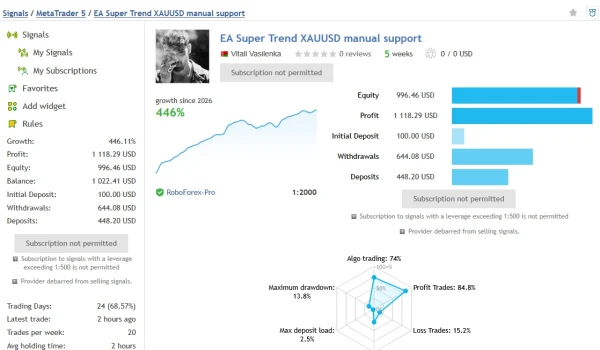
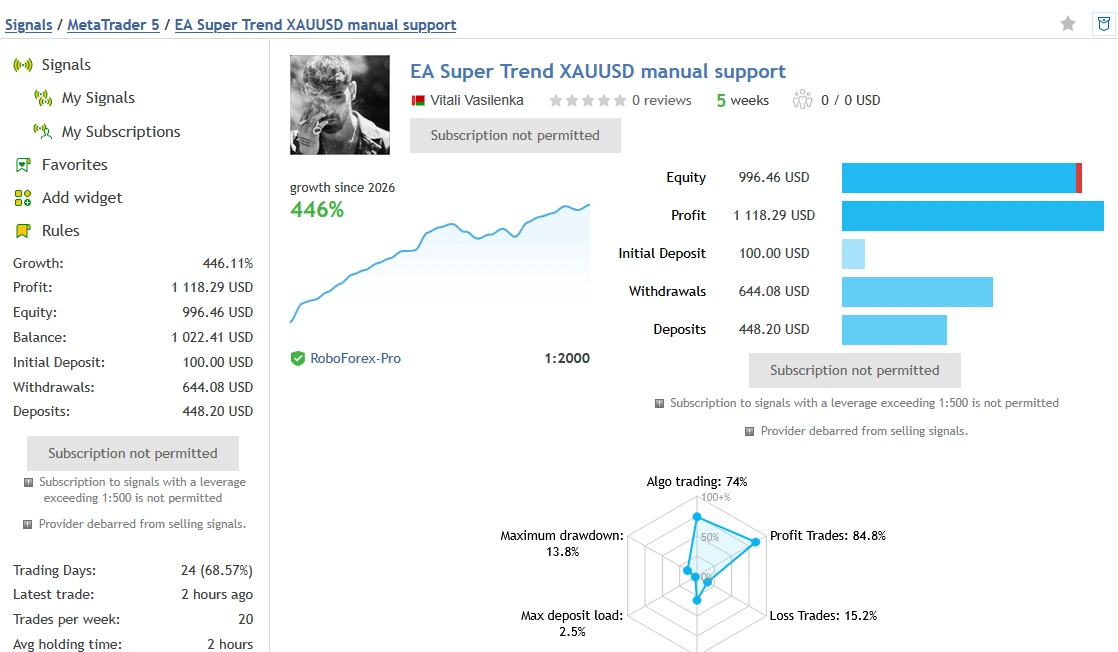
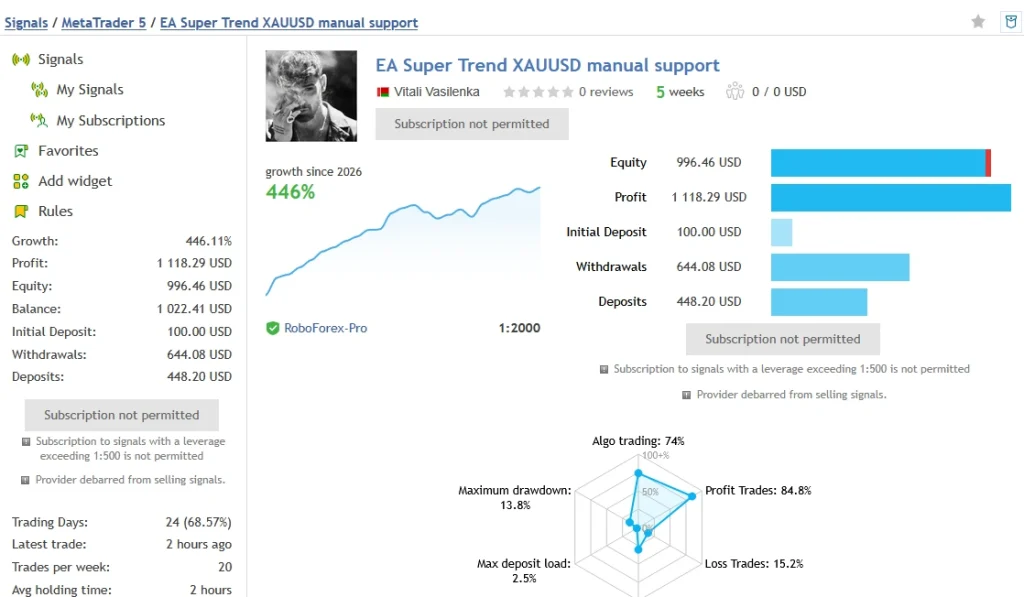
Main signal — manual support
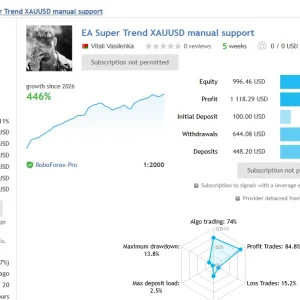
The
EA Super Trend XAUUSD manual-support signal showed
446.11% growth,
$1,118.29 profit,
231 trades and five displayed weeks. Funding includes a
$100 initial deposit,
$448.20 additional deposits and
$644.08 withdrawals.
Relative drawdown was
13.78% by balance and
12.46% by equity. The account reported
74% algorithmic trading and
1:2000 leverage. Its name and automation percentage make it unsuitable as isolated evidence of unattended EA performance.
Deposits and withdrawals also mean headline growth should not be substituted for profit divided by the initial deposit. Check the full record before comparing it with your account.
What these records mean
Compare account age, release, settings, trading intervention and losses together. Buying the EA is separate from subscribing to a signal. Both retrieved pages displayed subscription restrictions; do not assume a copy-trading subscription is included or available.
Past returns and historical drawdown do not establish future profits or a maximum future loss.
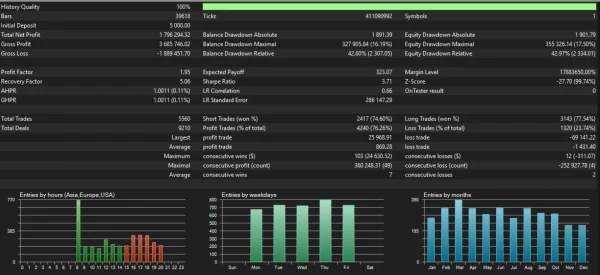
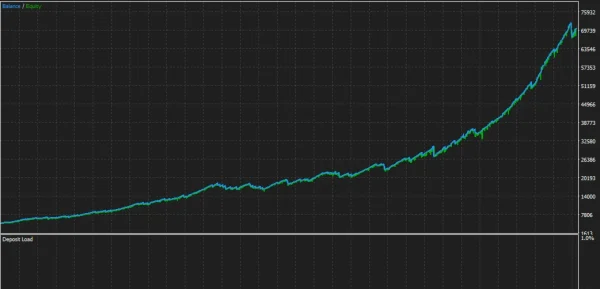
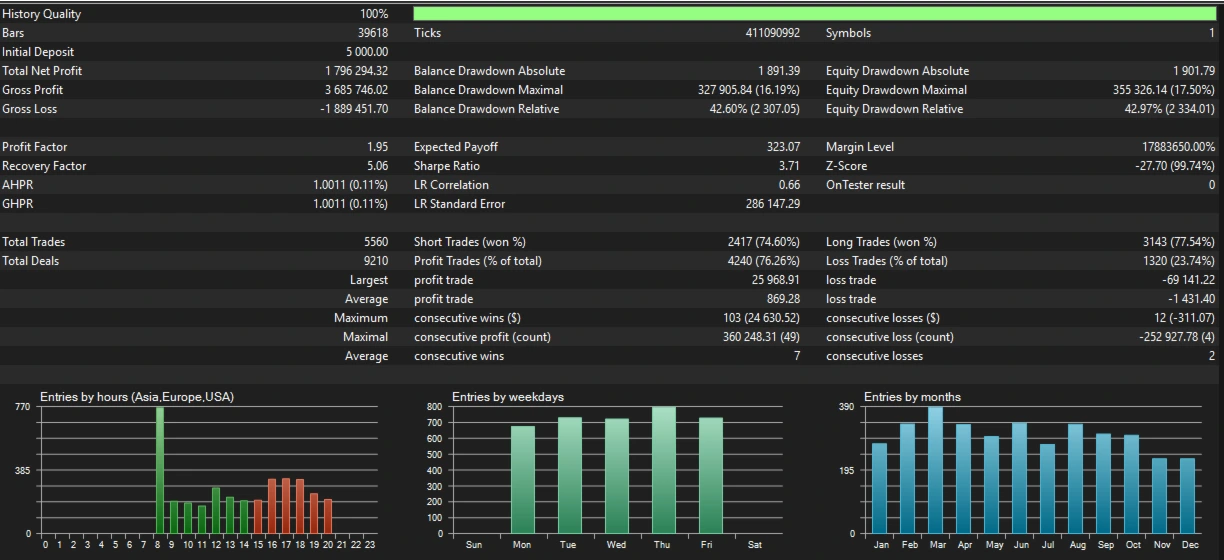
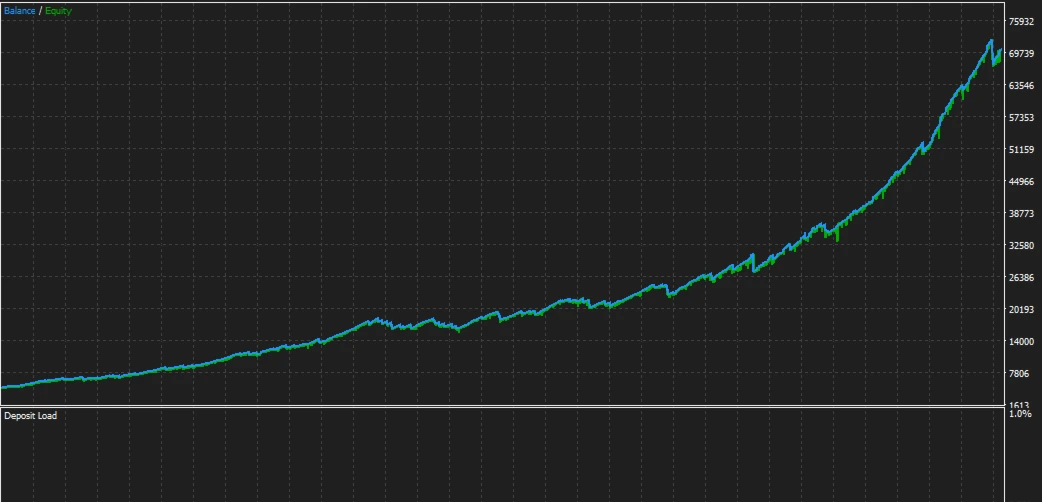
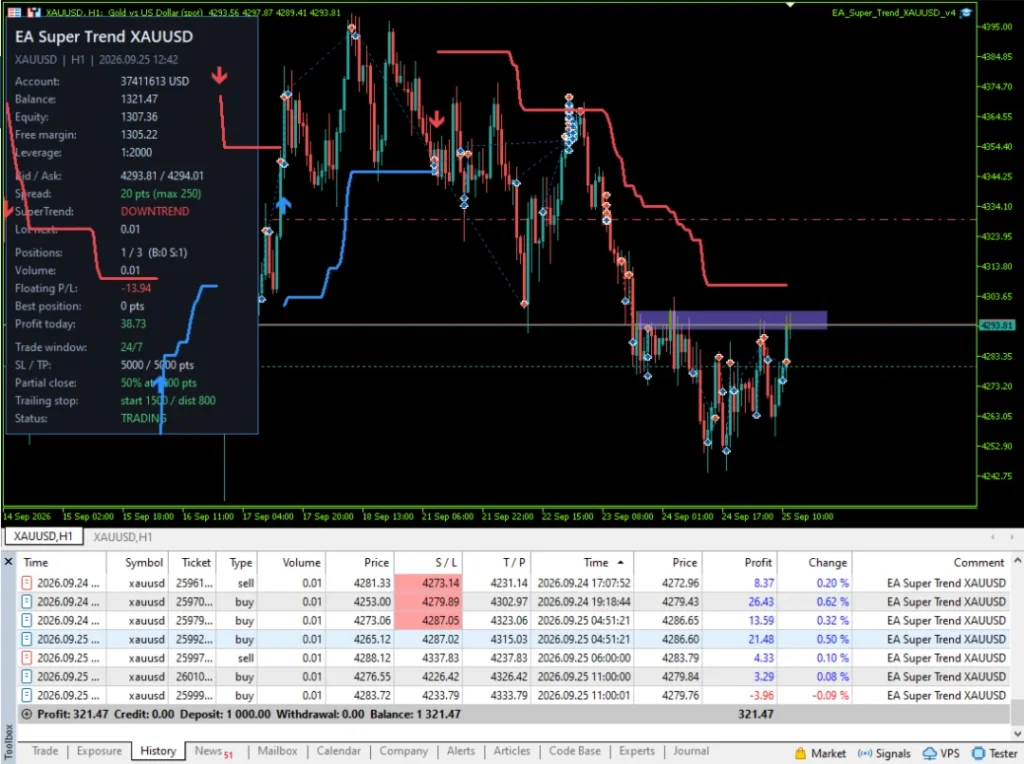
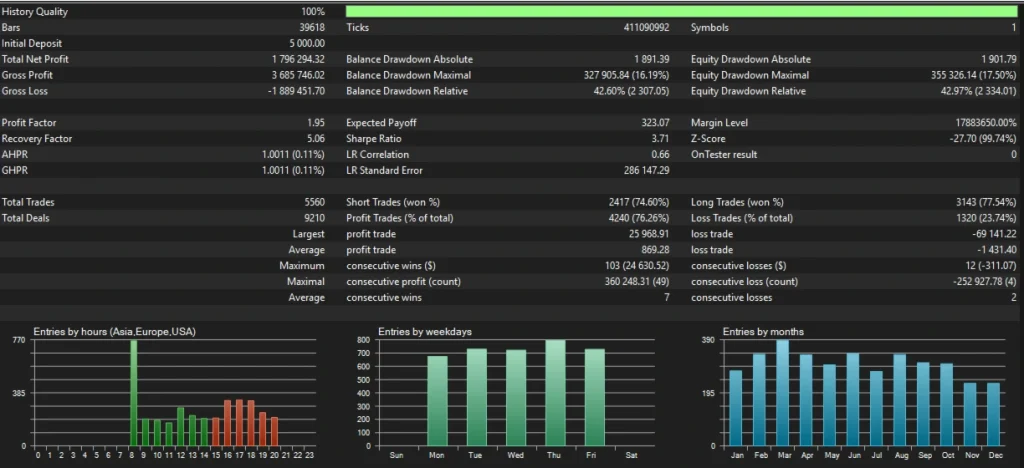
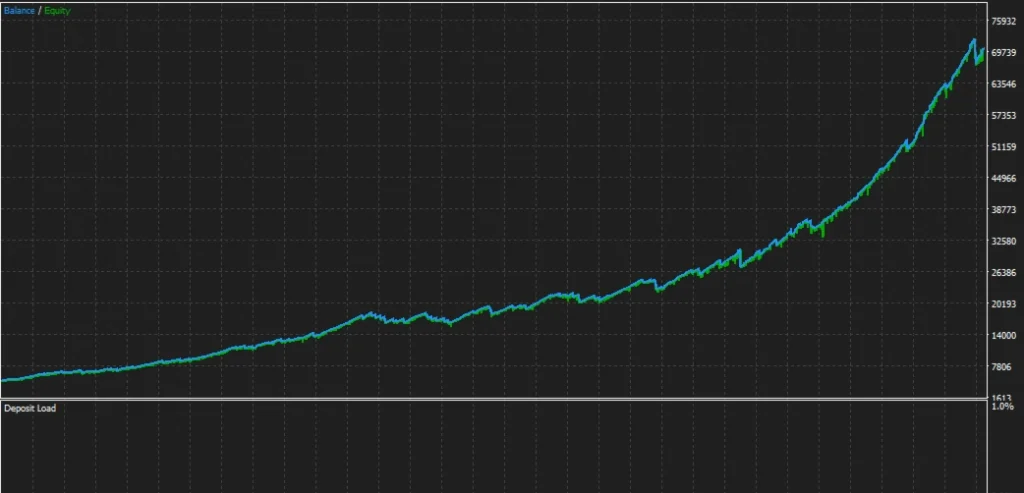
BackTest account evidence
How to install EA Super Trend in MT5
For a manually supplied file:
- Open MT5 desktop and confirm the supported account mode.
- Select File → Open Data Folder.
- Put the EA and any dependencies in the folders specified by the package instructions.
- Refresh Navigator → Expert Advisors.
- Open the supported Gold chart and timeframe for your release.
- Attach the EA and review sizing, stop levels, position limits and exit settings.
- Test on demo where permitted and check Experts and Journal for errors.
Use our
MT5 EA installation guide for the general steps. MQL5 Market purchases follow the Market installation process.
If a compatible preset is supplied, follow
how to load a SET file in MT5. A preset saves inputs; it does not install or activate the EA. SET inclusion has not been confirmed for this offer.
Delivery and downloads
After successful payment and any required order review, check your account and checkout email for file access. Check spam if the message is missing.
Our
Delivery & Downloads page explains the general process. Any product-specific activation or delivery lead time should appear with the purchase details.
Updates and setup support
Check the offer’s package details for update coverage and support. Do not assume another store’s lifetime-update promise applies to this order.
For a covered issue, contact
Product Support with your order number, EA version, MT5 build, symbol, relevant settings and exact error text. Never share your trading-account password.
Refund policy
Read our
Refund and Returns Policy before buying. Contact support about missing files, access problems or technical faults so the issue can be reviewed.
Trading losses or disappointing returns do not by themselves establish a software defect. Requests are reviewed under the published policy and applicable consumer rights.
Frequently asked questions
Which version will I receive?
Confirm the exact supplied release before ordering. The developer’s current v3.0 listing and a store’s older v2.0 title may describe different files.
Is $1,500 a guaranteed safe balance?
No. It is the main listing’s published minimum. Your actual exposure depends on settings and broker contract specifications.
Can I use a netting account?
The current main listing specifies hedging. Do not assume netting support without release-specific confirmation.
Does the EA run on MT4 or a phone?
This offer is for MT5. An MT5 EA cannot run as an MT4 program, and mobile account monitoring is not the same as running an EA in a supported trading environment.
Does the managed signal show what my unattended EA will earn?
No. Manual intervention, release changes, sizing and broker conditions can affect results. The managed account does not isolate unattended performance.
Does it use grid or martingale?
The developer’s profile describes no grid, martingale or averaging down. That is a published claim, not an audit of the supplied binary. Also check maximum positions and total exposure: several positions do not automatically establish a grid, but can still increase risk.