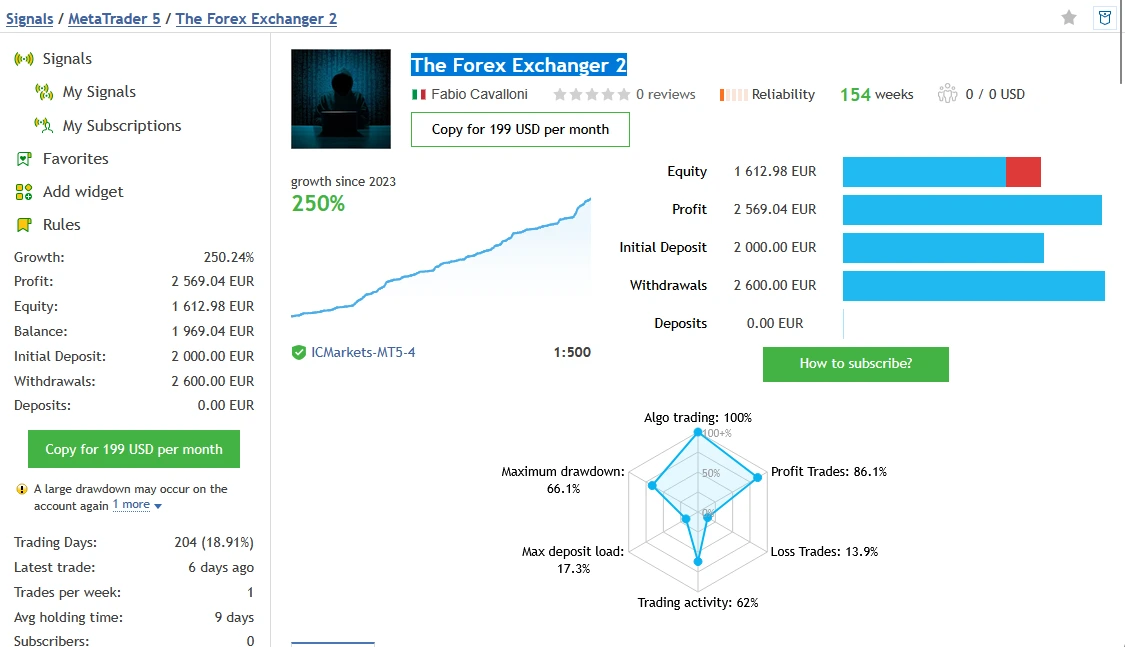
The Forex Exchanger MT5 v1.44 is a multi-currency Expert Advisor with grid and basket management. It can trade up to 28 forex pairs, with options to choose individual symbols.
Review the settings and public account records before buying. Adding positions to a losing basket can increase losses, and the published accounts have experienced deep equity drawdowns.
| Detail |
Published information |
| Platform |
MetaTrader 5 |
| Version |
1.44 |
| Market coverage |
Up to 28 forex pairs; custom selection available |
| Approach |
Overbought/oversold entries with grid additions |
| v1.44 change |
Fixed-lot option added |
Source:
official product details and
version history.
How does The Forex Exchanger work?
Developer Fabio Cavalloni describes looking for currencies that appear heavily bought or sold, then waiting for price strength in the intended direction.
When a position moves against the system, it can add entries to change the basket’s average price. This increases exposure. A later recovery may help the basket, but there is no certainty that recovery will arrive before losses become too large.
The
developer’s strategy explanation gives more background. Its claim that currency markets must reverse should not be treated as a promise that your account can survive the wait.
For example, opening another trade does not remove the first trade’s loss. It adds another position that can also lose money.
What changed in version 1.44?
The update dated 15 July 2023 added fixed-lot sizing. Its default value of zero keeps the earlier risk-factor method.
Version 1.43 had added the ability to enter “current” in Symbols custom to use the attached chart’s symbol.
Check your inputs after loading any preset. Fixed lots do not fix the total account risk when several positions can remain open.
See the
official update history.
Settings that need attention
The published controls include symbol prefixes and suffixes, basket-entry settings and currency exposure limits. Stopping new entries on a symbol is different from stopping additions to an existing basket.
The documentation also lists Stop threshold and Hard stop loss %. Zero disables their respective forced-close functions. Read the exact input descriptions before using them.
Do not assume a software exit guarantees an exact loss limit. Order execution, gaps and connection problems can affect the final result.
Public trading accounts: check growth and open losses together
The developer links two MQL5 signals. These are account records, rather than a promise about what a newly purchased file will earn.
The figures below were visible during our 29 October 2026 review. They can change. Historical trades may span different settings and software releases.
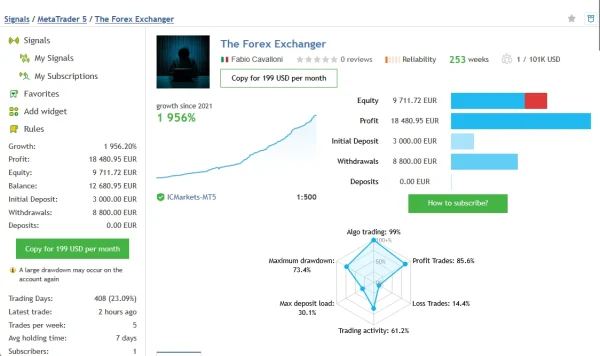
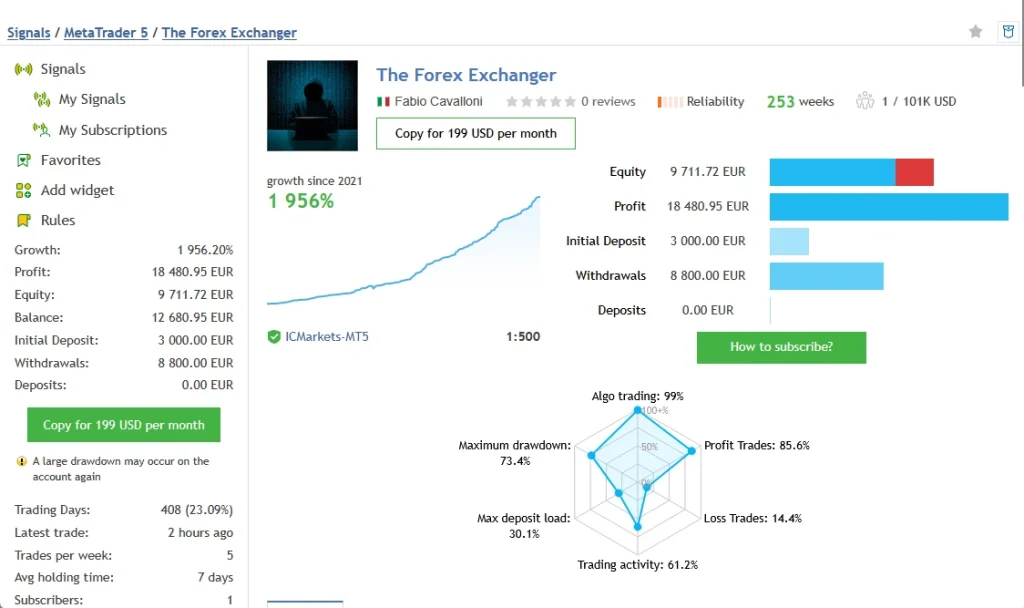
Main account — The Forex Exchanger
The
main MQL5 signal displayed growth of
1,950.60% and profit of
€18,449.19, across
897 trades. It reported an initial deposit of €3,000, withdrawals of €8,800 and no additional deposits.
However, its historical
relative equity drawdown was 73.37%, compared with relative balance drawdown of 11.81%. The displayed equity of €10,997.89 was also below the balance of €12,649.19.
That gap matters: balance counts closed results, while equity includes open profits and losses. The signal carried a warning that a large drawdown could happen again.
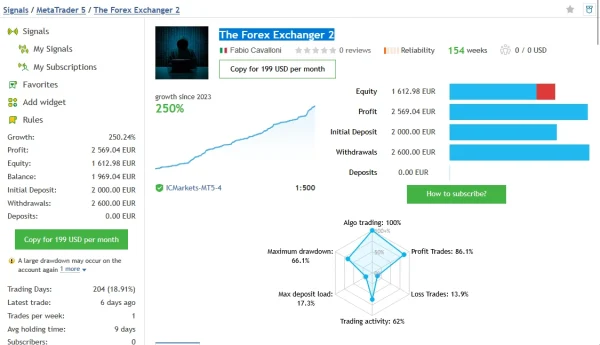
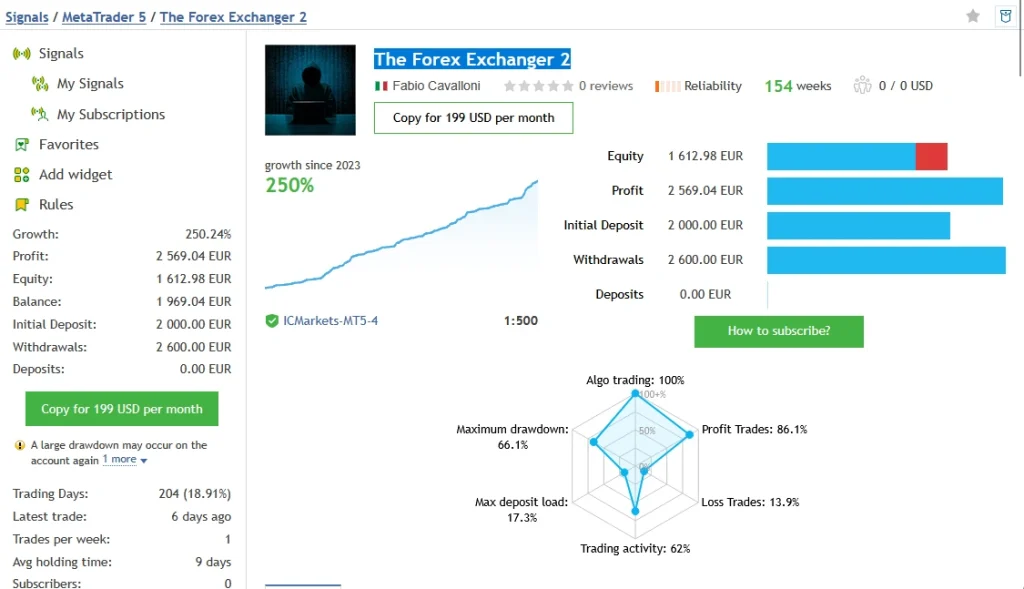
Second account — The Forex Exchanger 2
The
second MQL5 signal displayed
250.24% growth,
€2,569.04 profit and
381 trades. Its initial deposit was €2,000, withdrawals were €2,600 and there were no additional deposits.
Historical
relative equity drawdown reached 66.08%, while relative balance drawdown was 6.70%. Displayed equity was €1,668.96 against a balance of €1,969.04.
This account also carried a large-drawdown warning. Its results show why closed profits alone are not enough to judge the risk.
What do these records mean for a buyer?
Both records include substantial past growth and substantial past equity losses. Neither establishes a safe setting for your account.
A hypothetical 70% loss leaves €300 from €1,000. Recovering from €300 to €1,000 would require about 233% growth, before costs. This example explains the scale of a loss; it is not a forecast for this EA.
Check the current equity chart, open positions, withdrawals and risk settings directly on each signal. Do not combine both accounts into one return figure.
Which timeframe and minimum deposit should you use?
Some reseller pages suggest M30. Their funding guidance differs: ForexEAshop lists $500, while SimpleForexTools recommends $1,000. These are reseller statements, not a universal safe starting balance.
The official inputs also describe filters using different timeframes. A chart label alone does not explain the full analysis.
Use instructions that match your actual v1.44 file and preset. Before funding, test the planned symbol list, minimum lot size, leverage and margin requirements on your broker’s demo account.
A larger deposit does not automatically make an aggressive configuration suitable. The number and size of simultaneous positions still matter.
How to install and test it in MT5
- Open MT5 and select File → Open Data Folder.
- Put your supplied EA file in MQL5 → Experts.
- Refresh Navigator → Expert Advisors, or restart MT5.
- Attach the EA using the instructions supplied with your release.
- Review symbols, lot sizing, entry limits and exit settings.
- Enable algorithmic trading on a demo account when ready.
- Check the Experts and Journal tabs for errors.
Our
MT5 EA installation guide explains the process with more detail.
If you use a compatible preset, follow our
guide to loading a SET file in MT5. A SET file changes inputs; it does not install the EA or guarantee suitable risk.
Avoid attaching duplicate instances without understanding how their trade identifiers and symbol lists interact.
Delivery, updates and setup help
Read our
Delivery & Downloads page for general order-access instructions. Check your checkout email and account downloads after payment and any required order review.
For an installation issue, contact
Product Support with your order number, EA version, MT5 build and the relevant error message. Never send your trading-account password.
Check the offer details before buying for included files, activation requirements and update coverage.
Refund policy
Please read our
Refund Policy before ordering.
A file that cannot run because of a reproducible technical fault is different from an EA that runs but makes losing trades. Trading losses do not, by themselves, show that the software is defective. Your applicable legal rights still apply.
Common questions
Is this a low-drawdown EA?
The two published accounts have experienced relative equity drawdowns above 66%. Treat those records as evidence of substantial historical risk.
Does it use grid trading?
Yes. The published inputs describe adding positions to existing baskets. Review the total exposure, rather than looking only at the size of the first trade.
Is fixed-lot sizing safer than automatic sizing?
It gives you a specified trade size, but several fixed-size trades can still create a large combined position. Test the whole basket behaviour.
Can I use it with a prop firm?
Check the firm’s current rules and test the exact configuration. An available loss-control input does not establish that an EA will meet daily-loss, total-loss or strategy rules.
Does it guarantee a monthly return?
No. The public signals show past account outcomes. Your broker, costs, settings and start date can produce different results, including losses.
Are SET files included?
Check the purchase details for this offer. Only use presets supplied or confirmed for your release.
Risk notice: Forex trading can cause substantial losses. Grid additions can increase exposure during an adverse move. Test first and use only money you can afford to lose.