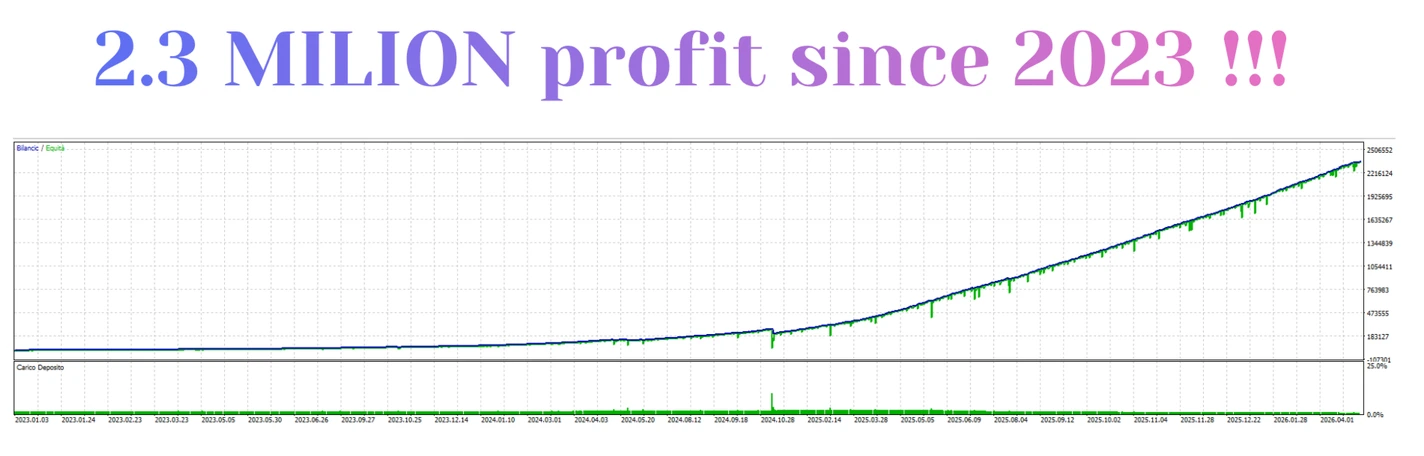
Institutional XAUUSD MT5 v25 is an automated gold-trading Expert Advisor. Its published approach combines trend direction and time filters with Stop Loss, Take Profit and trailing management.
Review the setup, exact release and public account evidence before buying. A no-grid strategy can still experience substantial losses, and a small trading sample does not establish long-term performance.
| Detail |
Developer-published guidance |
| Platform |
MetaTrader 5 |
| Market |
XAUUSD — gold against the US dollar |
| Chart |
H1 |
| Stated minimum deposit |
$150 / €150 |
| Account modes |
Hedging or netting |
| Published approach |
Trend direction with seasonal/time filtering |
| Trade management |
Stop Loss, Take Profit and trailing stop |
| Grid / martingale |
Developer states neither is used |
Source:
official Institutional XAUUSD listing. These are published specifications, rather than a test of your broker or a guarantee that a given balance is sufficient.
What is included in this offer?
| Purchase detail |
This offer |
| Product |
Institutional XAUUSD |
| Platform |
MetaTrader 5 |
| Supplied version label |
v25 |
Review the file list and purchase terms before ordering, including activation, dependencies and any included presets.
How does Institutional XAUUSD work?
The published design looks for recurring gold price behaviour and a preferred trade direction. Its time filter restricts entries according to programmed conditions.
A filter can stop some trades, but it cannot know which future trades will win. A strategy based on past patterns can perform differently when market conditions change.
The
published strategy overview describes predefined exits rather than grid or martingale recovery. Those are developer statements, not an independent inspection of the supplied program.
“Institutional” is the product name. It does not establish access to private bank orders or guarantee professional trading results.
H1 or M15: which chart should you use?
Use
H1 as the published developer starting point. Some reseller pages also mention M15; that does not prove the same configuration is suitable on both charts.
Match the chart and inputs to the file you actually receive. A preset intended for one timeframe should not be applied to another without checking its instructions.
Important first-start instruction
The developer says to attach and initialize the EA while the
XAUUSD market is closed, such as the broker’s daily break or weekend closure.
Follow the matching release instructions and check the logs after initialization. This is a startup instruction, not a promise that live trades will match a signal exactly.
Check your broker’s gold trading hours rather than assuming every broker uses the same break.
What does the $150 / €150 minimum mean?
It is a published starting figure, not a safe-capital guarantee.
Actual exposure depends on the lot size, stop distance, broker contract size and margin requirements. A small balance may be unable to use the intended risk level because the broker enforces a minimum lot.
For example, if the smallest permitted trade risks more money than your chosen limit, increasing the percentage label does not solve that problem. Check the actual volume and possible money loss before enabling trading.
Stops and trailing protection
A Stop Loss is intended to limit a trade’s loss. A Take Profit sets a planned target. A trailing stop changes the exit level as price moves favourably, according to the EA’s rules.
None guarantees the exact final exit price. Gaps, slippage and execution conditions can produce a different result.
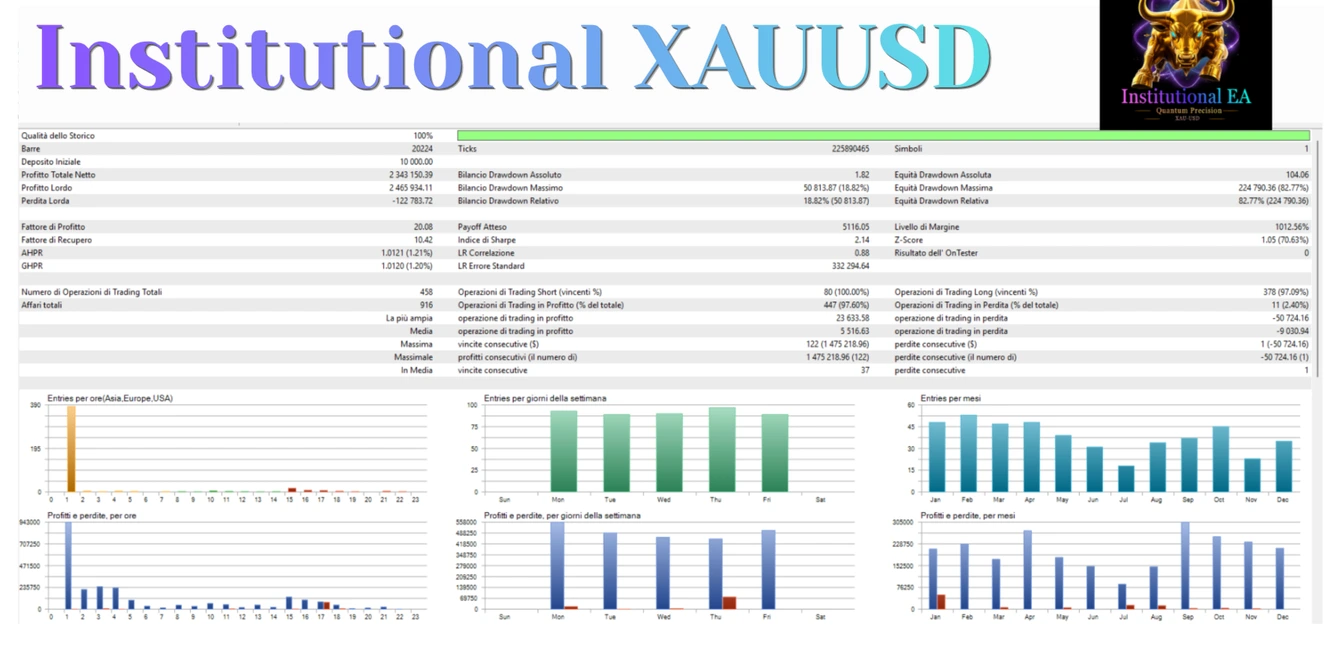
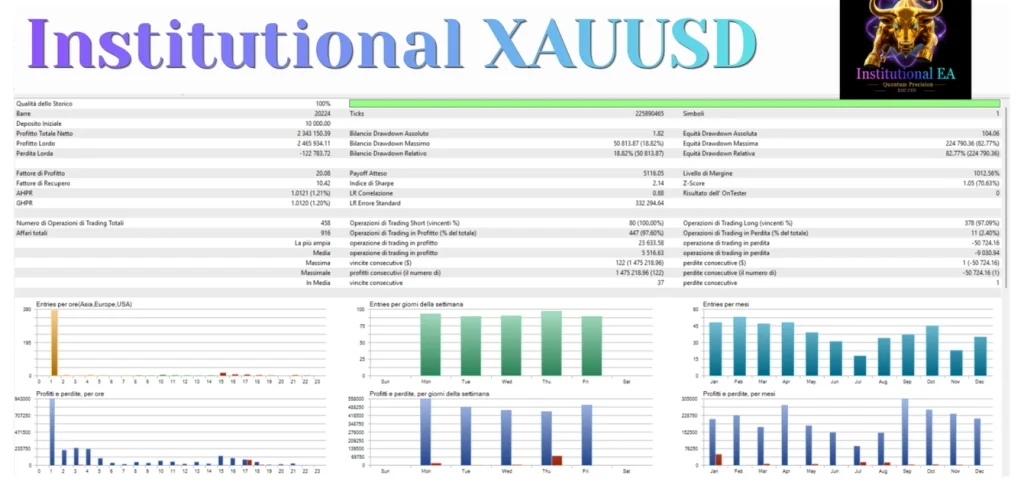
Do not judge risk only by how many trades close in profit. Check open losses, equity and the size of losing trades as well.
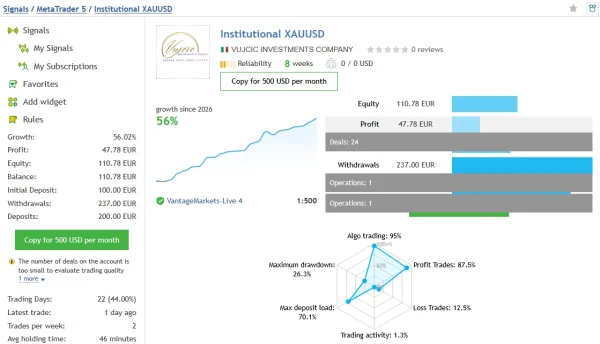
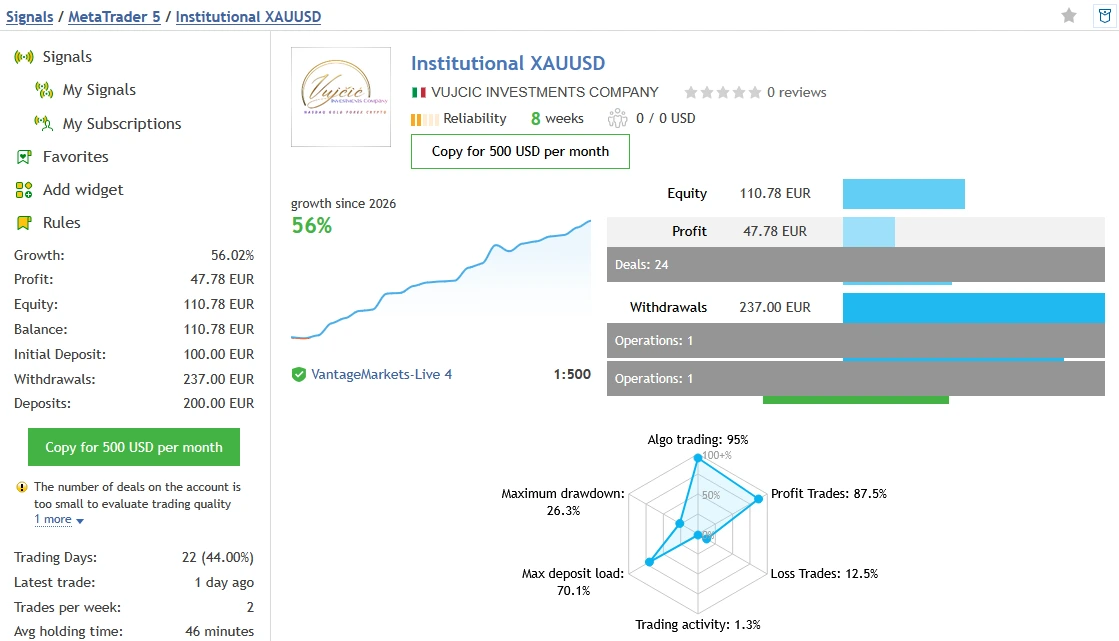
Public account evidence: Institutional XAUUSD
The developer links to the
Institutional XAUUSD MQL5 signal.
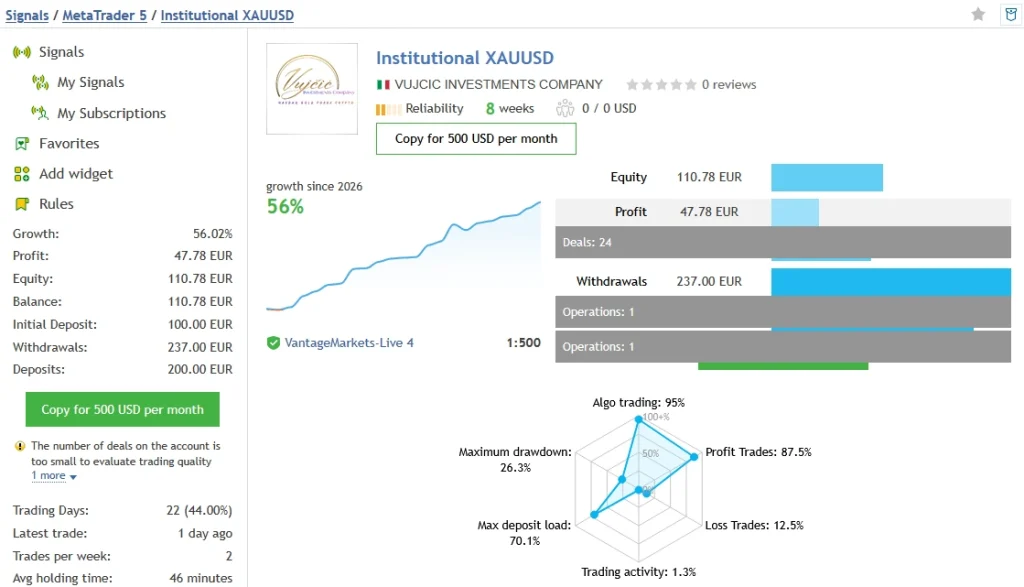
During our
31 October 2026 review, it displayed
52.82% growth,
€45.51 profit and
23 trades. The account showed a €100 initial deposit, €200 in additional deposits and €237 in withdrawals, leaving €108.51 balance and equity.
It reported
26.32% relative equity drawdown, compared with
2.00% relative balance drawdown. Maximum deposit load was
70.11%. Its description labelled the setup
“Very high risk.”
The platform warned that the account was new and that too few trades were available to assess trading quality. It reported 95% algo trading, which does not establish a completely unattended record.
What this means for a buyer
The percentage growth is not the same measure as money profit. Deposits and withdrawals also matter when reading an account’s history.
The equity drawdown is materially larger than the relative balance figure. Closed results alone would therefore give an incomplete view of the losses experienced while trades were open.
This short, high-risk account record does not establish a safe setting or prove what your supplied v25 file will earn. Open the
current signal page to review changes before relying on the snapshot.
Version note: v25 and v25.10
This offer uses the supplied label
v25. The official listing showed
v25.10, updated
19 September 2026, during this review.
Do not assume the labels identify exactly the same release. Check the version shown by the actual EA and use the corresponding instructions.
We could not retrieve the complete update history, so we are not claiming particular changes between these releases.
Cent accounts, gold symbols and DLL requirements
Broker symbols can have different price digits, contract sizes and minimum lots. A symbol such as XAUUSDm should not be treated as interchangeable with another broker’s XAUUSD.
Some listings describe point-value adjustments for three-digit gold quotes. Check the exact release instructions; do not multiply every setting or lot size by ten simply because an account is called “cent.”
Several sellers list a DLL-based package. Verify the requirements of this offer’s actual files before choosing hosting.
MetaTrader’s built-in virtual hosting forbids DLL calls. If your package requires them, use a compatible environment and follow its setup instructions. See
MetaTrader’s hosting rules.
How to install Institutional XAUUSD in MT5
- Open MT5 and select File → Open Data Folder.
- Put the supplied EA program in MQL5 → Experts.
- Place any supporting files as directed by the package instructions.
- Refresh Navigator → Expert Advisors, or restart MT5.
- Open the correct gold H1 chart and observe the market-closed startup instruction.
- Attach the EA and review the inputs and required permissions.
- Load a matching preset only if you have one for this release.
- Start on a demo account and check the Experts and Journal tabs.
Our
MT5 EA installation guide explains file placement and common setup problems.
If you use a preset, follow our
guide to loading a SET file in MT5. A SET file changes inputs; it does not install the robot, activate a licence or guarantee suitable risk.
Why might it not open trades immediately?
An absence of trades does not automatically mean installation failed. The EA may be waiting for its entry conditions.
Check initialization messages, symbol compatibility, account connection, trading permission and the required chart. Do not keep increasing risk or changing timeframes simply to force a trade.
Record the exact log message if there is a problem.
Delivery, updates and support
Read our
Delivery & Downloads page for general order access. After payment and any required order review, check your account downloads and checkout email, including spam.
For installation help, contact
Product Support with your order number, EA version, MT5 build, broker symbol and exact error message. Never share your trading password.
Review the offer terms for update coverage, activation requirements and the delivered file list.
Refund policy
Please read our
Refund Policy before buying.
A reproducible technical fault is different from a robot that runs but makes losing trades. Trading losses do not, by themselves, establish a software defect. Your applicable legal rights remain in place.
Frequently asked questions
Does it use grid or martingale?
The developer states that neither is used. That does not make the strategy risk-free; check trade sizes, exits and behaviour on your actual configuration.
Can I use it on BTCUSD or forex pairs?
The published setup is exclusively for XAUUSD gold. Do not assume support for other instruments.
Is this Institutional SMC Robot?
No. Institutional XAUUSD and Institutional SMC Robot are separate product listings. Do not interchange their files or instructions.
Are SET files included?
Check this offer’s file list before purchasing. Use only presets confirmed for the supplied release.
Can I run it on a prop-firm account?
Check the firm’s current rules and test the exact configuration. No-grid logic and available stops do not establish compliance with daily-loss, total-loss or strategy rules.
Does a high win rate mean the EA is safe?
No. A small number of large losses or substantial floating losses can matter more than the percentage of winning trades.
Can I run it on MT4?
This package is for MetaTrader 5. MT5 programs do not run on MT4.
Trading risk: Leveraged gold trading can cause substantial losses. Automated execution, time filters and stops do not guarantee profits. Test the exact file and configuration before considering live use.