What is AI Fusion Combo MT5?
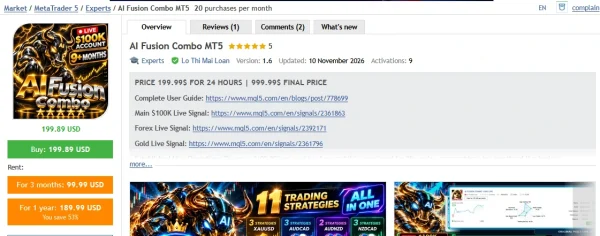
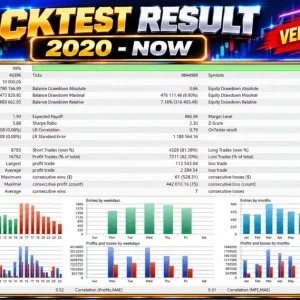
AI Fusion Combo is an Expert Advisor for MetaTrader 5. It combines selectable trading modules with an adaptive layer that reviews completed results and can adjust exposure within your settings. Processing runs locally, without an external AI API subscription.
This can make running several markets easier to organise. It does not mean the software can predict prices or avoid losing trades. The exact entry rules are not fully disclosed.
Setup and account requirements
| Setup item |
Published guidance |
| Platform |
MetaTrader 5 desktop |
| Markets |
XAUUSD, AUDCAD, AUDNZD and NZDCAD |
| Host chart |
One chart; XAUUSD M15 recommended for monitoring |
| Full portfolio account |
Hedging required for the Forex baskets |
| Netting account |
Forex engines disabled; Gold can operate separately |
| Suggested initial configuration |
Balanced profile and AI Mode Auto, tested on demo |
| Minimum deposit |
No universal balance specified |
| Broker connection |
Needed for trading, even though AI processing is local |
The host chart is where you attach the EA. It is not a claim that every strategy analyses only 15-minute candles or closes trades within 15 minutes.
Before choosing your starting balance, check the broker’s contract sizes, smallest trade size, leverage and margin. Leave room for several positions to remain open together. A deposit used by another account does not establish a suitable minimum for yours.
Basket risk: what should you understand?
A basket means several trades are managed as a group. Smaller individual positions can still add up to a large total exposure. AUDCAD, AUDNZD and NZDCAD also share currencies; trading different symbols does not make their risks unrelated.
The developer lists optional progressive lot sizing, or martingale, as disabled by default and in supplied presets. Leaving it off does not remove the underlying multi-position basket approach.
Read our guide to
grid, martingale and breakout EAs if these terms are new to you. Understand how additional positions change your risk before enabling a strategy.
Stopping new trades is different from closing existing trades
The manual lists a separate option to close all EA trades after a safety trigger; its suggested starting value is false. A trigger can therefore block new entries while current positions remain open.
It also explains that a maximum DCA-lot setting applies to progressive sizing, not every normal entry. Do not assume that one limit caps all account exposure. Read each setting’s scope and test what happens when a trigger is reached.
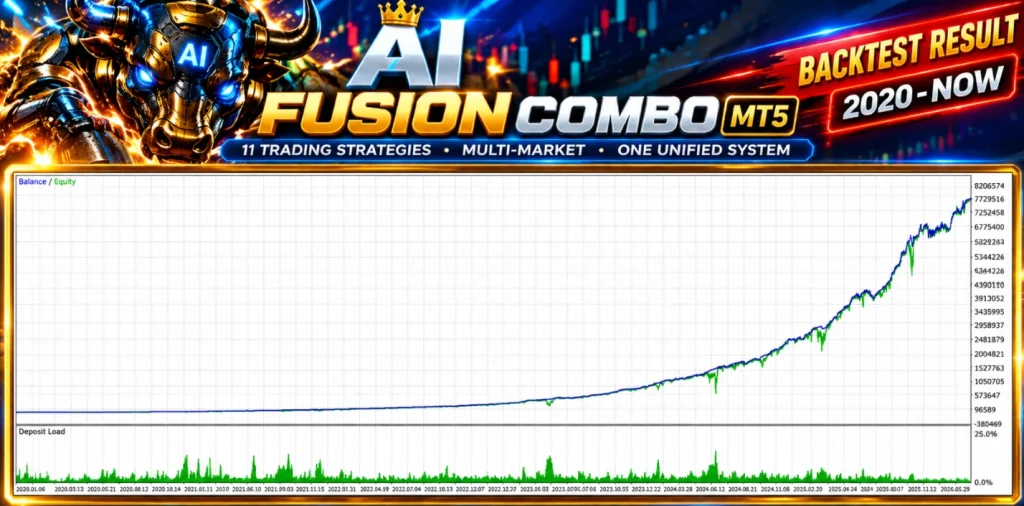
AI Fusion Combo live results: three separate accounts
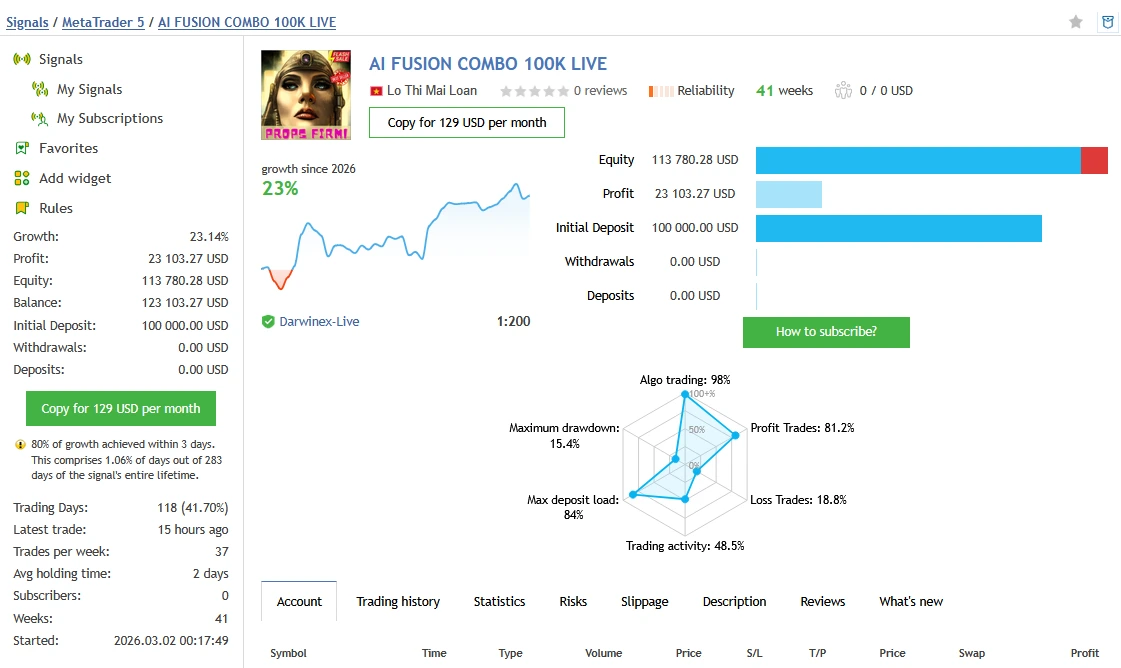
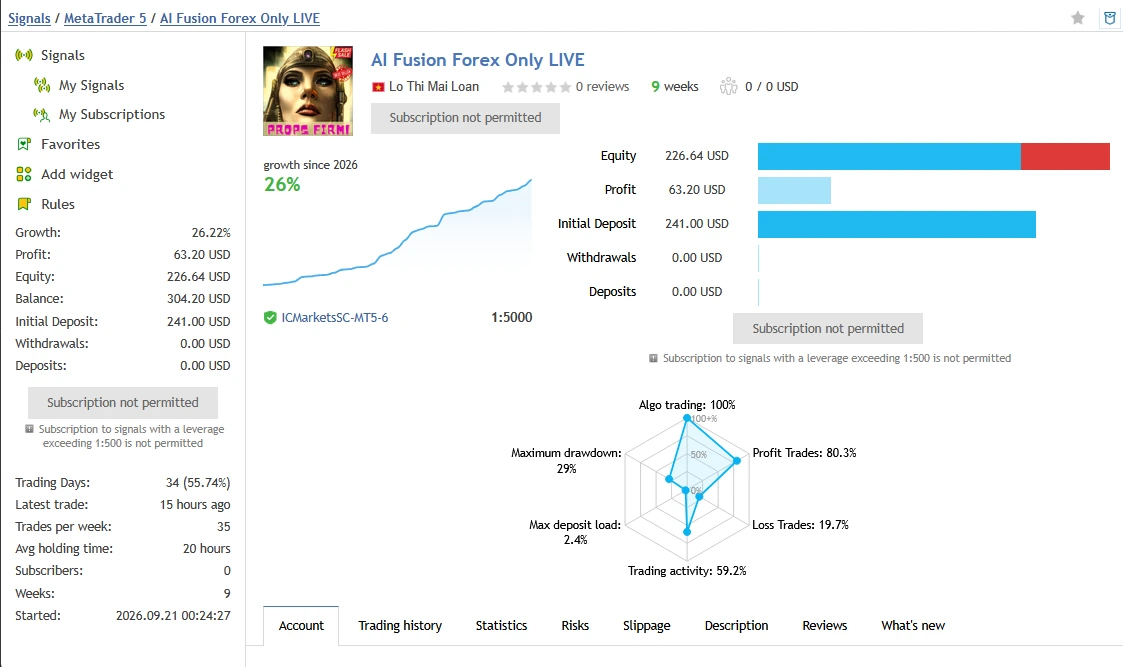
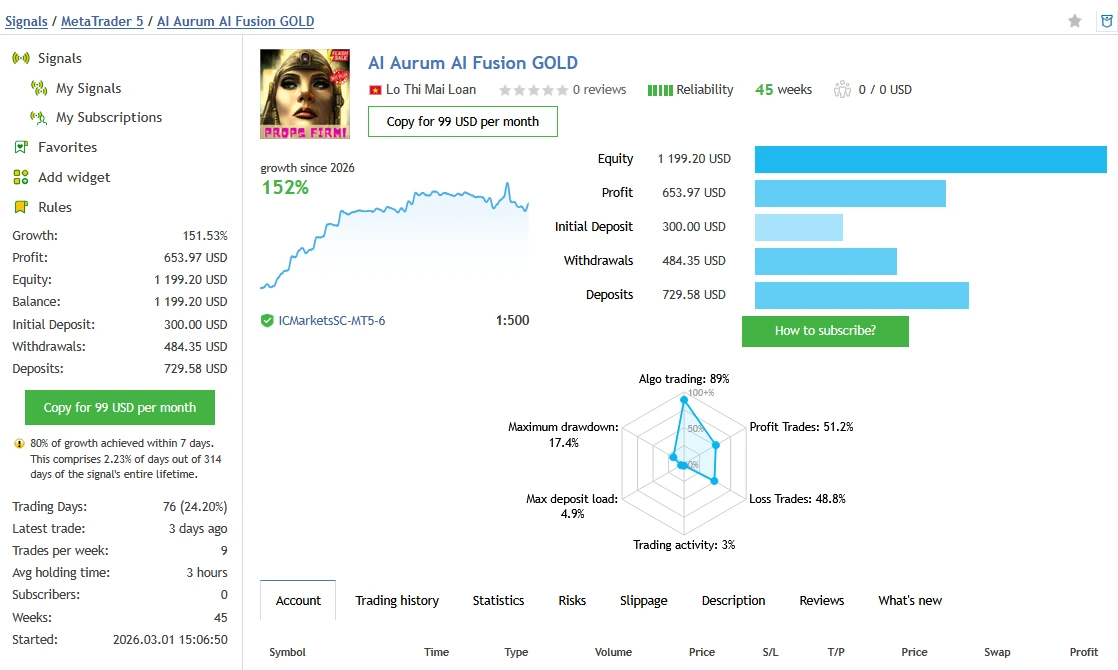
Snapshot checked 21 November 2026. These records have different balances, histories and configurations. They are not three identical tests of the file supplied by ForexEaTools.
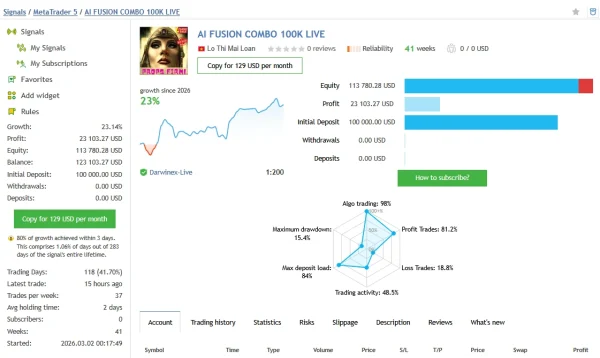
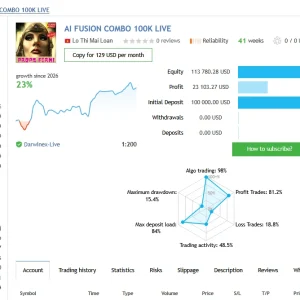
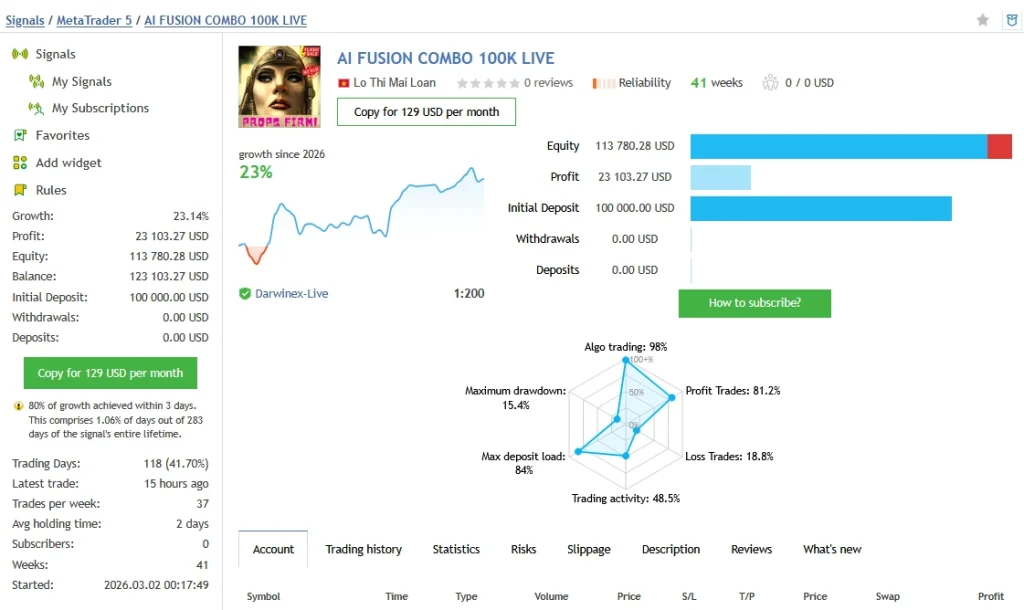
Combined portfolio — AI FUSION COMBO 100K LIVE
The
combined portfolio account showed
23.14% growth,
$23,103.27 profit and
452 trades, with
41 weeks displayed. Its initial deposit was
$100,000.
Relative drawdown was
9.93% by balance and
15.35% by equity. Balance was
$123,103.27, while equity was
$113,780.28—a
$9,322.99 gap at the check. The page also reported
84.05% maximum deposit load and warned that 80% of growth occurred within three days.
That gap matters because closed-trade gains do not tell you the full account position while trades remain open. Deposit load measures margin use; it is not another name for drawdown.
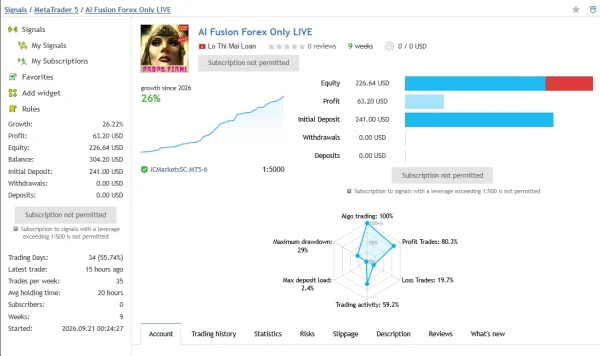
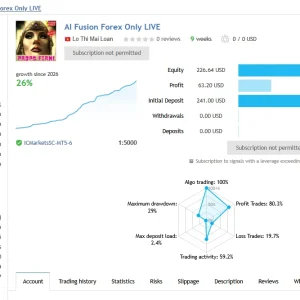
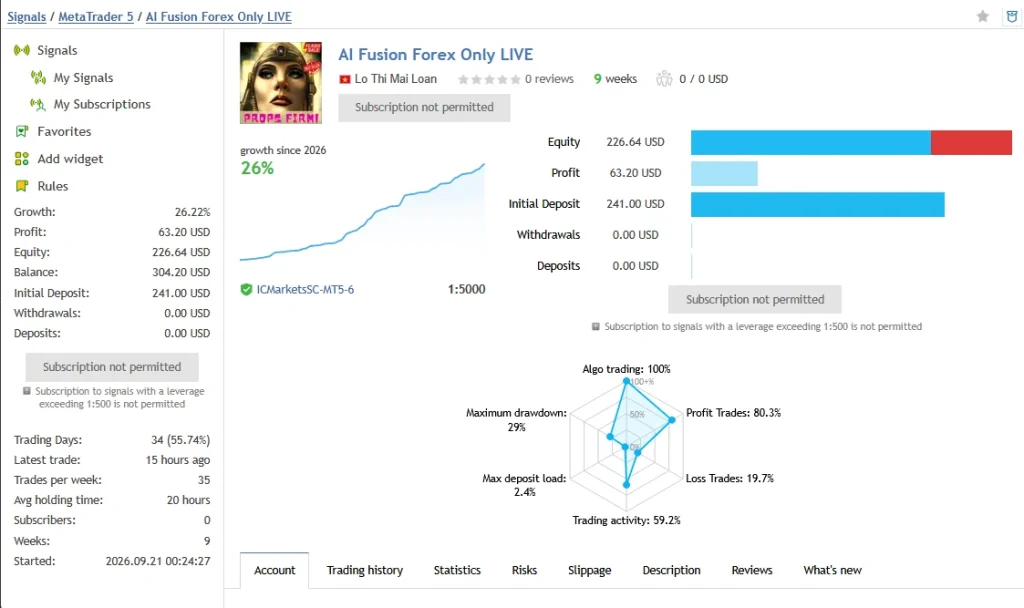
Forex-only portfolio — AI Fusion Forex Only LIVE
The
Forex-only account showed
26.22% growth,
178 trades and
nine weeks displayed. Relative balance drawdown was
2.33%, compared with
24.50% relative equity drawdown.
Its
$304.20 balance was higher than its
$232.56 equity. Equity was also below the
$241 initial deposit, with no later deposits or withdrawals shown. In other words, positive reported growth did not mean the account’s current equity was above its starting capital.
The displayed leverage was
1:5000, and MQL5 did not permit subscriptions because it exceeded 1:500. This restriction concerns copying the signal, rather than buying the EA.
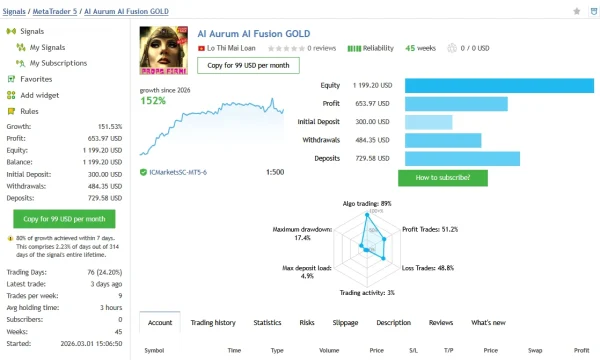
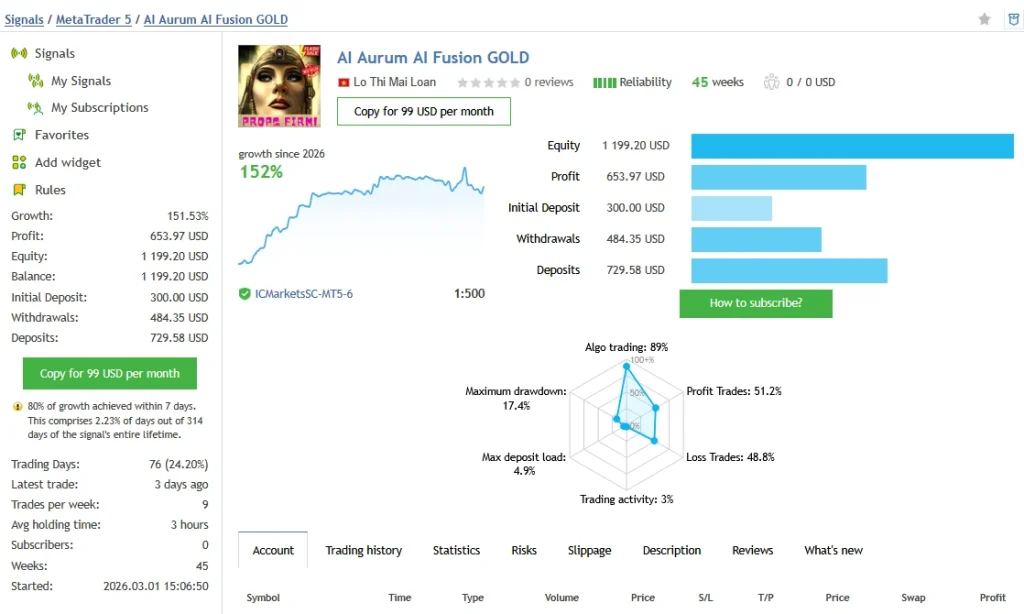
Gold-related record — AI Aurum AI Fusion GOLD
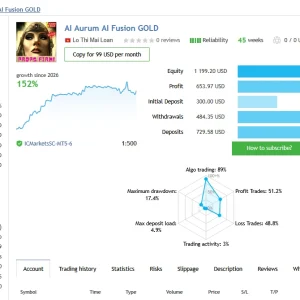
The
Gold-related account showed
151.53% growth,
125 trades and
45 weeks displayed. Relative drawdown was
17.44% by balance and
8.86% by equity.
It showed
$653.97 profit, a
$300 initial deposit,
$729.58 additional deposits and
$484.35 withdrawals. Balance and equity were both
$1,199.20. The page warned that 80% of growth occurred within seven days.
Importantly, its description identifies
AI AURUM PIVOT EA and notes a change from H2 to Daily defaults on 9 March 2026. Treat this as a related Gold record linked by the developer, not proof that the complete current Combo build produced its entire history.
What these results can and cannot tell you
The relative balance and equity drawdown figures are separate platform measures. Keep their labels when comparing accounts.
All three records began before the current retail listing’s publication. They provide context about earlier operation, but do not establish that the same version and settings ran throughout.
Our guide to
drawdown in forex trading explains why losses deserve as much attention as growth. Past performance does not guarantee future returns.
How to install and test AI Fusion Combo
- Check your order contains the files listed in the purchase table.
- Follow our MT5 Expert Advisor installation guide. Use the instructions appropriate to your delivery format.
- Make the enabled symbols available in Market Watch and confirm their broker names.
- Attach one instance using the host-chart guidance above.
- Review the selected engines, lot-sizing method, basket limits and safety actions.
- If matching presets are included, load the SET file in MT5 and check the imported values.
- Enable trading for a demo test, then inspect the dashboard, Experts and Journal tabs.
Observe a complete basket cycle where possible. Check the largest number of open positions, floating loss, margin usage and holding time. A profitable day alone does not show whether you understand the setup.
Is AI Fusion Combo right for you?
It may suit traders who want one place to manage several automated strategies and are willing to monitor open exposure.
Before buying, make sure you can explain what happens when a basket moves against you. If you need predictable income or cannot accept losing capital, a trading robot does not solve that problem.
Use our guide on
how to choose a forex Expert Advisor to compare evidence, costs and practical requirements.
Delivery, updates and support
Check the purchase table for your order’s delivery and update coverage. Our
Delivery & Downloads page explains general order-access procedures.
For setup help, contact
Product Support with your order number, EA version, MT5 build, account mode and exact error message. Hide private account details and never share your trading password.
Read the
Refund Policy before purchasing. Installation support is not a guarantee of trading returns.
Frequently asked questions
Which version will I receive?
The version shown in the purchase table defines this offer. Check it before payment; a developer’s latest release does not establish the file supplied by a store.
Can I use this EA on MT4 or a phone?
This offer is for MT5 desktop. An EX5 program does not run in MT4, and the mobile trading app does not host a desktop EA. The terminal needs to run on a suitable computer or VPS.
What is the minimum deposit?
There is no single verified figure suitable for every configuration. Check the required margin and total exposure with your broker before funding an account.
Does turning martingale off make the EA low risk?
No. Fixed-size positions can still create substantial combined exposure. Review how many positions may open and how losses are handled.
Do I need to pay for an AI service?
The published setup does not require an external AI subscription. Broker trading costs and optional VPS costs are separate. Confirm any additional requirements for the file you receive.
Does a Safe or Balanced profile protect my money?
Profile names describe settings, not guaranteed loss limits. Check the actual values and what actions occur when a threshold is reached.
Can I use AI Fusion Combo on a funded account?
Check the firm’s current EA rules, maximum exposure and daily loss calculations. A profile name or software control does not establish approval or guarantee a challenge pass.
Are the public signals included in the purchase?
Links let you review public evidence. Buying software is separate from subscribing to trade copying.