GoldCycle v1.0 MT5 is an automated Gold trading EA for XAUUSD H1. It uses daily price levels and volatility-based stops and targets, with a planned exit before the New York session ends.
Review broker-time settings and the optional recovery factor before trading. Recovery can increase risk after a loss, so the configured risk matters as much as the strategy name.
| Detail |
Published guidance |
| Platform |
MetaTrader 5 |
| Market |
XAUUSD / Gold |
| Chart |
H1 |
| Supplied version |
1.0 |
| Strategy approach |
Daily levels and volatility-based pending-order entries |
| Planned holding period |
Intraday; orders and positions intended to close by the New York session end |
| Broker time |
Default test instructions assume GMT+2 with daylight-saving adjustment |
| Key risk check |
Start Risk, Recovery Factor and Max Risk |
The
official GoldCycle listing showed version 1.0 when checked. These are published guidelines, rather than a compatibility test of the supplied file.
GoldCycle Public Trading Results
Review these four account records before choosing GoldCycle. Compare profits with drawdown, losing trades and account conditions. The two MQL5 signals use different platforms, and the supplied MT5 file may not match every account’s settings.
GoldCyle I — MT5 Trading Signal
The
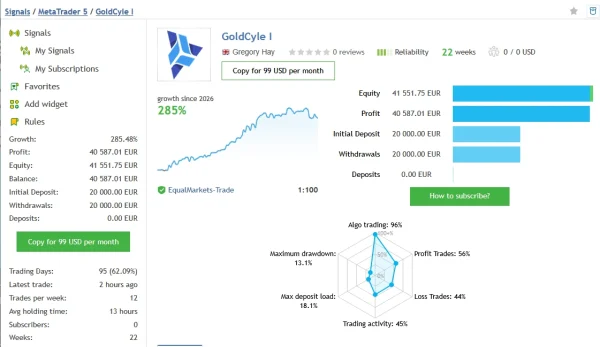
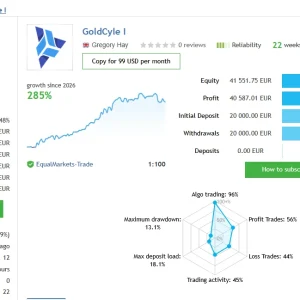
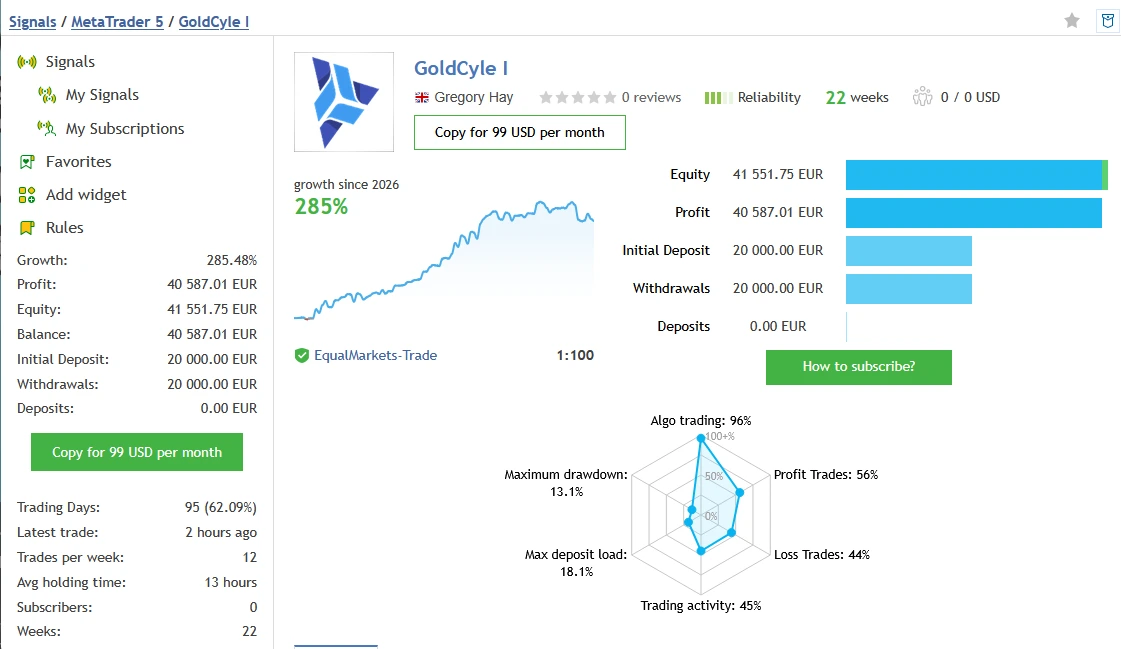
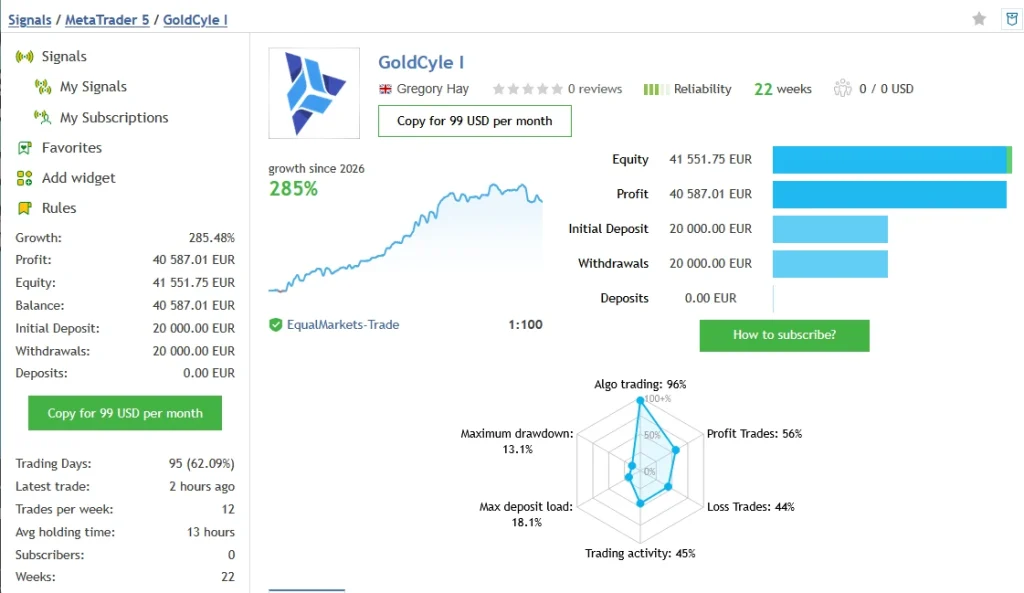
GoldCyle I MQL5 signal showed 285.48% growth and €40,587.01 profit across 109 trades when checked on 27 October 2026. It lists a €20,000 initial deposit, €20,000 withdrawn and no additional deposits.
MQL5 reports 13.06% relative balance drawdown and 12.16% relative equity drawdown. Its history also includes six consecutive losing trades totalling €5,893.32. This shows why the losing periods deserve attention alongside the headline growth.
GoldCycle II — Related MT4 Trading Signal
The
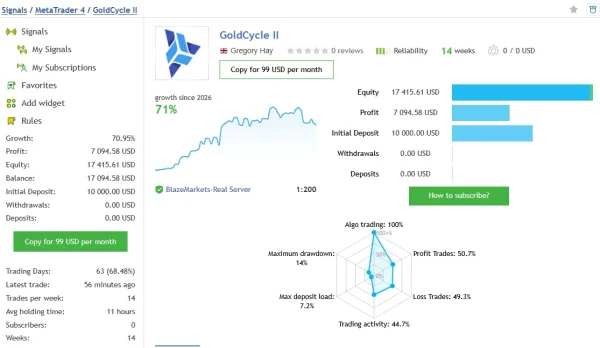
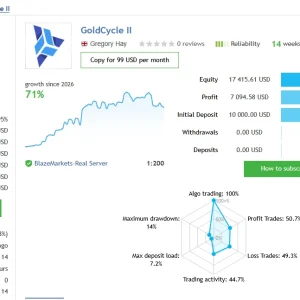
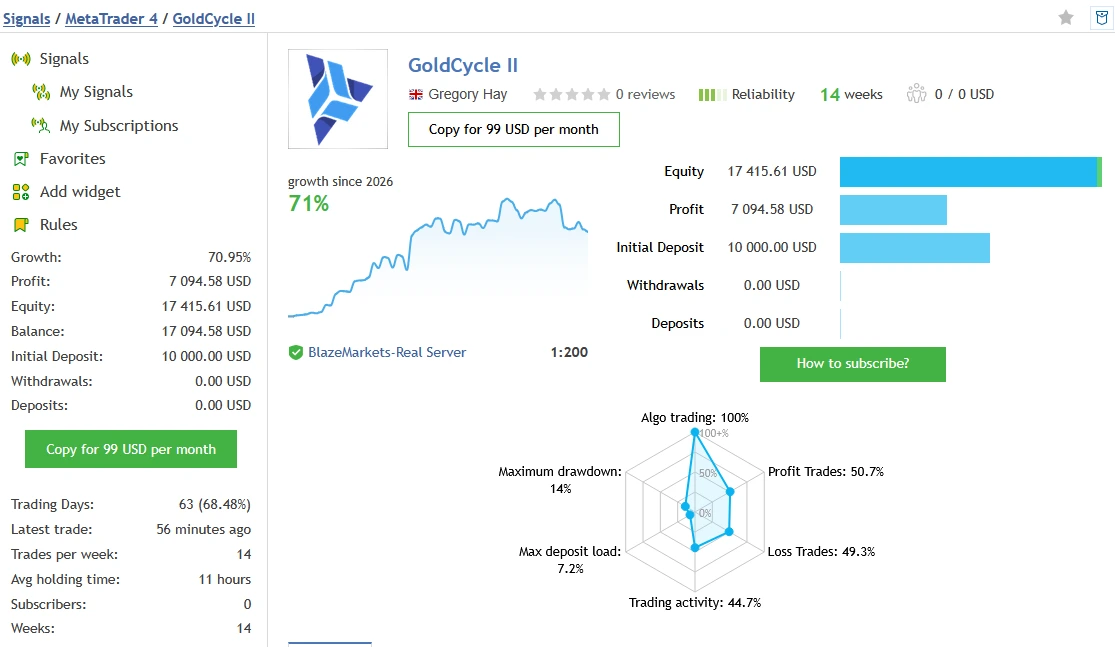
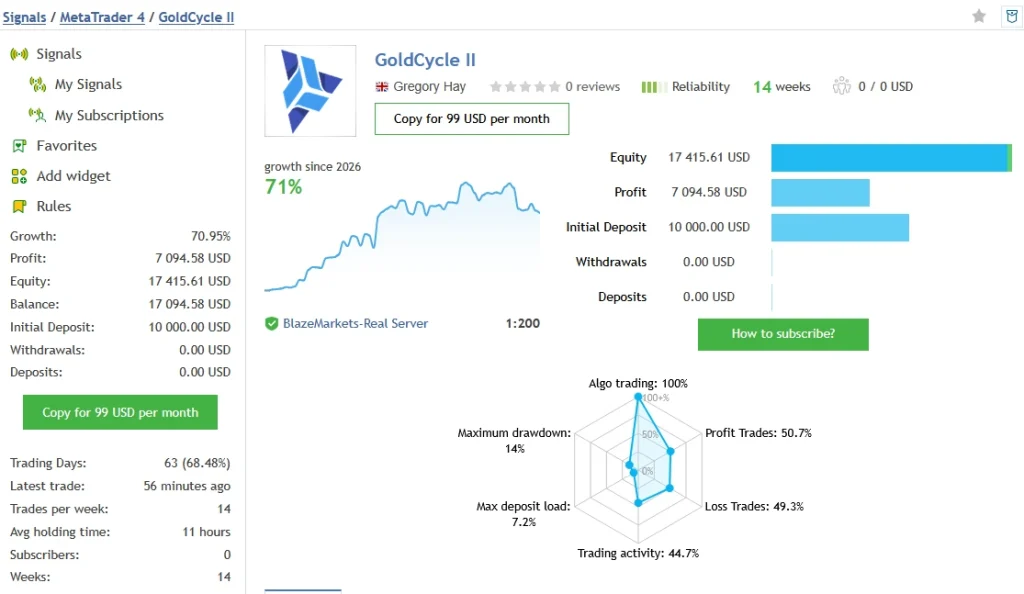
GoldCycle II MQL5 signal showed 70.95% growth and $7,094.58 profit across 73 trades. The account started with $10,000, with no additional deposits or withdrawals shown.
Relative drawdown was 14.05% by balance and 11.89% by equity. The record includes seven consecutive losses totalling $2,550.66. This signal runs on MetaTrader 4, so it provides related performance context rather than direct evidence for the supplied MT5 version.
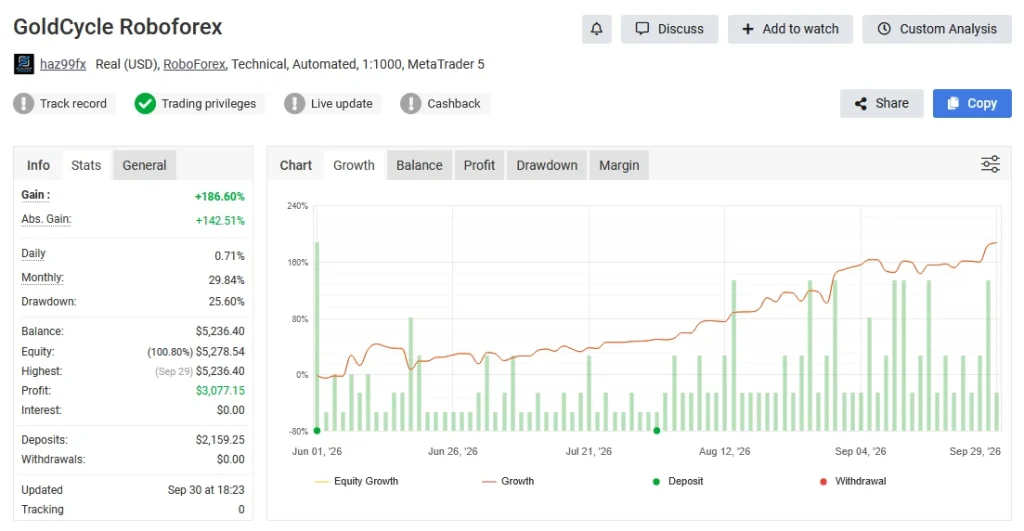
GoldCycle RoboForex — Myfxbook Account
The
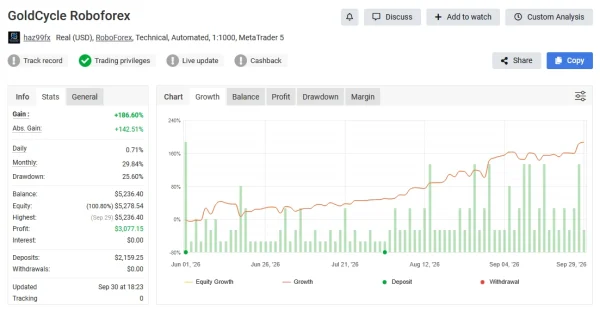
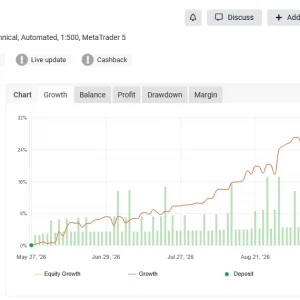
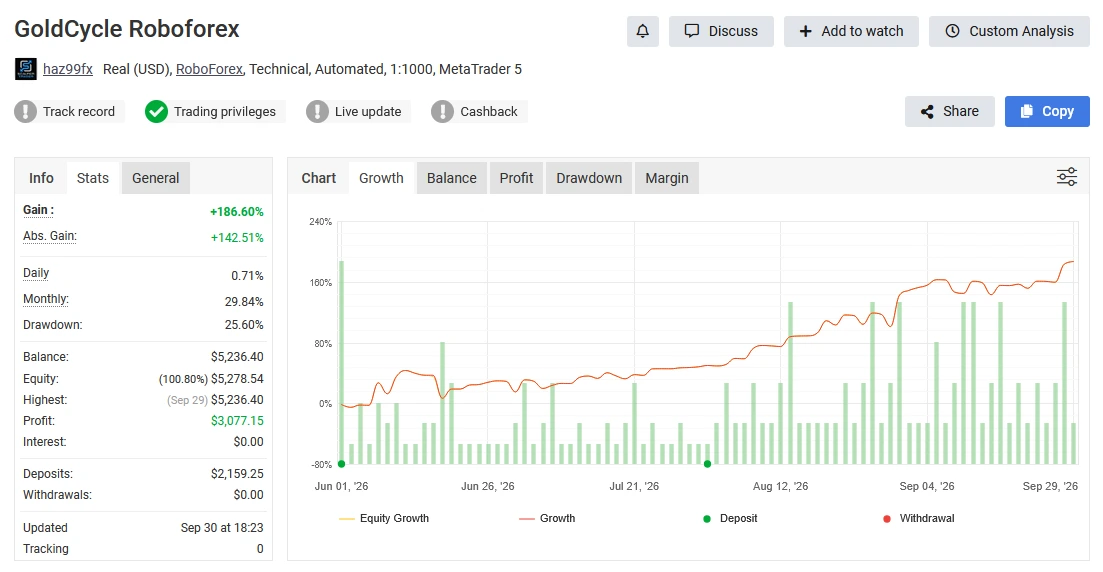
GoldCycle RoboForex Myfxbook record is another account reference available for review. Check its account type, latest update, trading period and verification status before relying on its results.
Current figures could not be independently checked during this review, so no unconfirmed gain or drawdown numbers are quoted here. Confirm the EA version, recovery settings and position sizes before comparing it with your planned setup.
GoldCyle Prop Settings — Myfxbook Account
The
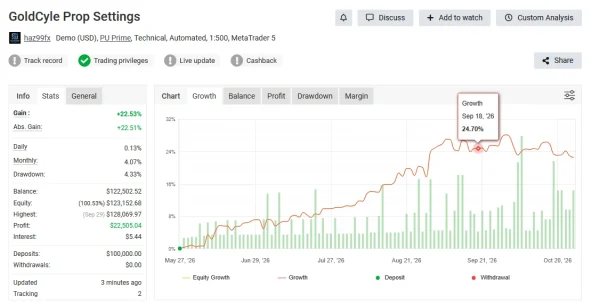
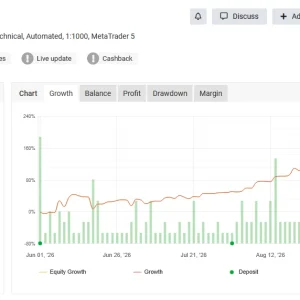
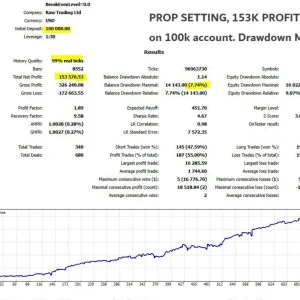
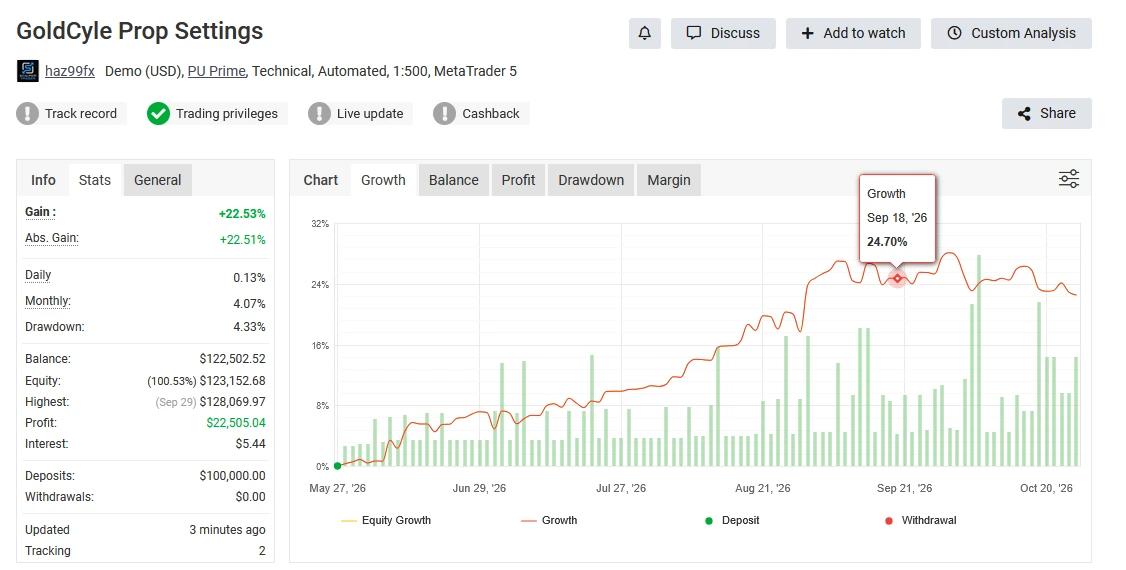
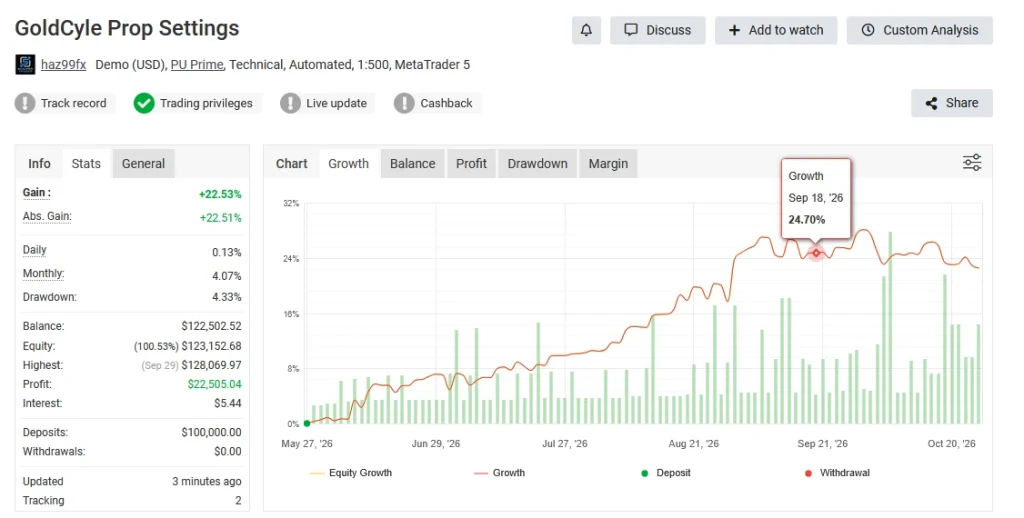
GoldCyle Prop Settings Myfxbook record provides a separate reference for a configuration labelled “Prop Settings.”
Its current statistics and verification status could not be independently checked. The account name alone does not prove compliance with a particular prop firm. Check daily losses, total drawdown, open exposure and recovery settings against your firm’s rules.
What Should You Take From These Results?
These are external account records, not ForexEaTools trading accounts. They do not establish that every trade used the exact file and settings supplied with your purchase.
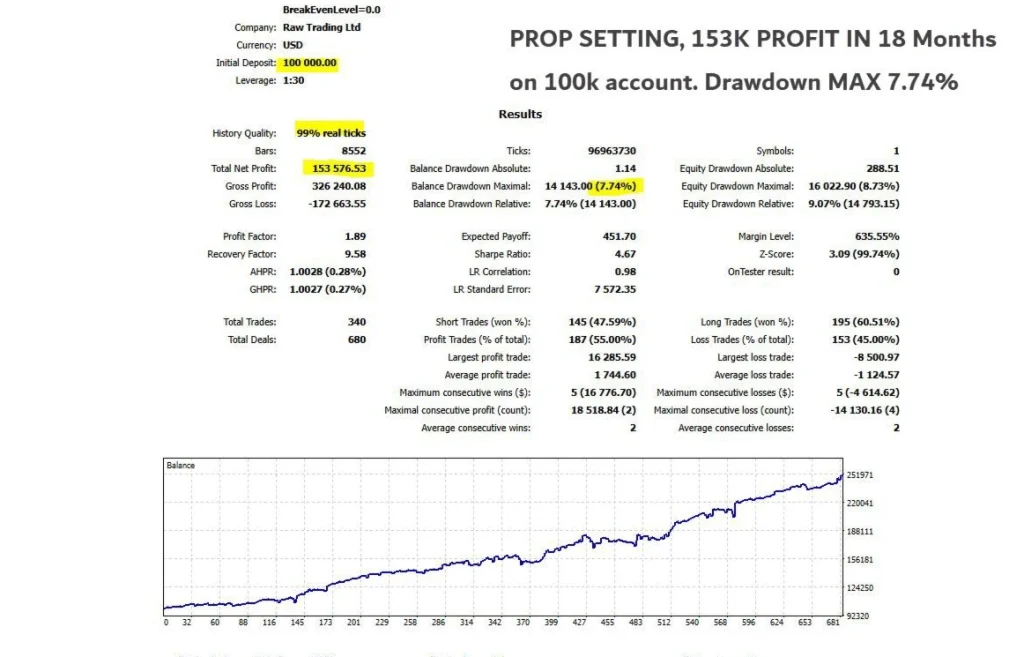
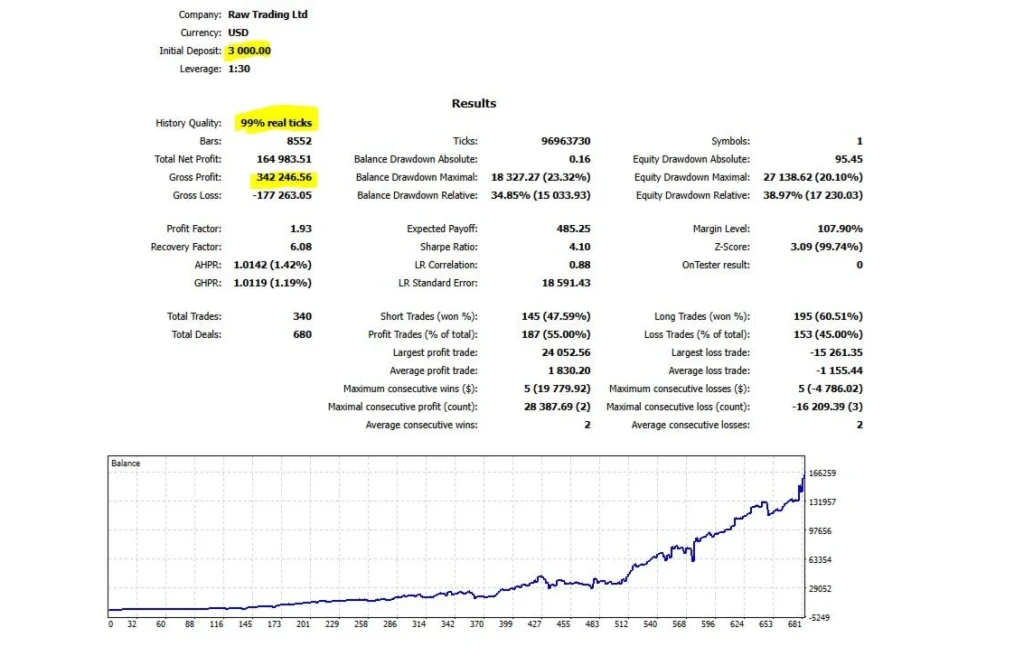
Balance reflects closed results, while equity includes open profits and losses. Review both, and remember that historical drawdown does not set a limit on future losses. Past performance does not guarantee future returns.
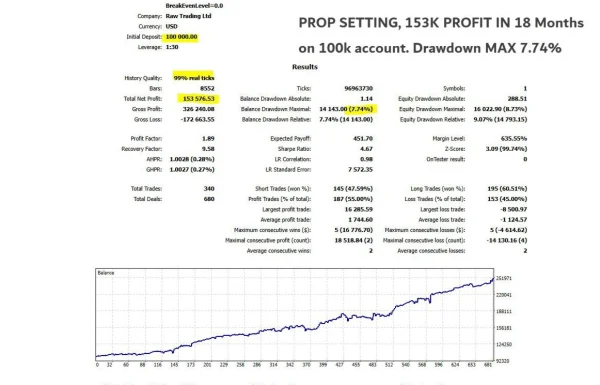
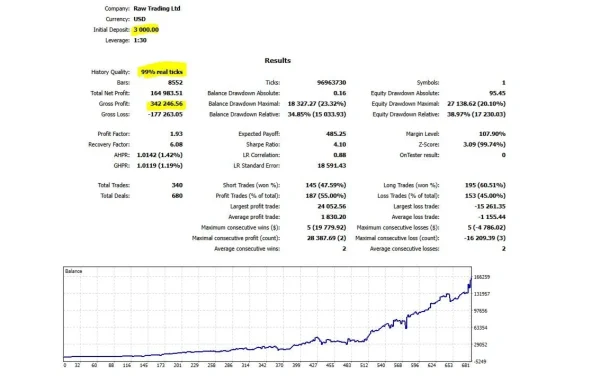
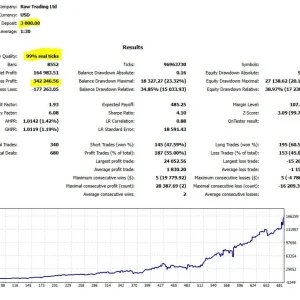
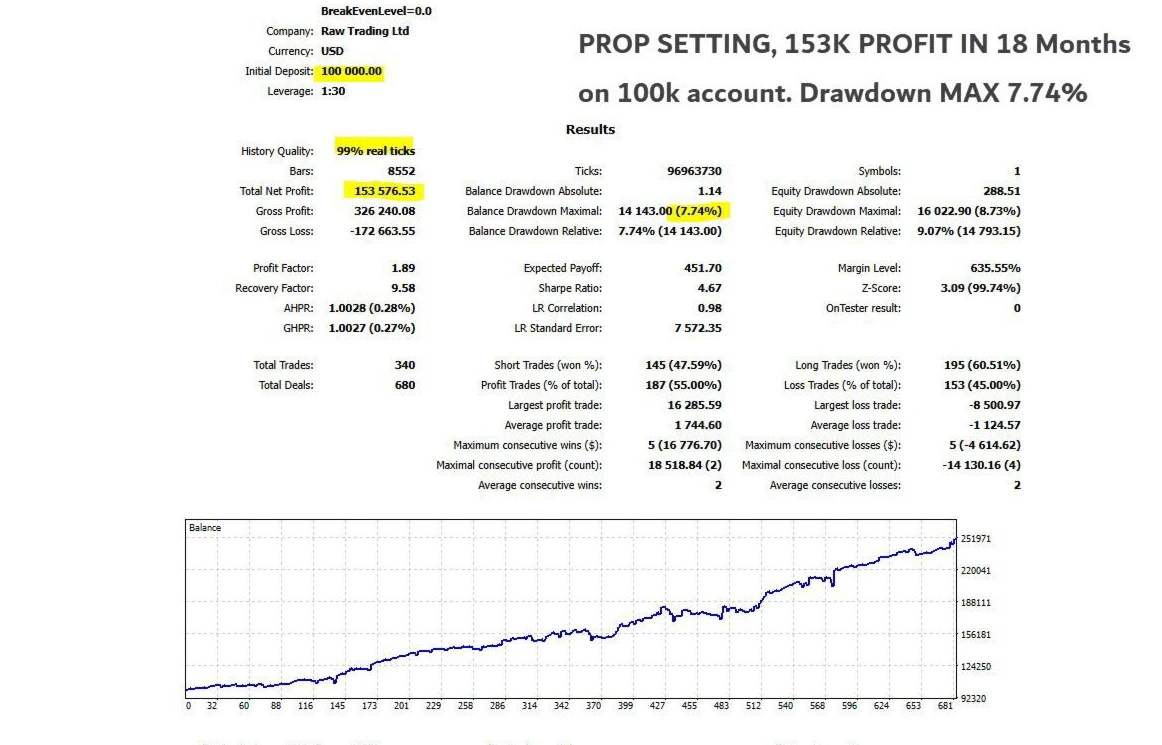
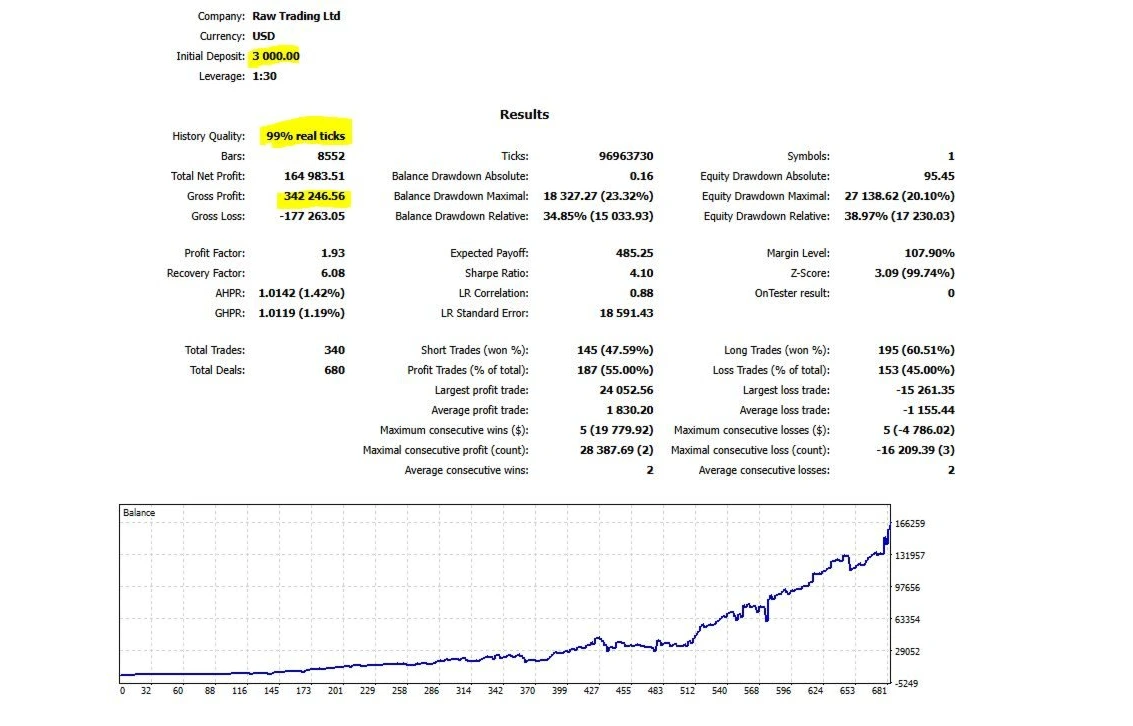
BackTest evidence
How does GoldCycle work?
Published descriptions explain a daily-level approach: the robot studies Gold’s price range and prepares pending orders around selected levels. Its volatility calculation adjusts stop-loss and take-profit distances as conditions change.
In quieter conditions, a shorter stop distance can lead to a larger lot size when percentage-based risk sizing is used. That does not automatically mean the intended percentage risk increased. Check both the stop distance and the money at risk before judging a trade by lot size alone.
A daily-level entry can still fail. Price may cross a level and reverse, or the broker may fill an order at a different price from the one requested.
Recovery settings: the main risk detail to understand
GoldCycle’s published description says it does not build recovery grids or average losing positions. It also describes an optional setting that increases the risk percentage after a losing trade.
Those are different issues. Avoiding several open averaging positions does not establish that risk stays unchanged after a loss.
Check these inputs in the supplied release:
- Start Risk: the initial risk setting.
- Recovery Factor: how the risk percentage can increase after a loss.
- Max Risk: the configured upper risk setting; it is not a guarantee of the exact realised loss.
If you want unchanged risk after losses, confirm the documented configuration that produces that behaviour. Do not guess a Recovery Factor value or assume recovery is disabled by default.
As a simple illustration, a $1,000 account losing 1% loses about $10 before execution differences. A later trade risking 2% puts about $20 at risk on a similar balance. This illustrates increased exposure; it is not a statement of GoldCycle’s default settings.
Is the daily limit one trade or two?
The developer’s description is inconsistent: one section says one trade per day, while two other statements give a maximum of two.
Treat the exact daily limit as a setting or behaviour to confirm in your installed v1.0 release. Do not choose your account-risk budget on the assumption that a second trade is impossible. The limit is a ceiling, not a promise that the EA will find a trade every day.
Broker time and session closure
The published setup assumes GMT+2 with daylight-saving adjustment and directs GMT0 and Exness users to alternative settings. Check the configuration for your broker rather than copying another user’s session times.
The planned New York exit reduces intended overnight exposure. It cannot guarantee that every closing request succeeds. Keep the trading environment connected, review rejected requests and check whether positions remain open after the intended exit time.
What is the minimum deposit?
Several reseller pages list $100, but a developer-confirmed universal minimum was not established in the official product text reviewed.
The practical requirement depends on minimum trade size, stop distance, margin and your chosen risk settings. If the smallest available position risks more than your budget, the account is too small for that setup.
A quoted minimum should not be interpreted as a safe starting balance or a promise of suitability for every Gold contract.
How to install GoldCycle in MT5
For a manually supplied EA:
- Open MT5 desktop and select File → Open Data Folder.
- Follow the package instructions to put the EA in MQL5 → Experts.
- Refresh Navigator → Expert Advisors.
- Open your supported Gold chart on H1.
- Attach the EA and check broker time, position sizing and recovery inputs.
- Load a matching preset only if one is supplied and intended for your setup.
- Test on demo where the licence permits, then inspect Experts and Journal for errors.
Our
MT5 Expert Advisor installation guide explains the full process. For a separately supplied preset, follow
how to load a SET file in MT5.
A SET file stores inputs. It does not install the EA, activate its licence or make one configuration suitable for every broker. SET inclusion has not been confirmed for this offer. Purchases installed through MQL5 Market use the Market installation process.
Prop-firm and broker checks
Before use on a funded or evaluation account, check the firm’s rules for automated trading, daily loss, total drawdown, news and holding periods. Compare those rules with the maximum exposure possible under the chosen recovery settings.
Broker compatibility also needs checking on the actual account. Gold symbol names, contract sizes, spreads, minimum volumes and execution can differ. A broad “all brokers” claim is not a test of your broker or an exemption from trading costs.
Help with your setup
Use
Product Support for questions about the supplied package or a covered setup issue. Include the EA version, MT5 build, broker symbol, time configuration, relevant settings and exact error text. Existing customers should include their order number. Never share your trading-account password.
Delivery and Downloads
GoldCycle is a digital product. After successful payment and any required order review, check your account and checkout email for access to your files. Also check your spam folder.
Read our
Delivery & Downloads page for the order-access process and help with missing download links.
Updates and Setup Support
Check the package details for the update period and support included with your purchase.
For installation help, contact
Product Support with your order number, GoldCycle version, MT5 build, broker symbol and exact error message. Never share your trading-account password.
Refund Policy
Please read our
Refund and Returns Policy before buying.
If your files are missing, inaccessible or have a technical problem, contact us with your order details. We will review the issue and may provide installation help or a working replacement where appropriate.
Trading losses or disappointing returns do not, by themselves, establish a software defect. Refund requests are reviewed under our published policy and applicable consumer rights.
Trading Risk
GoldCycle cannot guarantee profits. Results depend on market conditions, broker execution and your settings. Its recovery option can increase risk after losses.
Test the matching configuration on a demo account, where permitted, and understand the possible losses before trading live.
Frequently asked questions
Is GoldCycle v1.0 an MT4 or MT5 product?
This offer is for MT5. The related MT4 signal is labelled separately above. An MT5 EA cannot run as an MT4 program.
Does GoldCycle use martingale?
The developer describes a non-grid strategy without averaging losing positions, but also includes an increase-after-loss recovery option. Inspect that setting rather than assuming unchanged risk from a “No Martingale” label.
Can I use it with Exness?
The developer points Exness users to alternative settings. Confirm the matching configuration and broker-time guidance for your account before use.
Does it close every trade before night?
That is the published design intention. Correct timing and successful execution are still required, so monitor the account and closing logs.
Do I need to change only the risk percentage?
Risk is important, but broker time and recovery behaviour also need checking. Do not apply a universal setup instruction without comparing it with your account and release.