ALGO WIN EA MT5 is offered as an automated Expert Advisor for MetaTrader 5, with Gold-focused configurations described in public listings. Before ordering, check the supplied file, matching preset and chart instructions. Confirm how the EA manages losing trades as well as its account requirements. Your broker, trading costs and settings can affect the outcome.
Our Telegram
Which pair and timeframe should I use?
Public listings describe
Gold (XAUUSD), but they disagree about the launch chart and broader market support. A universal timeframe was not verified from primary documentation during this review.
| Setup detail |
What to check before trading |
| Platform |
MetaTrader 5 desktop |
| Trading symbol |
The exact symbol named in your matching preset or instructions |
| Chart period |
The timeframe specified for that file and preset |
| Account |
Broker requirements, account mode and any activation limits |
| EA release |
The version actually supplied with your order |
Use the package’s tested configuration rather than guessing between M1, M5 and M15. If your broker adds a suffix to XAUUSD, confirm that the EA recognises its symbol name. Do not assume an “any pair” label establishes a suitable configuration for every market.
ALGO WIN EA — Public Myfxbook Accounts
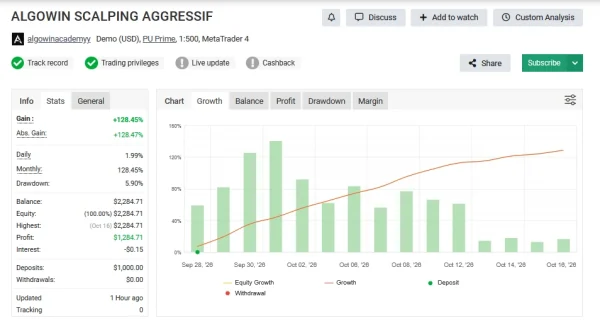
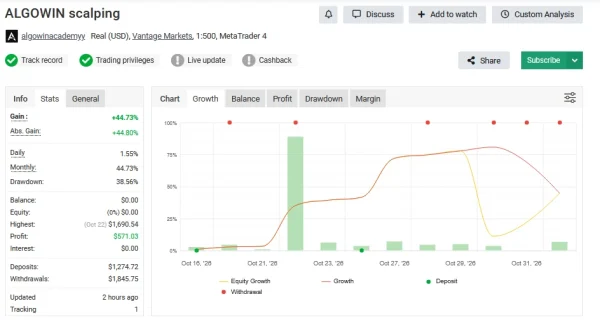
Review these two Myfxbook account pages before deciding whether ALGO WIN EA fits your trading needs. Compare each account separately, including its trading history, drawdown, open positions and latest update.
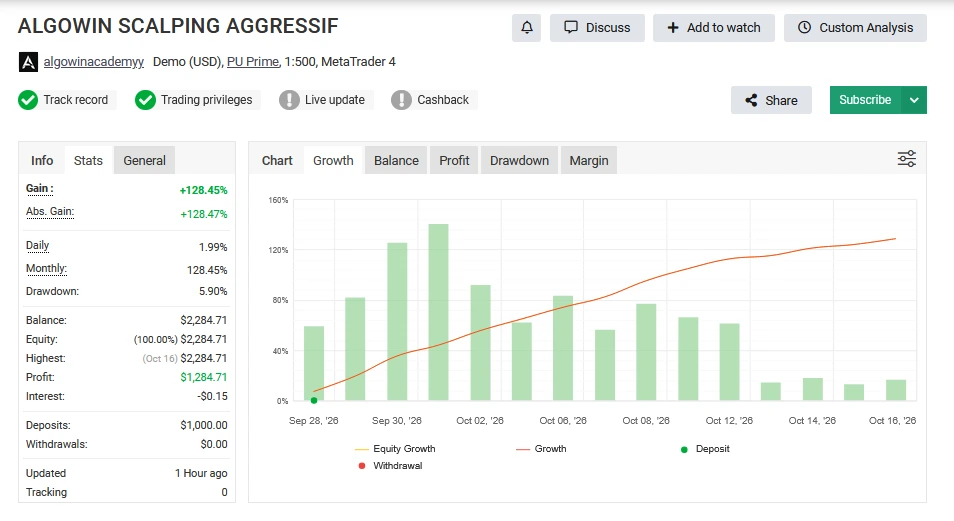
ALGO WIN Scalping Aggressif
View ALGO WIN Scalping Aggressif on Myfxbook
When reviewing this account, look at how trade sizes and the number of open positions change over time. Check the account’s drawdown alongside its growth. The “Aggressif” name alone does not establish its risk settings or how they compare with the other account.
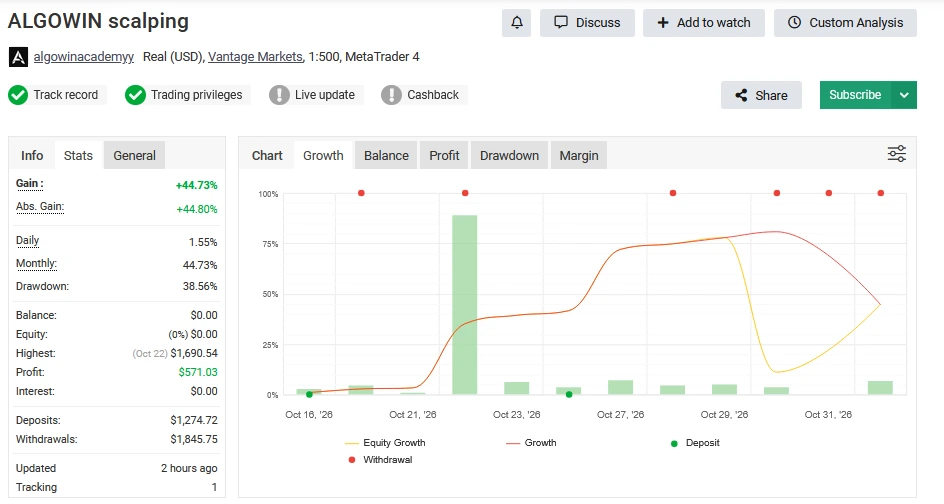
ALGO WIN Scalping
View ALGO WIN Scalping on Myfxbook
Review the length of its trading history and whether results include both profitable and losing periods. Check open trades as well as closed results. Confirm the account type, verification status and settings before comparing its performance with your intended setup.
What these accounts mean for buyers
These are separate account records. Neither link alone confirms the EA version or preset used, or whether that configuration matches the package you purchase. Past results do not guarantee future returns.
Understand the loss-management rules
The entry signal is only one part of the strategy. Before live use, establish how the supplied build behaves when a trade moves against it.
Check these questions in the manual and during a supported demo test:
- Does each position have a stop loss at the broker, or does the EA manage exits internally?
- Can it add more orders during an adverse move?
- Can the lot size change between entries?
- What is the maximum number of open positions?
- Does an account-level limit close positions, pause new entries or both?
Do not assume that a label such as “risk management” answers these questions. We have not independently audited the code or verified grid, martingale or news-filter behaviour for the supplied file.
Minimum deposit and broker compatibility
A reliable minimum deposit for this offer has not been established. Your required balance depends on the selected settings, minimum lot, contract size, margin requirements and possible number of open trades.
Before funding an account, check how much exposure the setup could build. A broker’s minimum opening deposit does not show that an EA’s possible losses fit that balance.
For a compatibility question, contact
Product Support with your broker, account type, MT5 build and intended symbol. Never share a trading password.
Public trading results: what has been verified?
A public Myfxbook profile and an account named
algowin tp sl are linked from reseller listings. We could not retrieve the account details during this review, so we have not verified its current figures, account type, trading period or connection to the file supplied here.
We are not publishing a return percentage, win rate or maximum-drawdown claim based on those links alone. No independent performance test was run for this page.
When you review an account record, check:
- Whether it is live, demo or a historical test.
- The date of the latest update and length of the record.
- Open positions and floating losses, not only closed profit.
- Broker conditions, settings and the EA release used.
A result on one account does not establish the result your account will achieve. Past performance does not guarantee future returns.
How to install ALGO WIN EA in MT5
For a package delivered as a standalone EX5 file:
- Open the desktop MT5 terminal you intend to use.
- Choose File → Open Data Folder.
- Copy the EA file into MQL5 → Experts.
- Return to MT5 and refresh Navigator → Expert Advisors.
- Open the symbol and chart period named in your package instructions.
- Attach the EA and review its inputs.
- Load a compatible SET file if supplied, then inspect the imported values.
- Allow automated trading when ready and check Experts and Journal for errors.
Use our
MT5 Expert Advisor installation guide for the full walkthrough. If presets are included, follow
How to Load a SET File in MT5.
Enable DLL imports or WebRequest access only when the delivered file’s documented dependencies require them. Do not copy permissions from a generic installation block.
What should I check in the SET file?
A SET file contains saved input values. It does not install the robot, activate its licence or make its settings suitable for every account.
Confirm the intended EA release, symbol and chart period. Review trade size, maximum positions and loss-management settings. Keep the original preset as a backup and record any changes before comparing tests.
Is ALGO WIN EA suitable for a prop-firm account?
Do not assume approval from a store category or marketing label. Ask the firm whether the strategy and third-party EA are permitted. Check its automation, news-trading, maximum-loss and daily-loss rules.
If the EA provides a daily limit, compare its calculation and reset time with the firm’s rules. Also check how other trades, commissions and floating losses affect the account. No EA can guarantee passing a challenge.
Delivery, updates and support
Read
Delivery & Downloads for order access and missing-file help. Check the offer’s package details for the actual files, licence term, activation and update coverage.
For setup help, send
Product Support your order number, EA version, MT5 build, symbol and error text. Remove passwords and private account details from screenshots or logs.
Read the
Refund Policy before ordering for eligibility and request instructions. Technical support cannot guarantee returns or reverse trading losses.
Frequently asked questions
Does ALGO WIN run on MT4?
This offer is for MT5. An EX5 file does not run in MT4. Any MT4 edition requires its own supported file and instructions.
Does it trade XAUUSD?
Gold-focused configurations appear in public listings. Confirm the symbol supported by your delivered file and preset before use.
Should I use M1, M5 or M15?
Follow the chart period documented for your supplied configuration. Public listings disagree, so a single universal recommendation is not established here.
Are SET files included?
Only if the offer’s package details say they are. Check that the files match the supplied EA version and intended symbol.
Does it use grid or martingale?
This has not been independently verified for the file supplied here. Check whether it adds positions or changes lot sizes during adverse moves. Do not treat another store’s strategy description as a code audit.
What is the minimum deposit?
A universal figure has not been verified. Check minimum order size, margin and the combined exposure of your intended settings before choosing a balance.
Why is the EA not trading?
Check account connection, Algo Trading, the EA’s permissions, symbol, margin and log messages. It may also be waiting for a signal. Send any error text to support instead of changing several inputs at once.
Is it a set-and-forget product?
Plan to monitor connection problems, errors and trading behaviour. Automation does not remove the need to understand and supervise the configuration.
How much can I earn?
There is no reliable fixed income figure. Trading outcomes depend on market conditions, settings and costs. Losing trades and losing periods are possible.