What is included?
| Purchase detail |
Included with this offer |
| Product |
Tradivo Profit Shield EA MT5 |
| Supplied version |
1.7 |
| Platform |
MetaTrader 5 |
| SET files |
Included |
A SET file stores settings. It does not install the EA, activate a licence or make the loaded trade size suitable for every account.
How does Tradivo Profit Shield EA work?
The
Tradivo website describes buy-stop and sell-stop orders, dynamic trailing stops, spread protection, configurable order limits and daily loss management.
A buy-stop order is placed above the current market; a sell-stop order is placed below it. These orders aim to enter when price reaches a chosen level. Price can still reverse after entry.
A trailing stop follows a favourable move according to its rules. It may help retain part of a gain, but a fast move or price gap can cause an exit at a worse price than expected.
These are developer-published features, rather than an independent inspection of the supplied v1.7 program.
| Item |
What to know |
| Main symbol |
XAUUSD — gold against the US dollar |
| Developer homepage chart guidance |
M15 |
| Reseller chart guidance |
Several listings specify M1 |
| Correct configuration |
Use the instructions matching your v1.7 file and SET file |
| Starting balance |
Depends on the preset and broker conditions; see below |
The
developer’s homepage gives M15 guidance and lists $100 minimum with 300–500+ recommended. Some reseller pages state M1 and $500 or $1,000. These recommendations are not equivalent.
Do not assume a preset intended for one chart or account type works unchanged on another. Before using real money, establish the correct configuration for the file you received.
What do the protection features mean?
“Profit Shield” is the product name, not a promise that your deposit is protected.
Check whether a daily limit measures closed results, open losses or both. Also check whether reaching that limit closes trades, removes pending orders or simply stops new entries. Those actions have different effects.
For example, an account can show $30 in closed profit while open positions are losing $100. A limit that watches only closed results may not react to that open loss.
During demo testing, check:
- Whether every position receives an initial stop loss.
- What happens to the opposite pending order after an entry.
- How many orders and positions can exist together.
- Whether lot sizes increase after losses.
- Whether a daily limit includes floating losses.
- How the EA behaves after a restart or connection loss.
A software limit cannot guarantee an exact maximum loss under every execution condition.
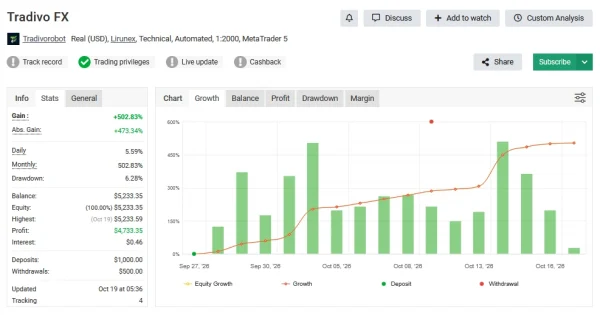
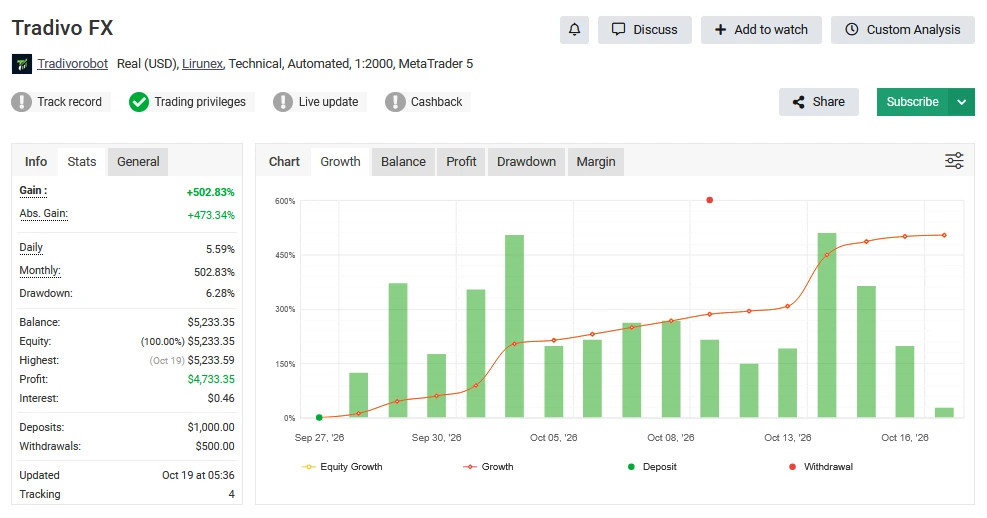
Public account evidence: Tradivo FX on Myfxbook
Tradivo’s current website links to
Tradivo FX on Myfxbook.
When reviewed on
30 October 2026, the page labelled this a
real USD account with Lirunex, using automated trading on MT5 and leverage of
1:2000. Its displayed last update was
19 October at 00:06, so the figures were not current to our review date.
Reported returns and account movements
The account displayed
502.83% gain,
$4,733.35 profit and
6.28% drawdown. Deposits were
$1,000, withdrawals were
$500, and both balance and equity were
$5,233.35 at that snapshot.
Read returns together with deposits and withdrawals. The gain percentage is a platform-calculated measure; dividing profit by the original deposit does not necessarily reproduce it.
Trading activity and costs
The record showed
19,812 trades, an average holding time of
21 seconds and a
profit factor of 1.61. Reported commissions were
$3,340.64.
Very short trades make spreads, commissions, slippage and broker execution especially important. A different broker can produce different outcomes even when the same preset is used.
Verification and limits of this evidence
Trading privileges were marked verified. The track-record indicator showed an alert rather than a verified check. Do not describe this as a fully verified track record.
The account name does not establish that every trade used v1.7 or the SET files supplied with this offer. The historical 6.28% drawdown also does not cap future losses.
Open the
Myfxbook record to check whether its update date and verification status have changed.
Is the developer’s demo account the same record?
No. Tradivo also displays investor access for a server named
LirunexLimited-Demo and explicitly identifies that investor account as demo in its FAQ.
That is separate from the linked Myfxbook page, which labels its account real. Do not combine the demo demonstration and the Myfxbook record into one performance claim.
Does Profit Shield use grid or martingale?
The published descriptions conflict. Some reseller pages say no grid and no martingale. Other pages mix in Magic EA descriptions, and parts of Tradivo’s homepage still mention grid and recovery.
Those conflicting descriptions do not establish the exact behaviour of the supplied v1.7 file. Check its manual, inputs and trade history before relying on either claim.
Multiple positions alone do not prove martingale. Look at why trades are added and whether trade size increases during a losing sequence.
How much money do you need?
There is no verified balance that makes every configuration safe.
Capital requirements depend on lot size, simultaneous exposure, leverage and the broker’s gold contract specifications. A minimum deposit that permits the EA to open a trade is different from a balance suitable for its possible losses.
Do not copy a cent-account preset onto a standard USD account without checking the account units and trade sizes. Test the intended account conditions first.
How to install Profit Shield EA and load a SET file
- Open MT5 desktop and select File → Open Data Folder.
- Open MQL5 → Experts and copy the supplied EA file there.
- Refresh Navigator → Expert Advisors, or restart MT5.
- Open the gold chart specified in your matching setup instructions.
- Attach the EA, open Inputs, select Load and choose the correct SET file.
- Review the imported values, especially trade size and available limits.
- Enable Algo Trading on a demo account when ready.
- Check the Experts and Journal tabs for errors.
Follow our
MT5 EA installation guide for the full process. Our
guide to loading SET files in MT5 explains presets and how to check that the settings loaded.
Use optional permissions only when required by the supplied file. Keep an unchanged backup of each preset.
Broker and VPS checks
Compare the total cost of trading gold, including commissions and slippage. A low advertised spread alone does not establish suitable execution.
Check the broker’s minimum lot size, gold contract size, stop-distance rules and support for your intended trading behaviour.
A suitable VPS can keep MT5 running while your computer is off. It does not guarantee profitable trades or remove execution risk.
Delivery, updates and support
Read our
Delivery & Downloads page for general order-access instructions. Check your account downloads and checkout email after payment and any required order review.
For installation problems, contact
Product Support with your order number, EA version, MT5 build, SET filename and the exact error message. Never share your trading password.
Review this offer’s activation and update terms before ordering.
Refund policy
Read our
Refund Policy before buying. A reproducible installation fault is different from a robot that runs but makes losing trades.
Trading losses do not, by themselves, establish a software defect. Requests remain subject to the policy and applicable legal rights.
Frequently asked questions
Are SET files included?
Yes. This offer includes SET files with version 1.7. Use only a preset intended for your release and account conditions.
Is this Tradivo Magic EA V12?
No. This listing is for Profit Shield EA v1.7. Do not assume Magic EA presets or results apply to it.
Should I use M1 or M15?
The developer homepage and reseller guidance differ. Use the documented chart for the actual v1.7 file and matching preset, rather than selecting a timeframe from an unrelated listing.
Is 6.28% the most I can lose?
No. It is a historical drawdown figure displayed on one account. Future drawdown can be larger, and losses can be substantial.
Is a news preset safe during NFP or CPI?
A preset name does not establish safety. News events can widen spreads and cause slippage, gaps and rapid reversals. Test and understand its behaviour before use.
Can I use it on a prop-firm account?
Check the firm’s current strategy rules and loss calculations. A daily-loss feature does not prove the EA will satisfy those rules.
Does it work on MT4?
This package is for MetaTrader 5. An MT5 EA program does not run on MT4.
Risk notice: Leveraged gold trading can cause substantial losses. Automation and protection settings do not guarantee returns. Test the exact file and preset before considering real funds.